

QuelloFree
Ask across your documents and tools, verify the sources, and write with workspace context.
Framefields: programmatic video generation with TypeScript
Create, inspect and render video compositions with TypeScript and a coding agent.
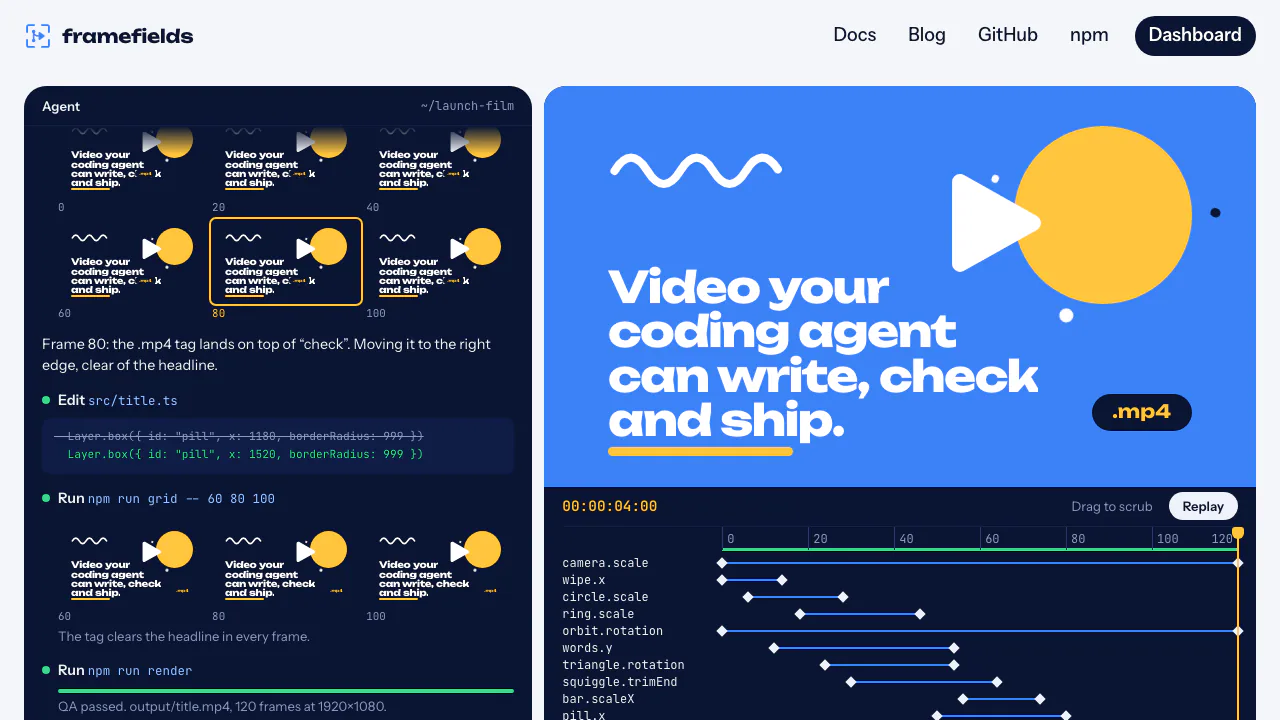
Framefields is an open-source engine for programmatic video generation. Developers and creators can describe a film in TypeScript, inspect its frames and export an MP4. Coding-agent skills help turn a brief into editable composition code, while the engine handles drawing, animation and rendering.
In plain English: what is this website for?
The website is the documentation and entry point for a video-making library. Think of a short product introduction with a moving headline, a chart and a rotating object: the project describes where those elements sit and how they change over time. Framefields renders that description into a video. You can edit the source yourself or ask a coding agent to help. Using it involves a software project and a rendering environment; the landing page is not a hosted prompt box that delivers a finished film by itself.
Build motion graphics, composites and 3D scenes together
The composition can combine animated text, flex layouts, images and video layers. Vector typography and per-character animation are useful for title sequences; grading, blur, grain, LUTs and masks provide controls for the appearance of footage or stills. Cameras, lights, materials and imported 3D models share the scene with 2D graphics.
Charts, Lottie assets, soundtracks and procedural sound effects extend that workflow to data stories and product demonstrations. Audio-reactive signals can drive visual properties. These are programmable components: you still need to supply suitable assets, timing and a coherent visual brief.
Go from a brief to a checked MP4
- Follow the official getting-started guide to prepare Node.js 22 or later, an ES module project and a supported GPU backend. Apply the documented native dependency approval before installing the package.
- Install the optional agent skills or write the project directly. Specify the intended audience, text, duration, aspect ratio, supplied assets and expected output.
- Separate the shared theme, composition and render script. Register real font files and ensure images, footage and audio are available; a Git LFS pointer is not the actual media file.
- Run the scaffold’s typecheck, inspect selected PNG frames, then inspect a frame grid. Use the local preview to watch motion with sound and leave feedback on the picture.
- Render the MP4 with QA enabled and review the findings. Play the exported file to confirm legibility, transitions and audio before delivery.
The preview supports scrubbing and frame stepping. Keeping the same composition builder for tests, preview and export makes changes easier to inspect.
Local vision and rendering have specific limits
On-device ONNX models can detect objects, segment subjects and estimate poses. They can help place a label on a subject, create cutouts or reframe a shot. The render-time withVision path reads the previous rendered frame: frame zero has no result. For this path, check consecutive frames or the exported video rather than a sparse frame grid. The vision guide explains this distinction and model caching.
Native WebGPU export avoids a headless-browser screenshot pipeline, but still depends on the machine’s graphics backend. Software rendering is available in supported configurations and is slower. The project is beta, so pin versions and verify a representative scene. An optional self-deployed render worker can process committed projects and upload results; it needs its own infrastructure setup.
Software cost, licensing and data handling
Checked on 21 October 2026: the package is open source under Apache-2.0. Local use is not described as a monthly credit plan. AI-agent subscriptions, compute, storage and licensed media are separate production costs; no hosted free quota or universal cloud price was verified.
Vision models download on first use and are cached locally. The agent skills themselves are instructions and do not send data. That statement does not cover the coding agent you choose or an external render deployment. Review those services separately before sharing project files.
Frequently asked questions
Can a coding agent make the video for me?
It can help write and revise the TypeScript composition using the official skills. You still need the runtime, assets and review steps; a successful code generation is not proof of a good final film.
What can I export and inspect?
The documented workflow includes PNG frames, contact-sheet grids and MP4 video. Use the live preview for motion and sound, and the final file for delivery checks.
Does open source make the entire workflow free?
It removes a proprietary package purchase from this setup, but does not pay for third-party AI services, hardware, hosting or assets. Check the project license and the rights to each input.
Official resources and community
- Agent setup and workflow: install the skills and follow the authoring loop.
- Source code and examples: inspect projects and report issues.
- Official Discord: community discussions.
- Gatewai YouTube channel: watch reference films.
Related tools
Programmatic Video Tools →
ReflectionFree
Build with Beam through an API, Mirror CLI, or your own infrastructure.
shimFreemium
Mask sensitive AI traffic, track spending and inspect coding-agent exposure.
LookoutFree
Watch selected Slack channels and turn matching messages into useful actions.
ToriFreemium
Product answers from your docs, with your team ready to step in.
readywhenFree
Turn promises in emails, chats and call notes into reviewed follow-up.