

ToriFreemium
Product answers from your docs, with your team ready to step in.
readywhen: an AI assistant for business owners
Turn promises in emails, chats and call notes into reviewed follow-up.
What does readywhen actually do?
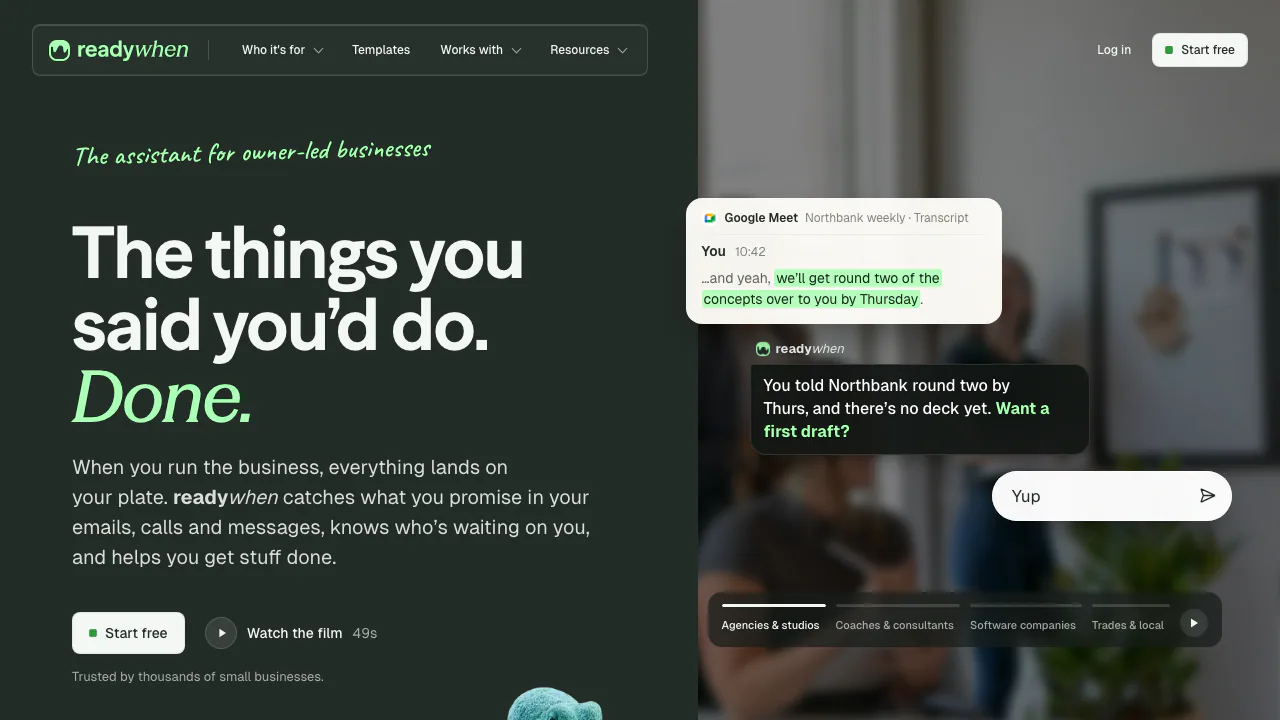
readywhen is an AI assistant for business owners who need to remember what they promised customers, suppliers and colleagues. It reads the work tools you connect, identifies commitments and helps prepare the next action. For example, a promise to send a revised quote can become a reminder and a draft reply instead of disappearing inside an email thread.
The current product positioning focuses on owner-operated small businesses: agencies, consultants, studios, trades and small software teams. It is useful when much of the operational work still comes back to one person.
Recover promises from email, chat and meeting notes
The assistant connects a request with its business context: who is waiting, what was agreed, when it is due and what happened next. Its workspace memory keeps these relationships available for subsequent follow-up.
Meeting input comes from notes and transcripts produced by tools you already use, including Google Meet, Granola and Fathom. readywhen does not join the call as a recording bot. If an agreement was never captured in an accessible source, do not assume the assistant knows about it.
Move from a daily brief to a useful response
The morning brief highlights commitments and explains why particular work matters. You can inspect the reasoning rather than treating the priority order as a decision you must accept.
Official examples include preparing for a client call, drafting the agreed next steps after a meeting, finding an earlier quote and preparing a friendly invoice chaser. These are useful starting points for an owner who needs to move a conversation forward. Check dates, amounts and the underlying agreement before approving a draft.
Try a complete Gmail follow-up workflow
The official Gmail connector guide documents this setup:
- Open your readywhen workspace and choose “Connect Gmail.”
- Review and approve the OAuth permissions described as read and draft access.
- Choose the inboxes or labels it should monitor.
- Review a prepared response in Gmail Drafts against the original conversation.
- Correct the recipient, deadline, figures and tone before approving the final message.
The Gmail guide says drafts are not sent automatically. The general terms also describe different action modes, including “act and notify,” so inspect the controls of each connector instead of assuming every integration behaves like Gmail. An organization may require administrator approval.
Check whether your existing tools fit
Official materials name Gmail, Outlook, calendar connections, Slack and Notion. Actions and access vary by connector; confirm the tools available in your actual workspace before building a process around them.
WhatsApp is presented as a feature with early access for active users. Treat availability as a rollout condition. Public API access, native app support, export formats and the app’s supported interface languages were not verified for this listing.
Understand what happens to connected business data
The vendor states that workspace data is not used to train AI models and that access follows existing tool permissions. Official materials also describe EU hosting and encryption in transit and at rest.
The privacy policy adds material detail: transcript content may be processed through Anthropic’s Claude API, with provider retention of up to 30 days for trust and safety. Derived outputs such as briefings remain for the account duration, and some billing records may remain longer when legally required. Review these conditions before connecting confidential customer information.
Frequently asked questions
Is readywhen free?
As checked on October 21, 2026, the official explanation describes the beta as free and unlimited, with no credit card required. A post-beta price and end date were not verified.
Will it send Gmail replies automatically?
The Gmail documentation says it prepares drafts and requires explicit approval. Check other connectors’ settings and action modes separately.
Does it join calls to record them?
No. It uses existing meeting notes and transcripts; you still need a supported source to produce that input.
Is business data used to train AI?
The vendor says no. This does not exclude processing by service providers; the privacy policy explains that distinction.
Useful official resources
- Security overview: access controls and the vendor’s data protection statements.
- Contact the readywhen team: questions about connectors, availability and beta conditions.
Operated by Oliva Health Ltd.
Related tools
AI Automation Tools →
LookoutFree
Watch selected Slack channels and turn matching messages into useful actions.
GleapPaid
Connect customer questions, bug investigations and reviewed fixes.
3AMContact
Investigate production incidents, verify causes and repair within your team's approval policy.
Inbox ZeroFreemium
Sort incoming mail, prepare replies and clear subscriptions with an AI assistant.
Craft AgentsFree
Connect AI agents to files, APIs, MCP and browser workflows.