
OpenScreenFree
Record, caption, and polish desktop demos with local tools and optional AI editing.
OpenCharm — an AI desktop assistant interface for your own agent
A face, voice and push-to-talk key for the AI agent you already use.
What does OpenCharm actually do?
OpenCharm gives an AI assistant you already run a small, expressive desktop presence. Hold a shortcut, ask a question and receive an answer through speech or captions. Its face changes as the connected agent works or needs your input. Think of it as a visible control panel and walkie-talkie for your agent: the agent still supplies the model, memory, skills and tools.
This is useful if you already work with an agent and want short interactions without repeatedly opening its chat. OpenCharm does not supply an independent AI model, and installing it does not automatically connect your calendar, email or smart home. Those tasks depend on the agent and the permissions and tools you configure.
Ask for work, then see when your attention is needed
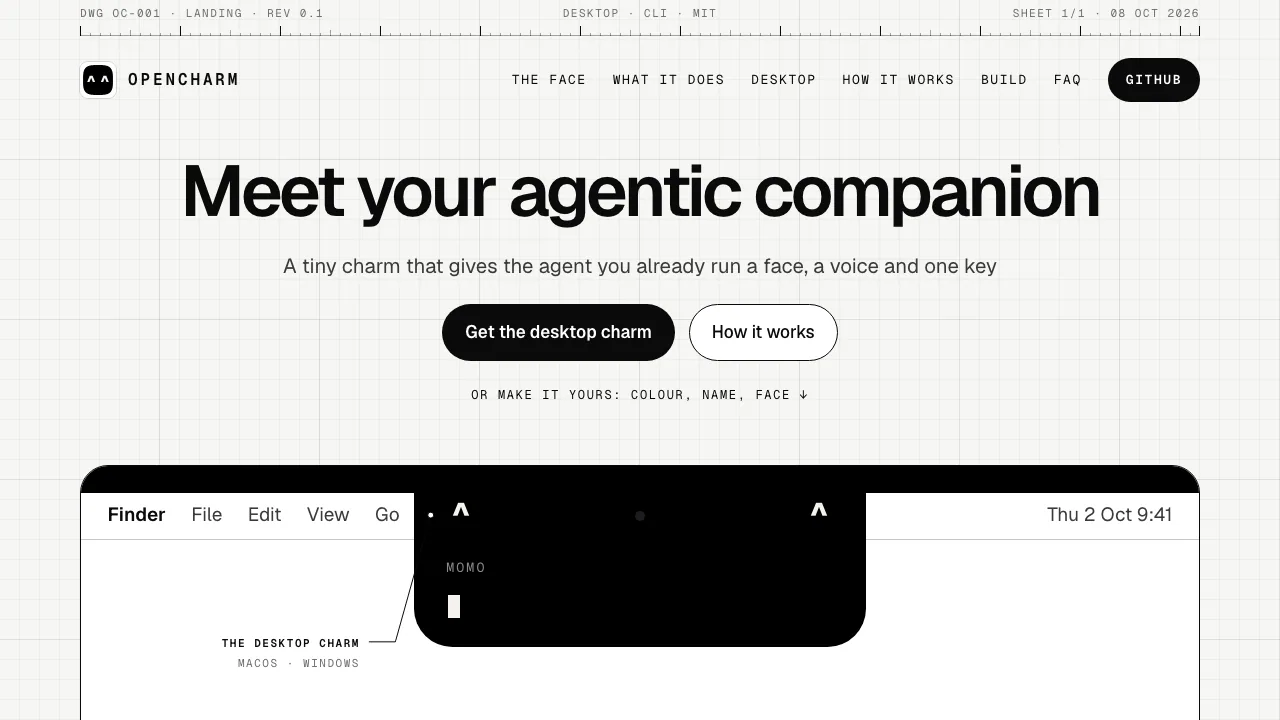
The desktop charm sits around a Mac’s notch, or in a small pill at the top of a display without one. A panel shows captions and questions. Expressions reflect events such as thinking, tool use and completion; check the actual result of a task before relying on it.
When an ACP agent sends an approval request, holding the key accepts and pressing it rejects. An unanswered request times out as a rejection after 30 seconds. This applies to requests the agent sends: it is not a promise that every action requires confirmation.
You can change the name, colour, greeting, idle sleep and motion. Additional skills and MCP tools belong to your agent’s workspace. OpenCharm also exposes interaction tools for showing a face, speaking, notifying and asking a question.
Set up your first desktop conversation
- Download the installer for your system from the official releases. macOS has Apple silicon and Intel builds. Follow the desktop installation guide, including its checksum and build provenance checks.
- Install and configure the agent you want to use. OpenCharm bundles its own Node runtime and charmd connection service; creating a new workspace also requires git.
- In setup, choose the agent and its working folder, then the charm’s appearance and voice. Grant microphone access when prompted.
- On Mac, hold Option + Space to speak and release it to send. Windows uses Ctrl + Alt + Space. Setup checks whether the charm woke, heard you and answered.
- Try a small request with a result you can inspect. For quiet work, use Option + Shift + Space on Mac or Ctrl + Alt + Shift + Space on Windows to type a one-line question and receive text.
Only one agent is connected at a time. Claude Code has been tested end to end. Presets also include Codex, Gemini CLI, goose, Hermes and OpenClaw, plus custom ACP commands and OpenAI-compatible servers, but the project says these other paths have not all been tried with real agents. Windows builds exist but remain untested on a real machine according to the project README.
Understand where speech and model data go
The microphone opens only while you hold the talk key; there is no wake word. Default speech recognition runs locally with Parakeet and is documented for 25 European languages. That is not a guarantee of support for every language.
By default, spoken reply text goes to Microsoft’s voice service. The project calls this service unofficial and notes that it may change or stop. You can choose local speech, a Mac system voice, another supported provider, or disable spoken replies. See the voice configuration documentation before choosing a setup for private material. Your agent’s model may still use a cloud service even when speech is local. Initial default speech-model downloads are about 620 MB.
Free software, separate service costs and future hardware
Checked on 13 October 2026: OpenCharm software is free and open source. Your agent, model provider and optional cloud voice service have their own costs and conditions. Software and firmware use MIT; hardware designs and brand/documentation assets have separate licences.
The optional reference board is described at roughly US$32 before shipping, not as a complete retail product or a local price. The board firmware port is still unfinished, and the project does not sell or ship devices. Consult the hardware build status and parts guide if you want to follow the DIY version.
Frequently asked questions
Can I use OpenCharm without an AI agent?
You need an existing agent or compatible server. OpenCharm supplies the interface, not the intelligence or task integrations.
Is it completely free to use?
OpenCharm itself is free. Agent subscriptions, model API calls, chosen voice services and optional parts are separate.
Is everything offline by default?
No. Recognition is local by default, but spoken reply text goes to Microsoft, and model processing depends on your agent.
Do I need to buy hardware?
No. Start with the desktop app. The DIY board path is still being developed; it is not a device you can order from the project.
Official resources
- Desktop releases: installers and verification files.
- OpenCharm source and licences: current status, code and project issue tracking.
Related tools
AI Assistants & Chatbots →
BevelContact
Enterprise AI agents built in your infrastructure, with Hexis for shared context and tools.
guilds.runFree
Run agent teams and inspect their prompts, tools and memory.
MeleteContact
AI agents that turn connected work into reviewed plans and follow-ups.
OpenPilotFree
A desktop coding agent that works in your project folder with the model you choose.
OpenVidsFree
Direct AI edits in an open-source desktop timeline you can take over.