

GitHub CopilotFreemium
AI coding assistance across editors, terminals, and GitHub workflows
Cursor AI Coding Agent: Features, Pricing and Privacy
An AI coding agent for understanding, editing, and shipping software
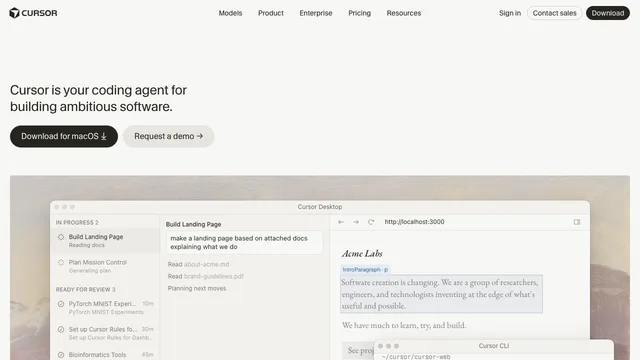
What is Cursor?
Cursor is an AI coding environment built around a coding agent. It can inspect a codebase, plan changes, edit multiple files, help fix bugs, review diffs, and work with development tools from a desktop editor or command line. It is designed for developers who want AI assistance to use repository context instead of responding only to isolated code snippets.
cursor ai: Key features
- Agent workflows: Ask Cursor to investigate a repository, plan an implementation, modify files, run tools, and help verify the result.
- Codebase understanding: Search and reason across project files to explain unfamiliar code or locate the right place for a change.
- Tab completion: Get context-aware, multi-line code suggestions while editing.
- Planning and review: Use planning workflows before implementation and inspect proposed changes before accepting them.
- CLI and cloud agents: Work from the terminal or hand off longer-running tasks to cloud workflows where available.
- Customization: Add project rules, skills, plugins, hooks, and MCP integrations to give the agent reusable instructions and tools.
- Team controls: Paid team and enterprise options add centralized administration, usage visibility, access controls, and security features.
cursor pricing: Pricing approach
Cursor uses a freemium model. The Hobby plan is free and includes limited Agent requests and Tab completions. Paid individual plans raise usage limits and add access to more models and agent capabilities. Team and enterprise plans add administration, shared controls, and organization-focused security options. Limits and plan details can change, so review the official pricing page before subscribing.
cursor ai: Privacy and security
Cursor sends relevant code data to its services to power AI features. Its Privacy Mode can be enabled by an individual or enforced by a team administrator; Cursor states that code data is not used for training by Cursor or model providers when this mode is enabled. Cloud-agent workflows may require remote code storage, so teams handling sensitive repositories should review the current security documentation and organizational settings before adoption.
Who is Cursor best for?
Cursor is useful for professional developers, indie builders, students, and teams that want an AI-native editing workflow. It is especially helpful for exploring an unfamiliar repository, implementing a scoped feature, refactoring related files, diagnosing bugs, and reducing repetitive coding work.
It should not replace engineering review. Generated changes can be incomplete, insecure, or inconsistent with a project’s architecture. Review diffs, run tests and static checks, and verify dependencies and security-sensitive code before merging.
Cursor: Frequently asked questions
Is Cursor free?
Yes. Cursor offers a free Hobby plan with limited Agent requests and Tab completions, alongside paid plans with larger limits and additional capabilities.
Is Cursor just code autocomplete?
No. Autocomplete is one part of the product. Cursor also provides repository-aware chat and agent workflows that can plan work, edit files, run tools, and help review changes.
Can Cursor understand an entire codebase?
Cursor can index and search project context to answer questions and propose changes across files. Results still depend on repository size, available context, configuration, and the clarity of the request.
Does Cursor use private code for training?
Cursor states that when Privacy Mode is enabled, code data is not used for training by Cursor or its model providers. Review the official data-use and security pages for the latest details, especially when using cloud agents.
Should I accept Cursor’s code automatically?
No. Treat AI output like a draft from a collaborator. Inspect the diff, run the project’s tests and linters, and manually review authentication, permissions, data handling, dependencies, and other security-critical changes.
cursor ai: Official resources
Related tools
AI Coding & Developer Tools →
ReplitFreemium
Build, test and deploy apps with an AI coding agent.
v0Freemium
Build editable full-stack web apps from prompts, screenshots and repositories with GitHub, databases and Vercel deployment.
DevPitFree
Keep coding sessions, task boards and call costs together on your desktop.
ReviuFreemium
Review agent-written code, return line comments and finish Git work in a native desktop workspace.
OctriFreemium
Generate API docs, SDKs and agent tools from one specification.