

TypelessFreemium
Speak a draft and turn it into editable writing
Immersive Translate Review for Bilingual Reading
Read webpages, PDFs and subtitles in a bilingual AI translation layout
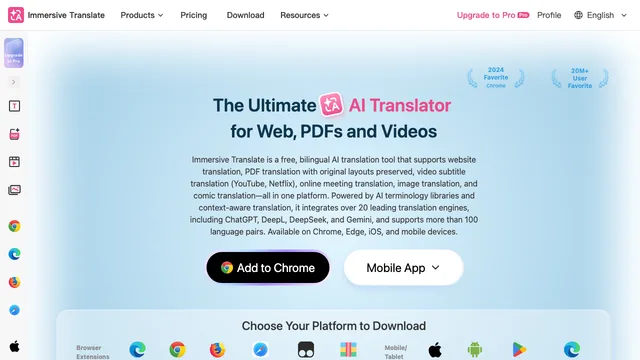
Immersive Translate overview and best users
Immersive Translate is an AI translation tool built around bilingual reading rather than replacing the source text. Its browser extension and supported apps can display an original webpage paragraph beside or near its translation, which helps readers compare meaning, terminology and tone. It is useful for students, researchers, developers, international shoppers, news readers and teams that regularly work across languages. The service also covers PDFs, video subtitles and other formats, but the exact workflow depends on device, browser and plan.
Bilingual web translator for daily reading
As a bilingual web translator, Immersive Translate tries to identify the main content while preserving the page layout. Users can choose which sites and languages translate automatically, adjust display styles and invoke translation with shortcuts. Side-by-side context is valuable when a sentence is ambiguous or a proper noun should remain unchanged. Dynamic pages, content inside unusual widgets and sites that aggressively update the DOM may require manual selection or a different translation mode.
Immersive Translate as a PDF translator
The PDF translator can create a bilingual reading experience for many text-based documents and, depending on the feature and plan, handle more complex layouts. Academic papers, manuals, reports and ebooks are common uses. Before relying on the result, inspect tables, footnotes, formulas, captions and multi-column ordering. Scanned PDFs may need OCR, and no automatic translator should be treated as authoritative for contracts, clinical instructions or certified documents. See the official PDF feature guide for current capabilities.
Immersive Translate subtitles, images and input boxes
Immersive Translate can translate supported video subtitles and may assist with images or text entered into webpages. This helps with tutorials, lectures, product pages and international communication. Subtitle quality depends on the available transcript, timing and selected engine. Text embedded in images first needs recognition, which can introduce errors. For publishing, customer communication or quotations, review names, numbers and specialist terminology before using the translated output.
AI translation tool engines and quality control
The AI translation tool can work with multiple translation services, including conventional engines and large language models, depending on availability and account settings. Different engines perform differently on short UI text, long prose, technical language and less common pairs. Create a small benchmark of representative material and compare consistency, latency and cost. Use a glossary for recurring terms where supported. Keep the original visible and treat fluent wording as a draft until important facts have been checked.
Immersive Translate setup and workflow tips
Install Immersive Translate from an official source, review requested browser permissions and set a source and target language. Begin with manual activation on selected sites before enabling broad automatic rules. The official usage documentation explains shortcuts and settings. Separate personal and work profiles if they require different providers or privacy rules. Export or record important settings before changing devices, and disable page translation when it interferes with forms or editing tools.
Immersive Translate pricing and plan choice
Immersive Translate provides free access with usage limits and offers paid Pro or Max-style tiers for higher allowances and premium capabilities; plans may change by market. Some translation providers or user-supplied API keys can create separate charges. Check the official pricing page for current quotas, supported engines and renewal terms. Choose based on document volume, preferred models, devices and whether professional features matter—not only a headline character allowance.
Immersive Translate privacy, limits and safe use
Translation may require sending selected page text, document content or subtitles to the chosen service. Review Immersive Translate’s current policy and the policy of any external engine or model; privacy behavior can differ by feature and configuration. Do not translate passwords, private keys or highly sensitive records through a provider that your organization has not approved. Browser extensions also deserve permission review and timely updates. For legal, medical, financial or safety-critical material, use a qualified human translator and domain review.
Immersive Translate alternatives and decision
Choose Immersive Translate when persistent bilingual context across webpages and documents is more important than generating a polished standalone translation. Built-in browser translation is simpler for occasional page reading; DeepL and Google Translate focus on direct text or document translation; specialist CAT tools better support professional translation memory and review. Compare language pairs, layout preservation, engine choice, privacy, price and the formats you use every week.
Immersive Translate frequently asked questions
Is Immersive Translate free?
A free tier is available with limits. Paid tiers provide larger allowances or additional features, while external providers may cost separately.
Does Immersive Translate replace original webpage text?
Its signature mode keeps the original and translation visible together, although display options can vary.
Can Immersive Translate translate PDFs?
Yes for supported PDFs, but scanned pages, formulas, tables and complex columns require careful review.
Which translation engine does it use?
Users may be able to choose among supported conventional engines and AI models depending on plan and configuration.
Is Immersive Translate private?
Privacy depends on the extension, feature, selected provider and settings. Review all applicable policies before sending sensitive text.
Is it accurate enough for legal or medical documents?
It can aid understanding, but high-stakes or certified translations need qualified human review.
Related tools
AI Translation Tools →
Vitra.aiFreemium
Translate and review video, images and documents in one workflow.
JarqFreemium
Translate and edit selected text, or dictate straight into the Mac app you are using.
DeepLFreemium
AI-powered translation for text, documents, and speech across 30+ languages.
NuvioPaid
Nuvio AI accounting software for small businesses
CoachareFreemium
Turn coaching conversations into goals, practice and weekly action.