

Z.aiFreemium
A GLM-powered web assistant for chat, files, slides, apps and agent tasks.
Mistral Vibe Review: Research, Work Agents and Coding
Mistral Vibe — AI agent for research, connected work, documents, images, voice, automation and coding across web, mobile, CLI and IDE.
AI Assistants & ChatbotsFreemium
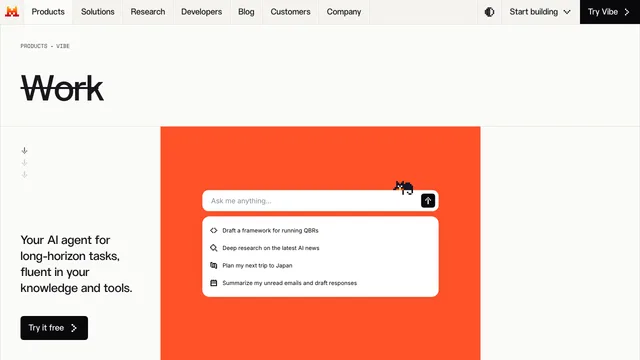
Mistral Vibe is Mistral AI's combined assistant and agent for work and code, replacing the former Le Chat brand while carrying existing conversations, settings, and plans forward. It handles chat, deep research, connected knowledge, documents, images, voice, scheduled workflows, and agentic coding. This review explains the current product, pricing, connectors, Vibe for Code, privacy choices, limitations, and a practical way to decide whether it fits an individual or team.
What Mistral Vibe is
Mistral Vibe combines Vibe for Work, formerly Le Chat, with Vibe for Code under one account and license. The official product page describes an agent for long-horizon tasks that can research, draft finished work, write and test code, and complete actions across connected tools. Web, mobile, CLI, IDE, and remote-agent interfaces cover different workflows.
The rebrand matters when comparing tutorials or pricing. Older Le Chat articles can still explain capabilities such as Canvas or Deep Research, but current plans and feature names should be checked under Vibe. Existing Le Chat users keep their conversations, settings, and plans. official Mistral Vibe product page
Mistral Vibe Deep Research and search
Deep Research can plan a question, search the web and connected sources, and create a structured report with references. A strong prompt defines the decision, time range, geography, excluded sources, and desired evidence table. Ask Vibe to separate confirmed facts, recent claims, and open questions.
Research output still requires verification. Open every important citation, check dates and authors, prefer primary documents, and compare conflicting accounts. Verified news and web search improve freshness but do not guarantee completeness or accuracy. Mistral Deep Research announcement
Mistral Vibe for documents and connected knowledge
Vibe can upload PDFs, images, CSV, text files, presentations, spreadsheets, and documents. Libraries and project folders keep context organized, while connectors can search email, calendars, chat, cloud drives, GitHub, Jira, and other systems. The product advertises more than one hundred connectors and MCP compatibility.
For useful document work, request page or section references, structured extraction, and a list of uncertain fields. Grant only necessary connector scopes and review actions before automation. Sensitive contracts, personnel data, customer records, and credentials require organizational approval and the correct deployment plan.
Mistral Vibe image, voice and Canvas tools
Mistral Vibe includes image generation and editing, voice input powered by Voxtral, and Canvas for documents, presentations, code, and mockups. These tools can turn research into a brief, deck, visual, or spoken workflow without moving between separate products.
Generated media should be checked for factual details, text errors, likeness rights, trademarks, and disclosure requirements. Transcriptions can miss names or numbers. Keep original recordings or documents available for verification, especially in commercial, legal, or public-facing work.
Mistral Vibe for Code
Vibe for Code works in the terminal, VS Code, JetBrains, Zed, web, and remote agents. It can scaffold multi-file features, create tests and documentation, open pull requests, modernize codebases, upgrade dependencies, and use context from development and project-management tools.
Treat generated code as an untrusted draft. Use branches, review diffs, run tests and security scanners, inspect dependencies and licenses, and protect secrets. Check authentication, authorization, migrations, destructive commands, and rollback paths before merging. Human ownership of architecture and business rules remains essential.
Mistral Vibe agents, schedules and automation
Vibe can package instructions, tools, and scripts into reusable skills or agents, schedule prompts and recurring work, and move data across connected systems. Remote coding agents can work in isolated sandboxes while teams monitor tool calls, code changes, logs, and run history.
Automation increases both value and risk. Begin with read-only tasks, require approval for external writes, limit permissions, set budgets, log actions, and define stop conditions. A reliable workflow should be idempotent, observable, and recoverable when a connector or model fails.
Mistral Vibe pricing and usage limits
The official pricing page lists a Free plan with limited messages, searches, coding sessions, image generation, connectors, and monthly API credits. Pro costs fourteen dollars and ninety-nine cents per month before tax and raises limits for research, coding, images, and support. Team costs twenty-four dollars and ninety-nine cents per user monthly, while Enterprise uses custom terms and deployments.
Plan allowances are not unlimited and may be subject to fair-use limits. Heavy research, image generation, remote coding, or long contexts can consume capacity faster than simple chat. Test a representative week, inspect current checkout terms, and separate Vibe subscription allowances from standalone API charges. official Mistral pricing
Mistral Vibe privacy and deployment choices
Mistral's privacy policy covers inputs, outputs, account and usage data for products including Vibe. Web search and verified news can display third-party content. Paid plans describe training opt-out options, and Enterprise can support private cloud, on-premises, or Mistral-hosted deployments with data-residency choices.
Before connecting workplace systems, review retention, training, access controls, data location, subprocessors, and deletion procedures. Remove unnecessary personal information and secrets. A private deployment can improve control, but organizations still need identity management, logging, least privilege, incident response, and governance. Mistral privacy policy
Who should use Mistral Vibe
Mistral Vibe suits users who want research, documents, images, voice, connected work, and coding under one subscription. Analysts, developers, operations teams, and organizations seeking deployment flexibility may benefit. The free plan is useful for testing simple tasks.
It is less suitable when a team only needs one narrow capability, cannot allow connected agents, or requires guarantees not covered by the selected plan. Evaluate one research report, one document workflow, one image task, and one coding change. Measure accuracy, review effort, time saved, permission risk, and allowance use.
Mistral Vibe frequently asked questions
Is Mistral Vibe the same as Le Chat?
Vibe replaces Le Chat. Existing conversations, settings, and plans carry over, while Vibe adds a unified work and coding product.
Is Mistral Vibe free?
Yes. A limited Free plan is available. Pro, Team, and Enterprise increase capacity and controls.
Can Mistral Vibe research the web?
Yes. Deep Research and web search can produce sourced analysis, but users should open and verify important citations.
Does Mistral Vibe generate images?
Yes. It can generate and edit images. Limits differ by plan, and outputs still need rights and accuracy review.
Can Mistral Vibe write code?
Yes. Vibe for Code works across terminal, IDE, web, and remote agents, with testing and pull-request workflows.
Can companies self-host Mistral Vibe?
Enterprise customers can discuss on-premises, private-cloud, or Mistral Cloud deployments and data-residency requirements.
Related tools
AI Assistants & Chatbots →
AnythingLLMFreemium
Build local or team AI workspaces with document knowledge, agents and workflows
LM StudioFreemium
Download, test and serve open models locally with chat, documents and APIs
GensparkFreemium
All-in-one AI workspace for research, slides, documents, sheets, coding, media and multi-step agent tasks.
DeepSeekFreemium
Free AI chat, reasoning, web search, file analysis and coding with token-priced developer API access.
GrokFreemium
Real-time AI chat, research, code, images, video and voice from xAI.