

MagpieFreemium
Magpie brings social saves and browser bookmarks into one visual library, with AI tags, semantic and colour search, projects, and clear free-plan limits.
ClawsGO Science — AI research assistant
Research papers, run analyses and prepare figures and LaTeX drafts in one workspace.
What does ClawsGO Science do?
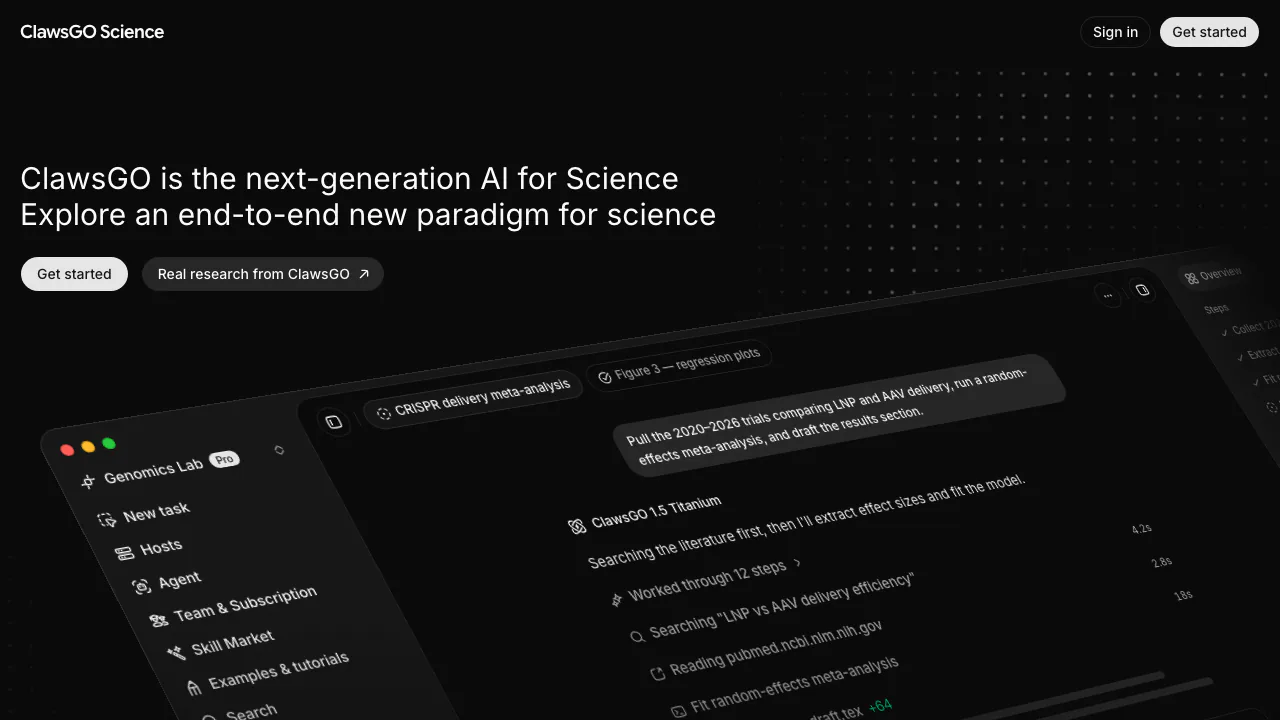
ClawsGO Science is an AI research assistant for turning a question, papers and data into files you can inspect and develop further. Built by BitMiracle, it combines literature search, reading, code execution, analysis and drafting in a task workspace. Researchers can ask for a sourced review, an analysis script, scientific figures or a LaTeX manuscript rather than working through each stage in a separate application.
For example, you might ask it to compare five years of research on a material, extract experimental conditions and produce a comparison table with references. Its role is to help assemble and execute that work. You still decide whether the research design, evidence and interpretation are sound.
Research with a process you can inspect
The agent can browse academic sources and the open web, read papers, run analysis code and draft a report. The homepage also presents policy scans, consulting diligence, engineering evaluations and market research. This makes it relevant to professional analysts as well as academic researchers.
Searches, commands, environment details and file changes are recorded in the task. Ask for an evidence table and source list alongside the narrative so you can trace conclusions back to their inputs. Check population, methods and context in the original papers. The homepage's illustrated study counts, timings and findings are demonstrations, not guarantees for your own project.
From analysis to figures and a LaTeX draft
ClawsGO can write and run code for data analysis, then use the results in tables, plots and prose. Its figure workflow retains code, environment information and version history. You can annotate an issue and request a revision, such as moving a legend or changing axis labels. The LaTeX workbench places source beside the compiled PDF, with automatic compilation and SyncTeX.
The file workspace previews research formats including CSV, notebooks, LaTeX and selected scientific structures and sequences. Preview and editing support varies by format and file size. Keep the analysis code with the deliverable and review units, statistical assumptions, citations and numerical results before using the output.
Run a first research task
- Sign in to the app and choose a cloud or local host, then a project if related tasks should share a workspace.
- State the goal, materials and constraints: research dates, scope, output language and the files you expect back. A useful brief asks for a cited comparison table, runnable code and a review of unresolved questions.
- Use Add → Upload files, drag in material or reference existing files with
@. A message supports up to 10 attachments; per-file limits depend on the plan. Put material exceeding the 32,000-character message limit in an attachment. - Choose an appropriate mode. Quick answers without tools; Solo uses one agent. Delegate requires Plus or above, while Cluster requires Pro or above and consumes more credits for parallel work.
- Inspect the timeline and find files in Deliverables under Overview or in Files. Request corrections before downloading the results. The first-task guide explains these controls.
Choose cloud, desktop or lab hardware
Cloud-hosted tasks can continue after your computer shuts down. The macOS and Windows x64 desktop app can register your computer for local file access and command execution. Local tasks require that computer to remain on and online; new desktop tasks use the local device by default, so check the host selector before starting a long run.
You can also register an authorized lab host over SSH to run jobs on your own hardware and bring results into the workspace. This is not an entitlement to a free dedicated GPU. Local execution also does not establish that model processing stays offline.
Free credits and paid-plan boundaries
Checked November 3, 2026, the global edition lists these monthly USD plans:
| Plan | Monthly price | Credits and relevant limits |
|---|---|---|
| Free | US$0 | 1,500 permanent signup credits, no monthly grant; 2 parallel tasks; 50 MB cloud uploads per file |
| Plus | US$9.9 | 30,000 credits per month; Delegate; 200 MB cloud uploads per file |
| Pro | US$29.9 | 120,000 credits per month; Cluster; 1 GB cloud uploads per file |
| Max | US$99.9 | 500,000 credits per month; higher parallelism and team capacity |
| Ultra | US$299.9 | 2,000,000 credits per month; expanded model and parallel-task access |
Credit use depends on the model's input, output and cached tokens, rather than a fixed fee per review. Cloud compute and baseline storage are included, with plan-specific disk and task limits. Documentation lists discounted annual billing, expiring monthly cycle credits and annual leftovers becoming permanent credits. Plans do not auto-renew. Check the current plans and limits before purchasing; prices and availability should not be assumed identical across regional editions.
Frequently asked questions
Is ClawsGO free to use?
Free provides 1,500 signup credits for a small initial task, with restricted model access and no monthly credit refill. Paid plans increase allowances and unlock modes such as Delegate and Cluster. Start with a narrow question so you can assess the workflow and credit use.
Can I cite its research without checking it?
Verify original papers, references and analysis first. A complete PDF is not peer review or a publication guarantee. The usage policy prohibits fabricated research and academic misconduct. The posted Terms of Service address output rights, but the version visible at this check is marked effective November 8, 2026. Confirm applicable terms, source-material rights and institutional rules before publishing.
Does local execution keep all data offline?
No such guarantee follows from running commands locally. The posted Privacy Policy describes sending relevant content to selected model providers and says ClawsGO does not train its own models on that content. This displayed version is marked effective November 8, 2026. It also describes team-workspace and share-link visibility. Check the applicable policy and your authorization before submitting unpublished or sensitive material.
Official resources and support
- Desktop downloads: official macOS and Windows installers.
- Files and previews: supported previews, downloads and format limits.
- Official FAQ and support: account, task and credit help; submit tickets through Settings → Tickets in the app.
Related tools
AI Assistants & Chatbots →
Teamily AIFreemium
People and AI agents work together in one messenger
VoyagerFree
Browse local folders, save searches and give selected files to your own AI agents.
TheySaidFreemium
Understand product friction with AI-moderated studies and feedback you can inspect.
Strawberry BrowserFreemium
A desktop browser with AI companions for research, recurring work, meeting notes and reviewed actions across your tabs.
QuelloFree
Ask across your documents and tools, verify the sources, and write with workspace context.