

LightPDFFreemium
AI PDF editor, converter, and document chat on web, desktop, and mobile
Photo to Text - Extract Text from Images & PDF Online
Free online photo to text OCR converter
What is Photo to Text?
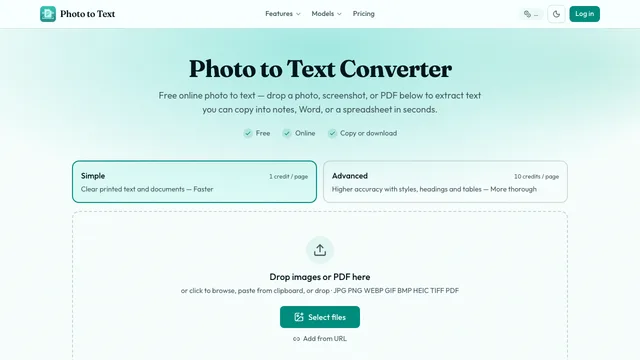
Photo to Text is an online AI OCR (Optical Character Recognition) converter that extracts editable text, structured tables, and formatted documents from images and PDF files. Designed to eliminate manual data entry, the tool handles camera photos, desktop screenshots, receipts, invoices, paper forms, and scanned multi-page documents.
Visitors can start converting immediately in their browser without registering an account, with flexible credit packages and subscriptions available for larger batches.
photo to text ai: Key Features & Conversion Modes
Dual-Engine OCR Modes
- Simple Mode (1 credit/page): Fast, lightweight optical character recognition tailored for clear digital screenshots, clean document scans, and high-contrast printed text.
- Advanced Mode (10 credits/page): Deep multi-modal layout recognition designed for challenging visual inputs, including low-light photos, perspective tilt, handwritten notes, multi-column articles, and complex nested tables.
Comprehensive Format Workflows
- Image & PDF to Text: Pulls raw or formatted text from JPG, PNG, WEBP, GIF, BMP, HEIC, TIFF, and multi-page PDF files for instant copying.
- JPG / PDF to Word (.docx): Converts scanned pages and screenshots into native Microsoft Word documents, offering options to keep formatting, extract plain text, or embed original images.
- JPG / PDF to Excel (.xlsx / .csv / .tsv): Digitizes tables from financial statements, invoices, and receipts into clean spreadsheets with reconstructed grid cells.
- Next-Gen OCR Model Tryouts: Test layout-aware OCR engines including DeepSeek OCR and GLM OCR directly on your documents.
photo to text online: Privacy & Security Safeguards
- No-Trace Guest Processing: Files uploaded by guest users are processed in memory and not stored in server history or shared with third parties.
- User Control over Results: Signed-in accounts can access saved conversion history with the ability to manually delete files at any time.
- Automated Expiration: Inactive results and temp files are automatically purged after approximately 14 days.
- No Model Training: Uploaded private documents and user data are not used to train public AI models.
Photo to Text: Pricing & Usage
- Free Tier: Convert up to 10 images or PDF pages per run without signing up. Free credits and promotional bonuses allow quick testing.
- Paid Subscriptions:
- Starter ($7.50/mo billed annually): 10,000 credits/month (≈ 1,000 Advanced or 10,000 Simple pages).
- Pro ($10.83/mo billed annually): 20,000 credits/month (≈ 2,000 Advanced or 20,000 Simple pages).
- Max ($20.83/mo billed annually): 40,000 credits/month (≈ 4,000 Advanced or 40,000 Simple pages).
- Permanent Credit Packs: Non-expiring packs ranging from $6.99 (5,000 credits) to $39.99 (40,000 credits) for on-demand use.
photo to text ai: Frequently Asked Questions
Is Photo to Text free to use?
Yes. You can convert images and short PDFs online for free without creating an account. Optional credit packs and subscriptions unlock higher batch limits (up to 100 pages) and Advanced OCR mode.
How accurate is the table extraction to Excel?
Advanced OCR accurately identifies table rows, columns, and headers from receipts, financial reports, and screenshot grids, exporting directly into editable XLSX, CSV, or TSV formats.
Can Photo to Text recognize handwritten notes?
Yes. When processing handwritten documents or cursive notes, selecting Advanced Mode uses vision-language neural networks to significantly improve handwriting recognition over traditional OCR.
Are my uploaded images and documents secure?
Yes. Guest conversions are processed ephemerally without persistent storage. Registered users have full control to delete results at any time, and unmanaged history is automatically purged after 14 days.
Related tools
AI Productivity & Document Tools →
InvofoxPaid
Turn invoices, PDFs and scans into structured JSON for your software.
HemoryFreemium
Turn conversations into searchable memory for your AI agents.
DictantorFree
Record speech, find the exact passage and keep transcription on your Apple devices.
Napkin AIFreemium
Turn text into editable diagrams, infographics and presentation decks
scitePaid
See how scientific papers are supported, contrasted or mentioned