

InvofoxPaid
Turn invoices, PDFs and scans into structured JSON for your software.
AI PDF Editor & Document Chat
AI PDF editor, converter, and document chat on web, desktop, and mobile
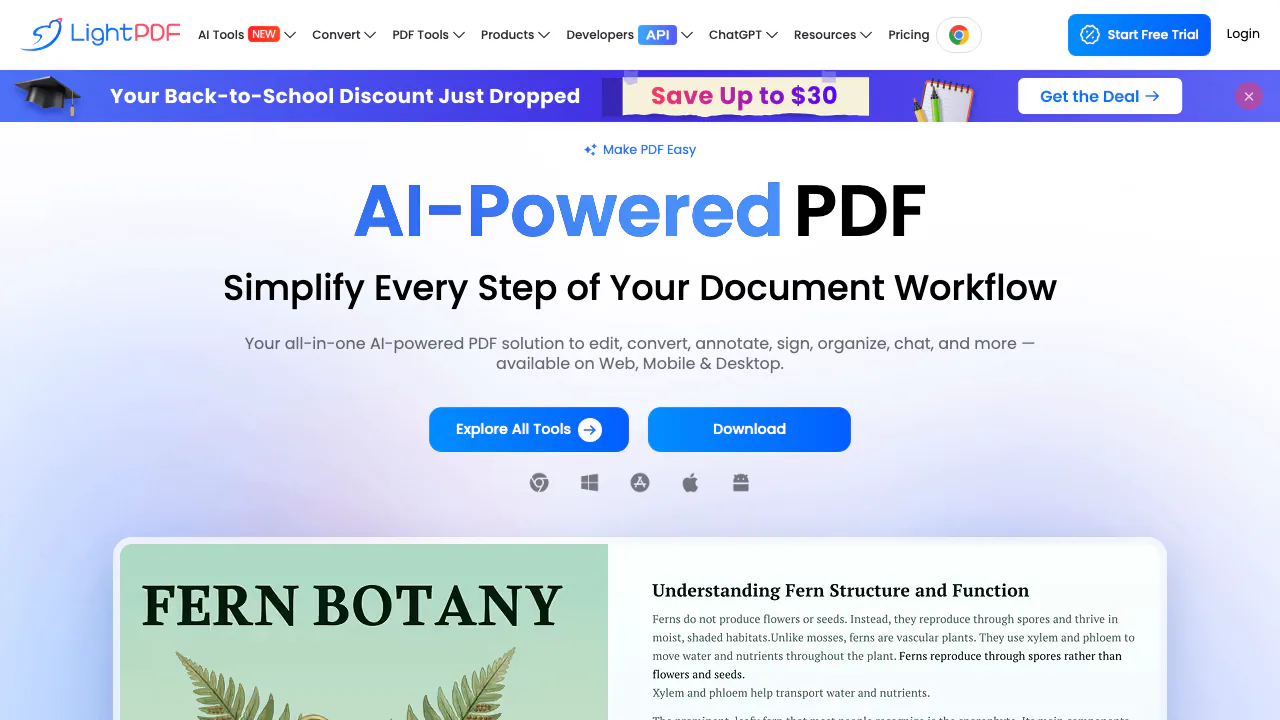
LightPDF is an AI-driven PDF editor and converter from Wangxu Technology, available on the web plus Windows, Mac, Android, and iOS. It combines classic PDF editing and conversion with ChatPDF-style document chat, OCR, summarization, translation, and AI agents so teams can move from upload to answers without juggling separate apps.
Practical workflows
For research and compliance review, upload PDF, Word, Excel, PowerPoint, EPUB, or TXT files—or paste a webpage URL—and ask follow-up questions across multiple documents. ChatPDF cites sources so you can jump to the page that supports each answer. Free uploads cover documents up to 100 pages; larger files require Premium.
For everyday document tasks, use the web toolkit to merge, split, compress, convert, and annotate files. Desktop apps handle many operations offline, though AI features and some converters need internet access. The AI PPT maker, summarizer, mind-map generator, and watermark removers automate presentation and cleanup steps that would otherwise take manual editing.
For developer or batch conversion needs, LightPDF exposes a Convert API with separate API pricing and sales contact options on the official site—not bundled into consumer VIP plans by default.
Pricing boundaries and AI credits
LightPDF uses a freemium model (verified September 2026). The Free plan is web-only. Premium covers all platforms with a 3-day trial on the yearly plan. AI credits fuel ChatPDF, agents, summarizers, translation, and other AI tools: monthly plans include 1,000 credits expiring each calendar month; yearly plans issue 1,000 credits monthly with the same expiration; the perpetual plan delivers 40,000 credits that remain until used. Credit consumption varies by feature—check the pricing comparison for current rates. Premium allows one active Windows session at a time for security.
Privacy and data handling
LightPDF states it uses 256-bit SSL encryption, deletes files after processing where applicable, and aligns with GDPR, ISO/IEC 27001, and ISO/IEC 27701. ChatDOC stores encrypted cloud copies while sessions are active; you can delete uploads. For enterprise or team billing with centralized management, contact sales through the official channels.
Official resources
- LightPDF homepage — product overview and PDF toolkit
- ChatPDF / Chat for Docs — multi-document chat, OCR, formats
- Pricing and plan comparison — Free vs Premium, AI credits, trial
- Convert API — programmatic PDF conversion
- Contact and support — tickets, sales, API inquiries
FAQ
What file formats does LightPDF support?
LightPDF accepts PDF, Word, Excel, PowerPoint, EPUB, TXT, RTF, images, HTML, OFD, CAJ, and scanned files. ChatPDF also supports webpage URLs. Premium removes practical file-size limits listed on the pricing page.
How do free uploads differ from Premium?
The free ChatPDF tier allows uploads up to 100 pages per document. Free web access excludes desktop and mobile Premium apps. Premium unlocks all platforms, larger files, and the monthly or perpetual AI credit pools described above.
Can I use LightPDF offline?
Windows and Mac desktop clients perform many PDF edits offline. AI chat, agents, and several online converters require a connection. Plan accordingly if you work on air-gapped machines—offline coverage is partial, not complete.
How are AI credits consumed?
Credits apply to AI-powered tools such as ChatPDF, AI Agent, Summarizer, PPT maker, translation, and watermark removers. Monthly and yearly VIP credits expire if unused; perpetual plan credits stay until spent. Exact costs per action are shown in the Premium column on the pricing comparison (verified September 2026).
Who operates LightPDF and is there an API?
LightPDF is operated by Wangxu Technology per the consulting-service page. Developers can explore the Convert API and API pricing pages and reach the team via the contact form for integration questions.
Related tools
AI Productivity & Document Tools →
InvitedFreemium
Turn bills, invitations and tickets into reminders you can review.
NuvioPaid
Nuvio AI accounting software for small businesses
Photo to TextFreemium
Free online photo to text OCR converter
ContextGemFree
Extract typed document data with source references using Python, LLMs and decision models.
PapermarkFreemium
Share confidential files, track readership and review documents with AI.