

InvofoxPaid
Turn invoices, PDFs and scans into structured JSON for your software.
Invited: AI Bill Reminders from Photos and PDFs
Turn bills, invitations and tickets into reminders you can review.
What does Invited actually do?
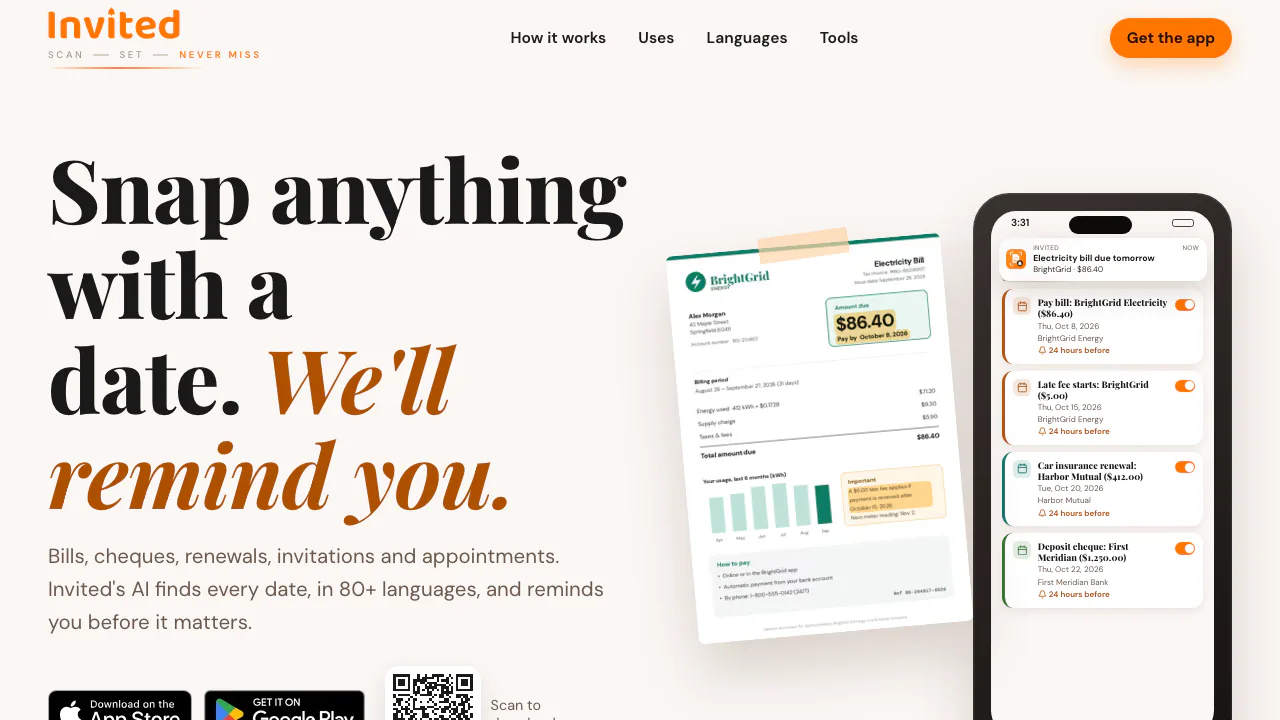
Invited is a bill reminder app and document scanning assistant from KraftosTech for iPhone and Android. Photograph a dated document, import a screenshot or PDF, and its AI identifies dates, times, places and amounts. You review the results and save the events as reminders on your phone.
Think of it as a way to move a deadline from a document into a notification. A utility bill can become a payment reminder; a wedding card can become several event reminders. The website explains the product and provides app downloads. The scanning workflow happens in the mobile app, with no account or signup required.
Keep payment deadlines and event details together
Paper bills and emailed statements often contain more than one relevant date. Invited can create separate reminders for a payment due date and a late-fee date when both appear in the document. The amount can accompany the reminder, helping you understand what the alert refers to.
For invitations, each wedding function can retain its own date, time and venue. Remove events you will not attend during review. Renewal notices, trial confirmations, appointments, travel tickets and warranties are other documented uses. A trial reminder gives you time to decide; you still cancel the subscription with the service or app store yourself.
From a photo or PDF to a checked reminder
- Open Invited and photograph the whole document in good light, select a photo or screenshot, choose a PDF from Files, or share a document from another app.
- Let AI extract the event information. Compare every date, time, place and amount against the original, especially when a document contains several deadlines.
- Correct mistakes, remove irrelevant events and add a manual reminder if necessary before saving.
- Choose an alert 1, 6, 12 or 24 hours, or 2 days in advance. You can set a default and change individual reminders.
- Save the events and allow phone notifications. Reopen a saved scan to edit, share or delete its reminders.
The official walkthrough shows these stages. AI extraction can be wrong, so saving should follow a deliberate check rather than an automatic acceptance.
Read documents in different languages and calendars
The official language page lists 85 document languages. Invited also recognizes nine calendar systems: Gregorian, Vikram Samvat, Hijri, Hebrew, Chinese Lunar, Persian, Thai Buddhist, Ethiopian and Japanese era.
This is useful when an invitation uses a regional script or traditional date. The output still needs checking against the source; support for a calendar is not a guarantee that every ambiguous date will be interpreted correctly.
Three free AI scans, with manual reminders still available
Checked on October 14, 2026: Invited is free to download, includes 3 free AI scans and allows unlimited free manual reminders. When the scan allowance is used, you can continue entering reminders yourself. Invited Pro adds unlimited AI scans through a subscription.
The official pricing FAQ points to App Store and Google Play for current prices. Country, currency and purchase options depend on the store; there is no verified universal price to quote.
Local reminders and external AI processing
Reminder lists are stored on the phone, but documents submitted for scanning are sent to an AI service. The privacy policy names Google Gemini for analysis and extraction, alongside purchase, advertising and website analytics providers.
The policy gives no fixed numerical deletion deadline for temporary processing data. Eligible free users may see ads. Review these conditions before scanning sensitive bills or invitations; local reminder storage does not make AI scanning an offline operation.
Frequently asked questions
Is Invited completely free?
The download, 3 AI scans and unlimited manual reminders are free. Further AI scanning requires Pro under the published offer; check your store for the subscription price.
Can one photo or PDF create several reminders?
Yes. Supported documents can contain multiple dates, such as a bill's due date and late-fee date or several wedding functions. Review which events to keep.
Do my documents stay entirely on my phone?
The reminder list stays on the device. Scanned documents are sent to an AI service for extraction, so those are different data flows.
Why am I not receiving an alert?
Enable Invited notifications in phone settings and check Focus or Do Not Disturb. The official support page gives further troubleshooting.
Official resources and support
- Invited Support: notification, scanning and purchase help, plus the official support email.
- Application terms: app licence and store subscription conditions.
Related tools
AI Productivity & Document Tools →
LightPDFFreemium
AI PDF editor, converter, and document chat on web, desktop, and mobile
Photo to TextFreemium
Free online photo to text OCR converter
NovastartFreemium
Arrange real app windows, follow AI agents and share a working canvas.
HemoryFreemium
Turn conversations into searchable memory for your AI agents.
DictantorFree
Record speech, find the exact passage and keep transcription on your Apple devices.