

LightPDFFreemium
AI PDF editor, converter, and document chat on web, desktop, and mobile
Invofox — Invoice OCR API and Document Data Extraction
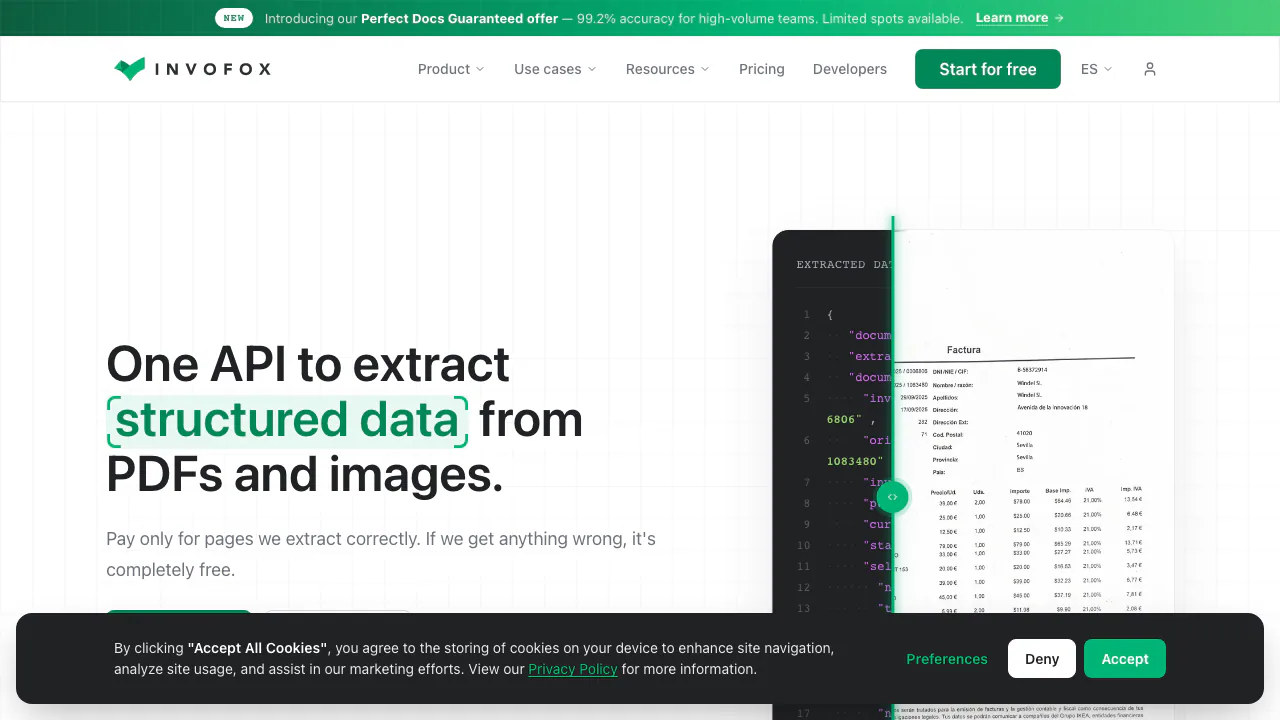
Turn invoices, PDFs and scans into structured JSON for your software.
What does Invofox actually do?
Invofox is an invoice OCR API and document extraction service for teams building software around incoming paperwork. Send it a PDF or image, and it identifies document fields and returns structured JSON. Think of it as the step between receiving a supplier invoice and having usable supplier, date, tax and line-item records in your application.
Its documented use cases extend to receipts, payslips, bank statements, utility bills and contracts. Finance platforms, logistics systems and operations teams can use the extracted fields downstream. You still decide how those fields become approved records or business actions.
From invoice fields to complete document batches
The invoice model extracts header information and line items, including quantities, unit prices and row totals. Validation helps identify inconsistencies before your application uses the result. Test both the fields you need and the exceptions your team must review; a readable total alone does not prove that every item was captured correctly.
For a PDF containing several documents, Splitter separates logical documents rather than treating the whole file as one invoice. Classifier can identify configured document types before extraction. An unmatched type may be discarded or routed to a default model, depending on your environment configuration.
Try the API with one representative document
- Create an account, open an environment and generate a key under API and Webhooks.
- Copy the ID or alias from Document Types.
- Send a multipart request to
POST https://api.invofox.com/v1/ingest/uploads, withx-api-key, afilesattachment and aninfoJSON field containingtype. - Save the returned
documentId. Receivedocument.processedat your webhook, or pollGET /documents/{documentId}during testing. - Inspect the state, confidence and extracted fields against the original. Send corrections through
PUT /documents/{id}when needed.
The upload response is an acknowledgement, not the final extraction. Also handle file.rejected: corrupt, password-protected or unsupported files may never produce a document. Splitter uploads return an importId; use import.processed to determine when the entire batch has finished. The official integration guide explains the response structures and polling behavior.
Trial limits and production costs
Checked on October 6, 2026: the public pricing page lists 500 free pages. The homepage describes a one-time evaluation allowance, with no recurring free quota. Starter is advertised from $500/month, billed annually, with up to 5,000 pages per month. These are public dollar-denominated estimates; complexity, volume and integration affect the quote. Scale and Enterprise require custom pricing.
Billing generally follows pages, with some custom enterprise workflows billed per document. Do not assume the advertised accuracy credit applies to every account: the pricing page qualifies that offer for teams processing at least one million pages annually. Consult the current pricing terms before budgeting.
Decide how documents may be retained
Ordinary retention supports audit, debugging and improvement; the correction workflow can feed model training. Zero retention is an opt-in configuration for Scale and Enterprise, rather than the default for every trial. Its optional anonymized training sample requires separate opt-in. Review the zero-retention conditions and agree on processing, retention and deployment requirements before using sensitive production files.
Frequently asked questions
Is this just OCR that returns text?
No. The documented output is structured fields and line-item arrays, with classification and validation around extraction. Your configured document type determines the fields.
Can I use Invofox for free indefinitely?
The published allowance is for evaluation. It is not a fresh 500-page allowance every month; ongoing production use requires an appropriate paid arrangement.
Must I write an API integration?
A direct integration uses REST and asynchronous results. An official Zapier connection offers another route for connecting document extraction to existing app workflows.
Official integration and support resources
- Zapier setup: connect the API key, choose a trigger and map extracted fields to your destination.
- Contact Invofox: discuss custom document types, volumes and data-handling requirements.
Related tools
AI Productivity & Document Tools →
Photo to TextFreemium
Free online photo to text OCR converter
HemoryFreemium
Turn conversations into searchable memory for your AI agents.
DictantorFree
Record speech, find the exact passage and keep transcription on your Apple devices.
Napkin AIFreemium
Turn text into editable diagrams, infographics and presentation decks
scitePaid
See how scientific papers are supported, contrasted or mentioned