

Vitra.aiFreemium
Translate and review video, images and documents in one workflow.
Yedric AI: an AI chatbot for website and app actions
Embed a product assistant that answers questions and runs connected actions.
What is Yedric AI, in plain English?
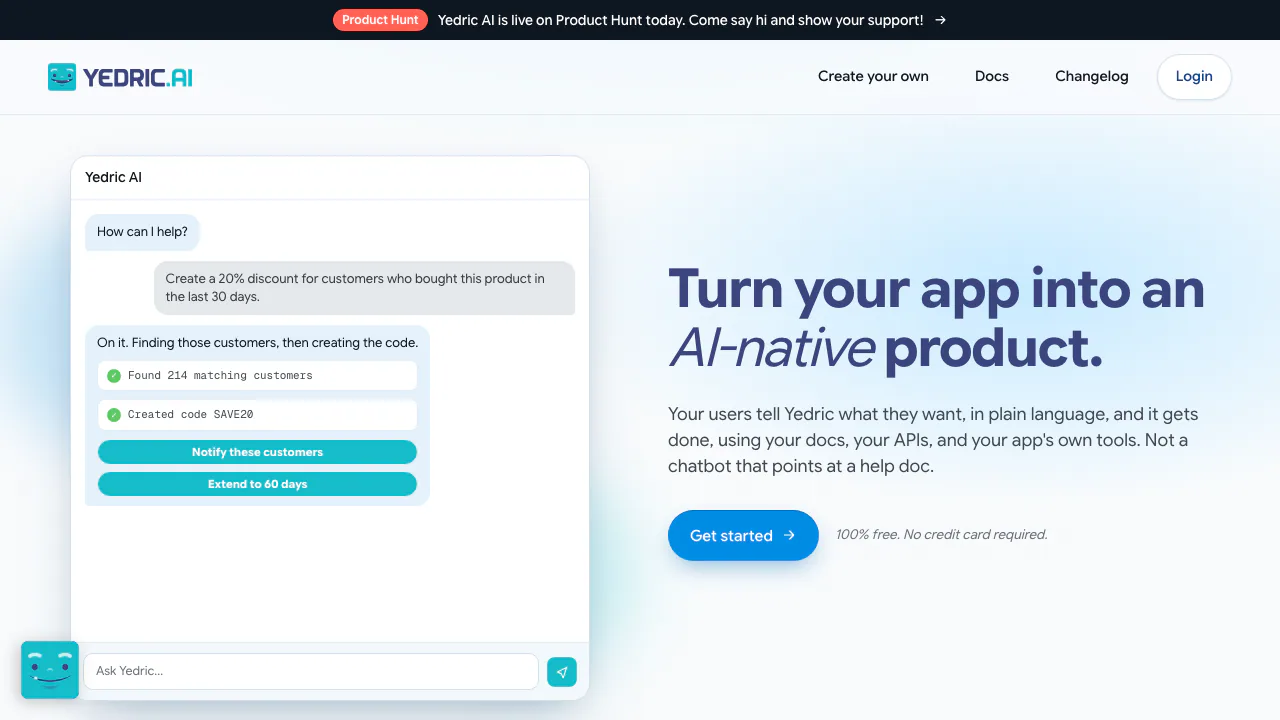
Yedric AI adds an AI chatbot to your website or application so users can ask for help and request actions in everyday language. Built by ShopPad, it is aimed at SaaS and Shopify app teams that can provide product documentation and connect the operations their application exposes. A user describes an outcome; the assistant consults the knowledge base and, when an appropriate action is configured, calls it.
That distinction matters when evaluating the product. Explaining where a setting lives requires documentation. Changing that setting requires an authorized tool connected to your application. Installing the widget alone does not give it control over every feature or third-party service.
Give answers a reliable product knowledge base
You can crawl a documentation website, upload PDF, DOCX or TXT files, or enter reference text manually. For a help center, restrict the crawl to the relevant URL path and choose depth and URL limits. Inspect each imported document: Ready means it is available for retrieval; Error needs investigation before you rely on it.
Website sources refresh weekly and can be refreshed manually. Uploaded files need your own maintenance, and the dashboard displays the storage limit. Keep operating instructions in the assistant's Instructions area and product reference material in Knowledge Base. This makes a changed policy easier to update without rewriting the assistant's entire behavior.
Connect actions without giving every operation automatic approval
In Actions, choose Add a connection. The available routes include an MCP server URL, an OpenAPI specification, API documentation or manually defined action schemas. These connections can expose account information, order data or operations your own service supports. Custom integration work generally requires a developer.
The action configuration guide documents three modes: Automatic, Ask first and Off. A practical rollout starts with read-only lookups and uses Ask first for changes that users should review. Check each setting explicitly: most actions default to Automatic. Page Prompts can then offer suggestions relevant to the current page rather than the same generic menu everywhere.
Build and verify a first working integration
- Create an assistant and write its role, supported tasks and boundaries in Instructions.
- Import a small, current set of product documents and confirm their processing status.
- Connect one useful operation and review its description, inputs and approval mode.
- Configure the widget's appearance, then copy the generated code from Widget → Install into your application before the closing body tag. The embed needs the agent ID and public widget key.
- Test a documentation question and an action request. Inspect the underlying result in the application and the tool activity in Conversations, rather than judging success only by a friendly reply.
Use the official embedding instructions for the exact code and authentication options. Teams without access to their application's code or APIs should involve its developer before planning custom actions.
Test changes and learn from conversations
Saved Simulations support success criteria such as whether a tool was called, whether it was avoided and whether the answer contained required information. Group scenarios into suites and rerun them after changes. Versions provides configuration comparisons and restoration; restoring a configuration should not be confused with undoing an already completed business action.
Conversations shows transcripts, tool results, sentiment and detected feature requests. Review the original exchange before treating an automatically detected request as roadmap evidence. Built-in live chat and an external handoff event are available when configured, giving users a path to human support.
Free access, model costs and data boundaries
Checked on October 2, 2026, the public global offer allows a free start with a small model using Yedric's keys. Advanced models or greater scale require your own OpenAI, Anthropic or Google keys. The homepage says model providers bill you directly without a platform markup. No universal local-currency subscription price or numeric default-model allowance was verified. Consult the current FAQ when estimating production costs.
For logged-in users, Secure Mode signs an identifier on your server and ties history to the verified user. The secret must stay server-side. This addresses session identity; it is not a promise of zero retention. The privacy policy discusses service providers and international transfers, but the reviewed material did not establish a precise end-user conversation retention period or a blanket no-training commitment.
Frequently asked questions
Is Yedric free to use?
You can start free on its supplied small model. Bring-your-own-key usage can generate bills from the model provider, so free platform access does not mean unlimited free inference.
How do I add it to my website?
Create an assistant, prepare its knowledge and use the generated Widget → Install snippet. Custom app operations need their own connected tools and authentication.
Can it do more than answer questions?
Yes. Connected actions let it work with your application's data and services. Its actual capabilities depend on the tools you expose and enable.
Official implementation resources
- Yedric documentation: configuration, support contact and integration reference.
- Secure Mode guide: server-side signatures and user sessions.
- Official changelog: product changes to check before updating an integration.
Related tools
AI Chatbot Builders →
ZooWorkPaid
Turn expertise, operating rules and connected tools into agents that carry out reviewed business tasks.
CoreSpeedFreemium
Connect your existing agent to business apps, durable memory and metered tools.
OkaraFreemium
Coordinated AI marketing agents, with human review
SaleSmartlyFreemium
AI customer support across messaging channels
HarmonyContact
AI ITSM for employee requests, access and service workflows