

AI BridgeFreemium
Organize real coding CLIs, approvals and resumable workspaces in one Mac app.
N8N Chat UI: a customizable n8n chat widget
Design a branded chat interface for your n8n workflows
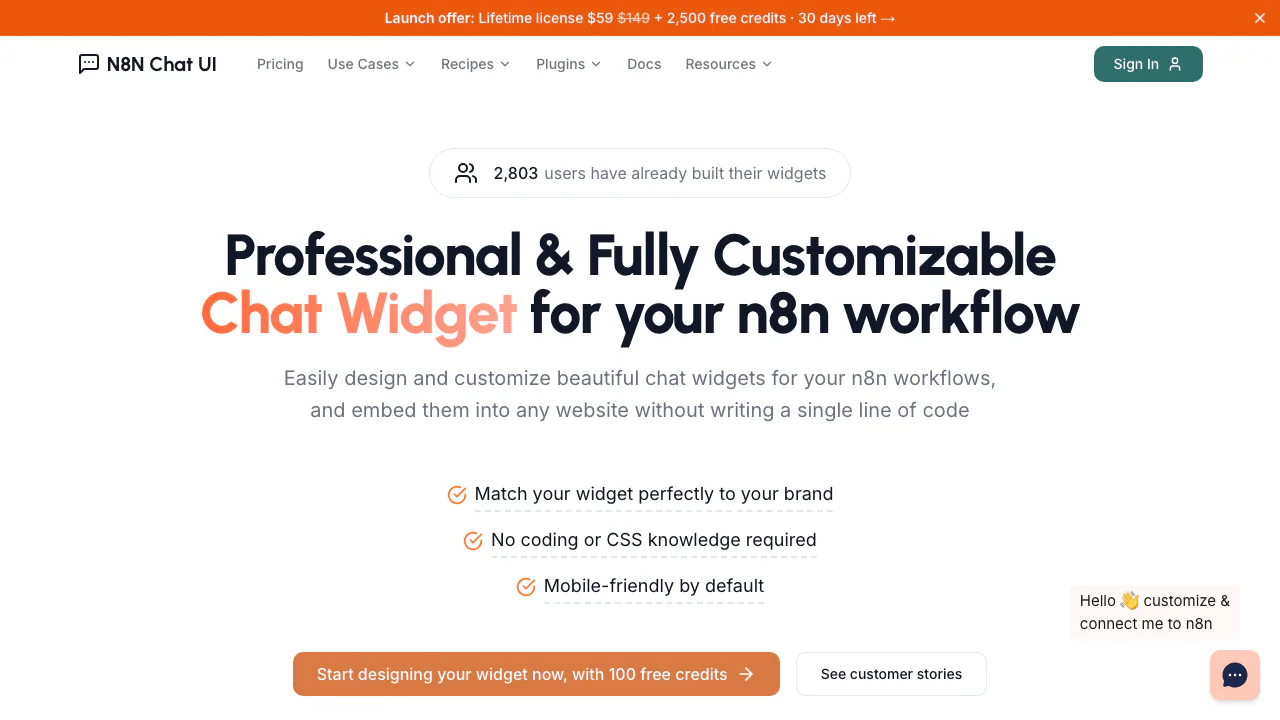
N8N Chat UI gives an n8n chatbot a website interface you can design visually. Connect a working workflow, style the conversation window and embed it where visitors need it. It is aimed at n8n builders, agencies and website owners who already have the backend logic or can configure it.
What does N8N Chat UI actually do?
Think of n8n as the process behind the counter and N8N Chat UI as the counter visitors talk to. The widget sends a message to your webhook and displays the result returned by your workflow. Support answers, lead capture and booking are possible use cases when those actions exist in the connected backend.
The product is independent of n8n. It supplies the interface and connection layer; it does not turn a theme change into a working agent, knowledge base or booking system.
Build a chat experience that fits your website
Use the live visual preview to adjust colors, fonts, avatars, welcome text and the chat launcher. Choose an inline window for a dedicated conversation area or a floating popup for help across the site. Responsive layouts cover desktop and mobile, with RTL support for relevant languages.
A backend can return followUpPrompts to offer clickable next questions. For multiple widgets sharing one workflow, plan session keys so unrelated page conversations do not share context. A session key does not establish user authorization.
Connect a workflow and check the first reply
Prepare a working Chat Trigger or Webhook workflow and permission to edit the destination website.
- Customize the window and choose its display mode.
- Connect the workflow webhook and configure the actual answer or business action in n8n.
- For a non-streaming reply, return HTTP 200 and valid JSON containing the output text field. Use proper JSON escaping for generated text.
- Copy the generated embed code into your site. Send a test message and check both the workflow execution and the reply displayed in the widget.
The backend integration guide also covers custom POST endpoints. WordPress users can install ChatUI Widget for n8n, activate it, enter a Managed Widget ID or Standalone webhook in Settings → N8N Chat UI, then save. Page exclusions let you keep the chat off selected pages.
Files, voice and streamed responses
Uploads forward files to the workflow; allowed types, maximum size and count are configurable. Parsing a document, storing an image or answering from its contents still requires backend logic. The file upload documentation explains the binary payload.
Voice input sends a recording to n8n. The documented flow transcribes it with a separate speech-to-text service before using the text in an agent. File and audio uploads send metadata as a JSON string, which needs parsing for object access.
For streamed replies, enable streaming on both the Chat Trigger/Webhook input and the AI Agent output. The widget detects a configured stream; changing the front-end alone will not enable it.
Managed credits or a standalone license?
Checked October 28, 2026: new accounts receive 100 Managed trial credits, valid for 30 days. Managed widgets then use prepaid credits, with one credit consumed per message processed by the proxy. New messages stop when the balance runs out. Paid credits bought from October 5, 2026 do not expire under current terms; older purchases retain their original conditions.
Standalone widgets require a one-time license and do not consume Managed message credits. For new buyers, distinguish the perpetual core license from optional support and update periods. Check current packs and license pricing and purchase terms; n8n hosting, model calls and transcription are separate costs.
Data handling and practical limits
Standalone messages go from the browser to your webhook, whose URL appears in client code. Managed messages pass through the vendor proxy, keeping the upstream URL private and adding domain restrictions, geofencing, rate limits, analytics and centralized configuration.
The privacy policy says the vendor does not retain chat content, while Managed processing still involves live message forwarding and technical metrics. Your n8n instance, databases and model providers have their own data practices. Evaluate those separately before handling sensitive content.
Frequently asked questions
Can I put the widget on an existing website?
Yes. Use generated embed code or the official WordPress plugin, with access to edit the site and a working backend.
Does it build the n8n workflow for me?
You still configure the workflow, model, data sources and permitted actions. The product designs and connects the chat interface.
Can I use it free forever?
The 100 signup credits expire after 30 days. Continued use requires prepaid Managed credits or a Standalone license, plus your backend costs.
Official setup resources
- Product documentation: configuration and session guidance.
- WordPress plugin guide: installation and page exclusions.
- MCP setup: OAuth or API-key access to list, create and style widgets; theme updates do not change webhooks.
- Business support: account and setup questions.
Related tools
AI Chatbot Builders →
TheySaidFreemium
Understand product friction with AI-moderated studies and feedback you can inspect.
NINFreemium
Local chat, voice typing and approved tools in NINX, with optional app connections.
KiwiFree
Timely reminders and everyday actions through messaging, with approval before spending
Strawberry BrowserFreemium
A desktop browser with AI companions for research, recurring work, meeting notes and reviewed actions across your tabs.
JevModelFreemium
Turn text or JSON into labels, scores and probabilities with Jev.