

SellioFreemium
Handle customer conversations together and let a knowledge-based AI agent answer website visitors.
CoreSpeed AI agent connectors for apps and shared context
Connect your existing agent to business apps, durable memory and metered tools.
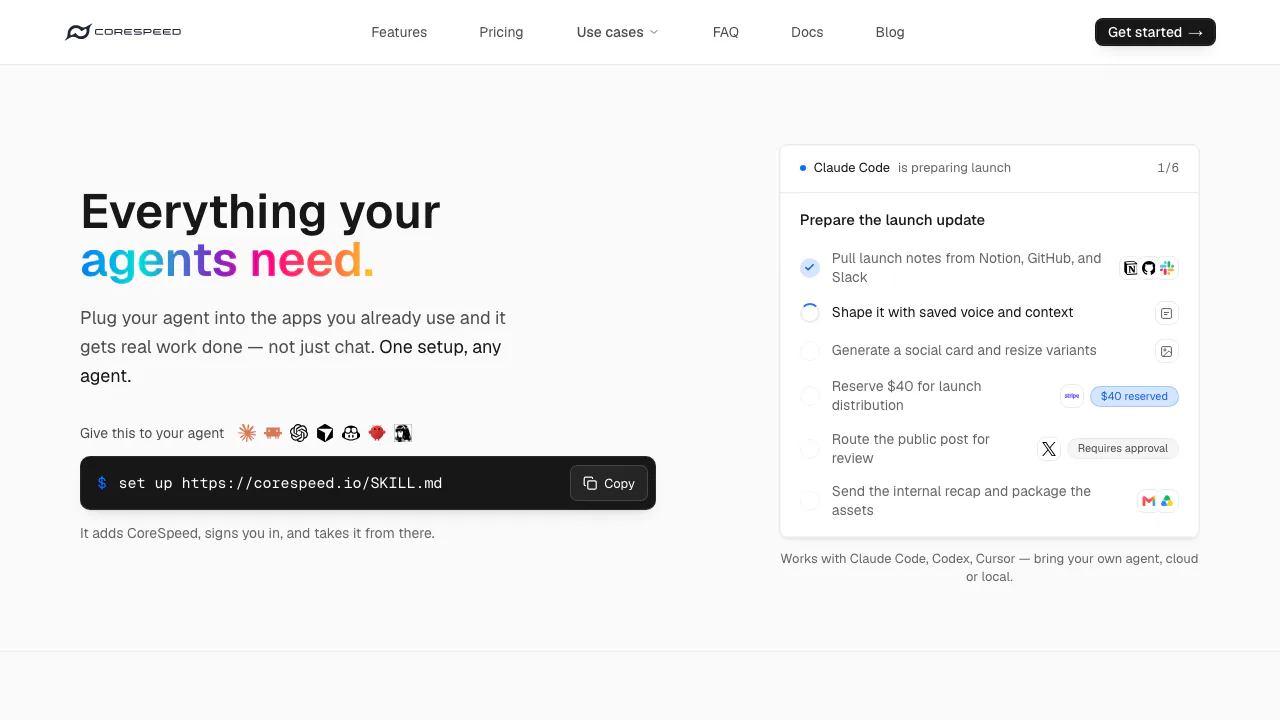
CoreSpeed provides AI agent connectors and reusable context through one remote MCP service. It is aimed at people already using agent clients who want those agents to read, prepare and carry out work across authorized applications.
What does CoreSpeed do, in plain English?
Think of it as a tool connection layer for an assistant you already use. Your agent interprets the request; CoreSpeed supplies the authorized app operations and supporting tools. A project-summary task can therefore progress from finding information to preparing a result for an application, instead of ending with text you must manually move around.
You bring an agent client and a CoreSpeed account. Connections and durable context belong to the authorized identity and organization, so changing clients does not require rebuilding that context from scratch.
Connect an app and verify a first useful task
Start with a bounded task, such as reading specified project notes and preparing a summary for review. This is an example workflow; available operations depend on your account.
- Follow the MCP setup guide to add the remote service to a supported client and sign in. Browserless clients can use an API key.
- Open Dashboard → Connectors, select an app and review its requested permissions. Depending on the connector, authorization uses OAuth, a provider key or an organization-owned OAuth application.
- Specify source material, destination and account. Multiple connected accounts may require an explicit account alias.
- Check the draft and configure approval for consequential writes before running them.
- Confirm the result in the destination app and inspect Activity for outcome and associated charges.
The connector documentation makes an important distinction: the authenticated catalog depends on your organization, environment and upstream approval. Homepage app logos are examples, not a promise that every integration is immediately available to every account.
Carry useful memory between agent clients
Store stable preferences, project decisions and other durable facts, then retrieve them from another authorized client in the same organization. Memory is private by default; team sharing is explicit.
Use this for reusable context rather than secrets or a full transcript archive. Disabling memory hides the tools but does not delete saved data. Inspect and remove records separately. Some archive and collaborative maintenance features are rolling out by organization, so check the tools actually exposed to your account. See the memory guide.
Research and produce media within the workflow
Web tools supply ranked sources and readable page text for the agent to assess. Public social-data tools provide read-only research without connecting a personal platform account; posting through an authorized connector is a separate action.
Media tools generate images, video and audio or answer questions about supplied media. Check the selected model's input schema and current rate first. A generation may return a job ID before it finishes; retrieve its result instead of assuming submission equals delivery. Signed output links expire after 12 hours and can be refreshed through the result tool. The media documentation explains the input and job lifecycle.
Choose which actions need approval
Approvals are off in a new organization. Once enabled, plain-English policies govern writes, and Test policy lets you try hypothetical calls without executing them. The default Balanced behavior ordinarily permits unmatched non-destructive writes; reads are not gated. Wait on the original approval receipt rather than resubmitting an operation and creating a second request. See approval controls.
API-key spending caps stop later metered requests after recorded usage reaches the cap. They are request-boundary controls: an in-flight operation can finish above the remaining amount.
CoreSpeed holds provider credentials while agents receive tools. Its privacy policy describes Neon memory storage, Gemini processing for memory, and transfers of relevant connected-account content to the selected model provider. Processing can occur in the US and other countries. Disconnecting removes stored credentials, but a pasted provider API key must also be revoked with that provider. Submitted content remains yours; generated-output rights follow the upstream model's terms.
Free credits, Pro subscriptions and usage charges
Public USD prices checked on October 6, 2026; final taxes and payment conditions appear at checkout.
- Free: one member, 200 MB memory and 30 days of visible history. The first organization receives 3,000 signup credits once per user, expiring after 90 days.
- Pro: US$20 per month, with 10,000 monthly credits, up to 25 members, 2 GB memory and one year of history. Monthly credits reset; additional top-ups are available.
- Enterprise: custom limits, SSO options, deployment planning and support arrangements.
Standard connectors and memory operations are free; premium connectors and built-in metered tools consume credits. The published conversion is 1,000 credits per US$1. Pro top-ups range from US$5 to US$1,000 per checkout and do not expire; Free cannot top up. Budget a small representative run before scaling. Consult the rate card and credit rules.
Who it suits and where to get help
CoreSpeed fits cross-application work and teams that want reusable context across clients such as Claude Code, Codex and Cursor. Someone seeking a standalone chat assistant should first check the required client setup. Agent Pay, agent mail and the code sandbox remain marked Coming soon.
- Documentation: setup and troubleshooting.
- Official GitHub: public components and issue trackers; this does not imply the whole hosted service is open source.
- Discord community: setup questions.
- Official X account: announcements.
- Contact and support: account, billing and security issues.
Frequently asked questions
Is CoreSpeed itself an AI agent?
It primarily supplies tools, app connections and memory to an existing agent client. You still need that client and a CoreSpeed account.
Are the free credits renewed every 90 days?
No. The 3,000-credit signup grant is issued once per user and expires after 90 days. Pro includes a separate monthly credit allowance.
Will it ask before every app action?
No. Approvals must be enabled, reads are not gated, and ordinary unmatched writes can run under Balanced. Configure and test a stricter policy when the task requires it.
Related tools
AI Automation Tools →
WikiFixPaid
Find conflicting, duplicate and ownerless Confluence pages, then review and apply fixes.
InvofoxPaid
Turn invoices, PDFs and scans into structured JSON for your software.
ZooWorkPaid
Turn expertise, operating rules and connected tools into agents that carry out reviewed business tasks.
Vitra.aiFreemium
Translate and review video, images and documents in one workflow.
Yedric AIFree
Embed a product assistant that answers questions and runs connected actions.