

BackdropFreemium
Create AI coworkers that use your tools, carry team context and move work forward.
withHuman: human-in-the-loop approvals for AI agents
Check agent tool calls against policy and route consequential actions to a human before execution.
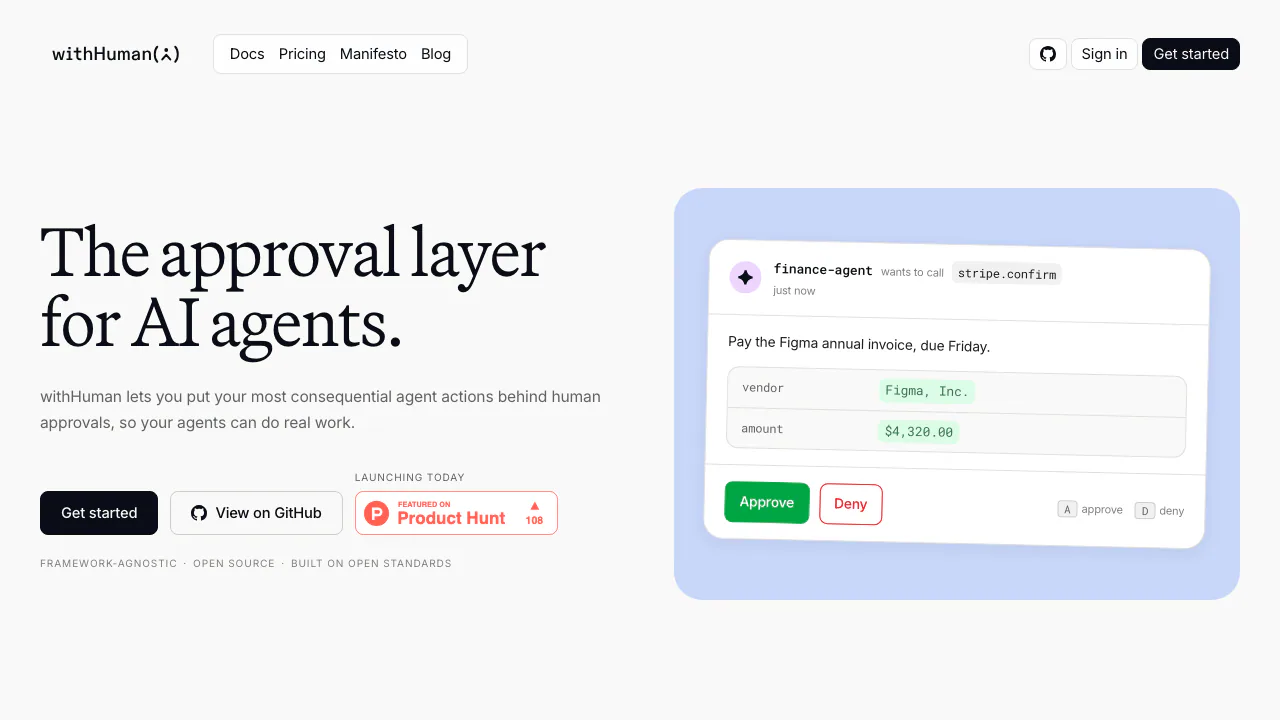
withHuman, operated by Metoro Inc, adds human-in-the-loop approvals to AI agents that can take actions in business systems. It receives a proposed tool call, evaluates your policies and returns a decision so connected agents know whether they may proceed.
What does withHuman actually do?
Think of it as an approval desk for an AI colleague. A support agent might prepare a refund, but the proposed transaction first reaches withHuman. A rule can allow it, refuse it or ask a person to inspect the arguments and context. The decision comes before the protected action.
This is useful for teams letting agents send messages, change records, deploy software or initiate payments. It requires a connected agent and an enforced approval path. Approval grants permission; the agent's subsequent output tells you whether the operation succeeded.
Let routine calls proceed and route exceptions to reviewers
Approval pipelines evaluate ordered blocks. The first block that makes a decision wins, so a broad allow rule can prevent later safeguards from being reached. Conditions can inspect the agent, tool, arguments and request context.
Hosted AI Judge blocks add evaluation against a written policy. They produce a verdict, confidence and rationale, with configurable mappings to automatic outcomes or human review. Failed or timed-out evaluations go to a reviewer. Confidence is a model assessment, so policies should describe what evidence is required and what to do when it is missing.
Escalation paths choose the responsible team or person. Notification rules control when and how that reviewer is contacted. Available channels include email, Slack, Discord, text messages, WhatsApp and mobile apps, subject to edition and configuration. The hosted audit log records requests and decisions; self-hosted core should be checked separately.
Connect an agent and complete a real approval loop
Follow the official quickstart on a machine with a supported agent installed:
- Sign in and run the personal setup command supplied by the guided setup.
- Select detected agents. The CLI discovers their built-in and configured MCP tools.
- Connect and verify notification channels, then choose timing for standard and urgent requests.
- Specify which calls need approval, manually or through the documented coding-agent setup flow.
- Run the displayed test command in a new terminal. Inspect the request and check that the notification reaches the expected channel.
- Approve or deny, confirm that the loop closes, and check the agent's actual result.
When editing pipelines later, test representative requests, create a revision and make it active. A saved draft does not change live policy. Test request checks routing without creating an approval request or contacting reviewers.
Hooks, custom frameworks and MCP Gateway
The site lists hooks for Claude Code, Codex, OpenClaw, Pi, Hermes and DeepSeek. Custom agents can integrate through the Agent Approval Protocol, with SDK examples for frameworks including LangGraph, Pydantic AI, OpenAI Agents, CrewAI, Mastra and AI SDK.
The MCP Gateway setup guide describes keeping downstream credentials in withHuman and exposing selected tools to agents. Remote servers must support Streamable HTTP. Disable an agent's existing direct connection to the same service, or calls may bypass the gateway. A credential named readonly also needs genuinely read-only permissions at the downstream service.
Free hosted access, paid seats and self-hosting
Checked on October 18, 2026, the official pricing table lists Free at $0 for up to five members, with unlimited agents and approval requests. AI Judge is limited, without a numerical allowance stated publicly.
Scale is listed at $20 per user per month and adds administration such as organization and scoped API keys, SSO and SCIM. Enterprise uses a custom annual contract and lists cloud, on-premises and BYOC deployment. Prices are the published USD rates, excluding taxes; subscription terms determine the actual charge.
The repository provides a Docker self-hosting path, but the pricing matrix excludes MCP Gateway, AI Judge, audit log and mobile apps from its Open Source column. Confirm edition requirements before deployment. The core's Elastic License 2.0 also restricts providing substantial functionality to third parties as a hosted or managed service. Public source availability is not an unrestricted resale permission.
Review what an approval request contains
The privacy policy covers tool arguments, agent reasoning and attached context, which can include customer data. Requests, decisions and audit records are kept for the organization's lifetime. The provider says requests, decisions and notes are not used to train models.
Hosting is in Azure North Europe, Ireland. AI Judge models are deployed in Sweden Central and may process a request in another Azure region. The website and hosted app also use analytics and session recording, with a browser opt-out. Assess the fields you send and the processing locations before connecting sensitive workflows.
Frequently asked questions
Does a human approve every call?
No. Active policies can automatically approve or deny routine calls and route selected cases to a person.
Is the free plan limited by request count?
The current table lists unlimited agents and approval requests, with a five-member limit and separately limited AI Judge usage.
Can I use my own agent framework?
Yes, through supported adapters or AAP integration. Verify that the actual execution path obeys the returned decision.
What happens when a request is denied or expires?
The agent must not execute a denied, expired or cancelled action. Approval alone does not prove successful execution.
Official resources
- Pipeline configuration: rule order, testing and activation.
- Official repository: deployment instructions, examples and license.
- Product support: assistance with setup or a specific request ID.
Related tools
AI Automation Tools →
Buddy WorksFreemium
Visual CI/CD pipelines, preview environments and deployment tools that AI agents can operate.
NitroStackFreemium
Build typed MCP tools, inspect their behavior and deploy them with a connected development stack.
CopilotKitFreemium
Connect your application's interface to AI agents, tools and human decisions with an open-source SDK.
AfterpartyFreemium
Turn meeting commitments into drafts you review and approve.
ChatwayFreemium
Answer website and store enquiries with AI, a shared inbox and human support.