

CardboardFreemium
Turn footage or an idea into an editable cut, then refine it through chat or the timeline.
Bicep Heart AI: photo to video with an arm-heart gesture
Make a short, silent arm-heart video from one consenting adult’s photo.
What does Bicep Heart AI actually do?
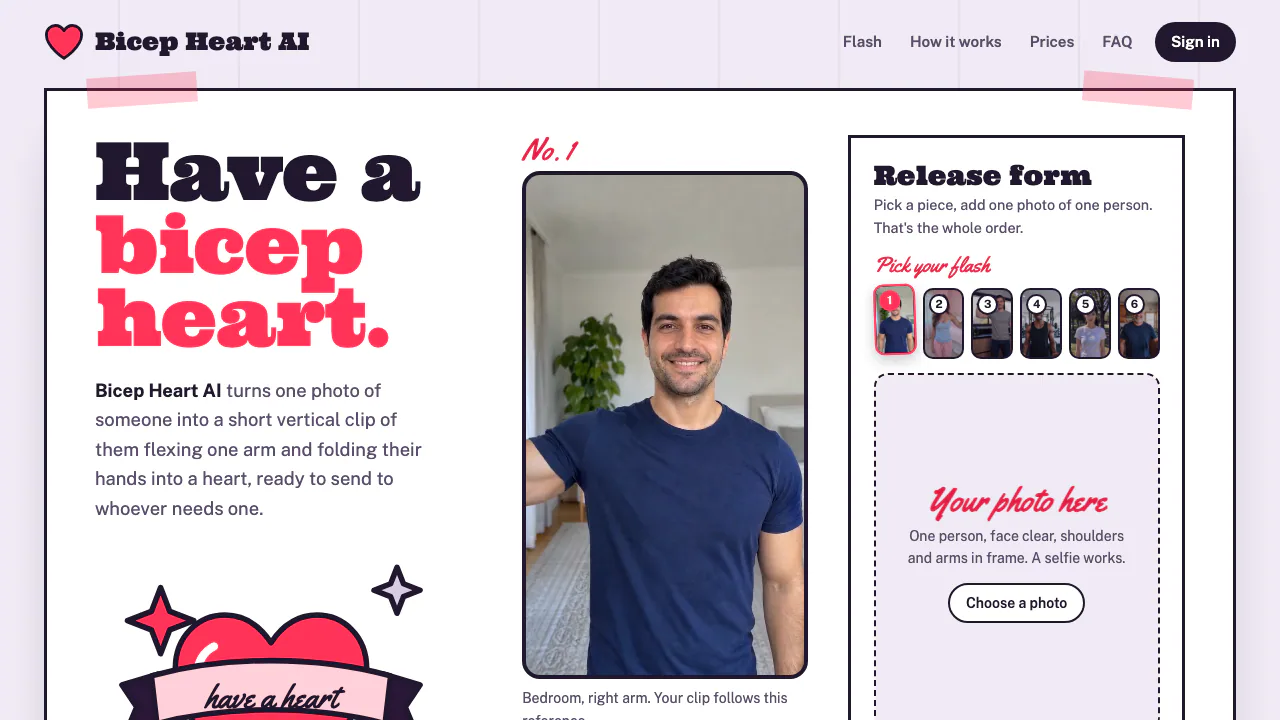
Bicep Heart AI is a photo-to-video tool for a specific gesture: the person smiles, raises and flexes one arm, then makes a heart with both hands beside their head. Upload one portrait and choose a reference; the service creates an approximately seven-second, vertical 9:16 clip. It suits a playful message to a partner, a friend or family member when you would rather send a personalized animation than film yourself.
The reference controls the arm, setting and timing. Your photo supplies the person’s face, hair and clothing. This focused workflow is useful when you want that particular move rather than an open-ended video production project.
From a portrait to a clip you can send
- Open the Bicep Heart generator and compare the six reference pieces. Choose the arm and scene you want.
- Upload one PNG, JPEG or WebP portrait. Use even lighting, a clear front-facing face, and visible shoulders and arms. Avoid group shots, tight face crops, covered eyes and heavy filters.
- Confirm that you have rights to the photo and that the subject is at least 18 and agrees to this use. Sign in with Google or an email code and buy credits.
- Submit the generation. The site says it usually takes a few minutes and emails you when it is ready; you can then download it from your account.
- Check the face and hand shapes before sharing. Add your music or caption in TikTok, Reels or your chat app; the generated clip is silent.
Understand the references and quality limits
The clips shown in the Flash gallery are references from the trend, and the site explicitly says none was made with Bicep Heart AI. Treat them as motion guides rather than evidence of generated quality. The finished person may resemble the portrait without matching it exactly, and hands can be imperfect. The tool is independent of TikTok, Instagram and the trend’s creators.
One-time prices and what happens if a job fails
Checked on November 13, 2026: the public pricing section lists US$4.99 for one clip, US$9.99 for three and US$19.99 for eight. Each clip costs ten credits. Packs are one-time purchases, there is no subscription, and credits do not expire. These are the site’s USD prices, not local-currency quotes or a guarantee of payment availability in every country.
Failed or timed-out jobs automatically return credits. Unused clips can be refunded within 14 days of purchase, including the unused portion of a partly used pack. Disliking a completed result does not qualify on its own; clearly broken clips can be reported for returned credits.
Photo handling and permission to share
According to the privacy policy, your photo and reference clip go to Yir, which routes generation to Kling. The site says it does not sell your data or use photos to train models. Uploads are deleted after about two days, while finished videos remain until you request deletion. This is cloud processing, so consider the policy before sending a portrait.
You retain your existing photo rights, and the terms prohibit deceptive impersonation and require following platform AI-labelling rules. Share the result as AI-generated content.
Frequently asked questions
Is Bicep Heart AI free?
No. There is no free trial; generating a clip requires purchased credits.
What kind of photo should I upload?
Choose one consenting adult, facing the camera, with a clear face and arms visible. A selfie can work if it is not cropped too tightly.
Does the downloaded video include sound?
No. It is about seven seconds long, vertical 9:16 and silent. Add audio in the app where you share it.
Official help
- Refund rules and support: detailed eligibility and the official support address, support@bicepheartgen.com. Use your account email for refund or deletion requests.
Related tools
AI Image & Video Generators →
Genjutsu AIPaid
Recast a short video or replace a selected subject using reference images.
PopcraftFreemium
Create AI videos, images, audio and product ads in one workspace
SeamlessCanvasFreemium
Repair image seams and generate repeatable textures and patterns.
SurgePixFreemium
Generate images, posters and decks, then refine individual layers.
Bulin 47 AIPaid
Turn an authorized adult portrait into a 23-second freestyle remix with the original sound.