
MidjourneyPaid
Create, refine, organize, and animate distinctive AI images from prompts and reference images.
Photoroom AI Photo Editor: Pricing, Credits & Review
Create commerce-ready product photos with background removal, AI staging, fashion models, batch editing, and video.
What is Photoroom?
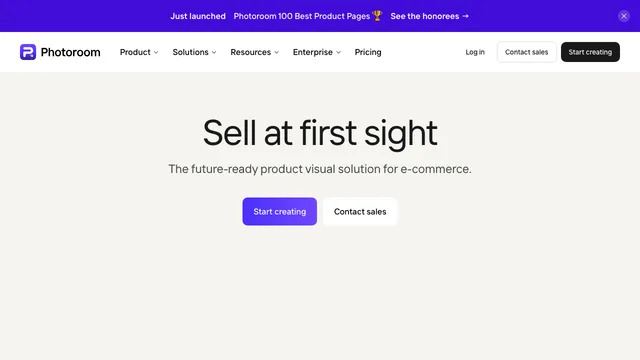
Photoroom is an AI photo editor and product-visual production platform for online sellers, marketers, and e-commerce teams. It can remove a background, replace it with a clean or generated scene, improve lighting and shadows, retouch a product, create fashion imagery, resize a listing, process a catalog in batches, and turn product photos into short promotional videos.
The service is available on the web, iOS, and Android. Its workflow is built around a Space, which holds designs, team members, AI credits, and export allowances. A subscription belongs to a Space rather than an individual seat, and up to 50 people can work in one Space under the same shared limits.
photoroom app: Product photography and AI editing
Background Remover automatically detects the main subject and creates a cutout. You can add a white, transparent, colored, blurred, template-based, or AI-generated background. Retouch removes unwanted objects, Image Enhancer improves quality, AI Expand changes the canvas, Resize prepares marketplace dimensions, and preset AI Shadows help products look grounded.
For more advanced production, Product Staging places a product in a generated lifestyle scene and may add a human hand or other interaction. AI Fashion Models show apparel on generated models; Ghost Mannequin presents garments without a visible person; Flat Lay creates overhead clothing arrangements; Product Beautifier improves angles, lighting, and shadows; Recolor makes product color variants; and Edit with AI applies natural-language changes to an image.
Photoroom also supports Brand Kits, templates, Batch workflows, Shopify integration on Max and higher plans, and an API or MCP allowance for automation. Batch and Shopify exports share the Space's regular export quota, while API and MCP calls use a separate wallet charged at API rates.
photoroom ai: AI images and product video
Create any image generates a new visual from a prompt, style, and size. Other AI workflows start from one or more reference images so the model can preserve the product. Quality tiers currently range from Standard 1K on Pro, through Advanced 2K on Max, to Premium 4K on Ultra. Higher quality uses more credits and takes longer.
Video Generator creates a short MP4 from one to four product images. It offers more than 300 commerce-focused motion templates, an optional text prompt, and landscape, portrait, or square output. It is an image-to-video tool rather than a complete text-to-video system: at least one source image is required. Standard-resolution video requires Max, while the highest resolution requires Ultra. Each generation costs 500 AI credits, including every variation.
Photoroom: Free plan, trial, and current prices
Photoroom has a permanent Free plan for limited personal, non-commercial use. The current unified export policy allows 100 exports per month on Free, plus a small AI-credit allowance whose exact amount can vary. Free utilities such as background removal also have lower daily fair-use limits. Advanced AI workflows, Batch Mode, higher resolution, API access, and commercial rights require a paid subscription.
Some paid plans offer a seven-day trial for the first Space a customer upgrades. It is available once per customer and only for that first upgraded Space. The trial unlocks the selected plan's features and automatically converts to a paid subscription on day eight unless canceled.
Photoroom's current pricing page and official US pricing references list these rates:
- Pro: $12.99 month-to-month, or an effective $7.50 per month billed annually. Includes up to 8,000 AI credits and 1,000 exports per month, advanced image workflows, Batch, high-resolution output, and more than 1,000 templates. Video Generator is not included.
- Max: $34.99 month-to-month, or an effective $20.99 per month billed annually. Includes up to 25,000 AI credits and 3,000 exports per month, more advanced models, faster processing, priority support, Shopify integration, and Video Generator.
- Ultra: from $99 month-to-month, or an effective $82.50 per month billed annually. The base tier includes up to 75,000 AI credits and 10,000 exports per month, the highest-quality models, 4K image and video output, and larger-catalog workflows. Ultra ×2, ×5, and ×10 raise the limits.
- Enterprise: custom pricing, credits, visual quality assurance, SSO, SLA, onboarding, and support.
Prices, taxes, credits, and plan availability can vary by country, platform, billing cycle, and selected capacity. Confirm the live web, App Store, or Google Play checkout before purchase. Photoroom's pricing page says eligible purchases can be refunded within one week, subject to the applicable platform process.
photoroom app: AI credits and export limits
AI credits and exports are separate resources. Credits are deducted when Photoroom generates or edits content with a credit-based model. An export is counted when an image is downloaded, saved, shared as a file, or published to an external service such as Shopify. A batch of ten images therefore uses ten exports.
Current credit costs include:
- AI Backgrounds v3 and AI Scenes: 1 credit per generation.
- AI Backgrounds Studio, Product Staging, Product Beautifier, Flat Lay, Ghost Mannequin, Recolor, and AI Fashion Model 1K: 5 credits.
- Advanced AI Shadows: 10 credits.
- Edit with AI: 20 credits.
- 2K export: 135 credits; 4K export: 240 credits.
- Video Generator: 500 credits.
- Photography, logo, poster, and card makers: about 10 credits, with approximately 20% variation.
Background Remover, white backgrounds, templates, Retouch, preset Shadows, AI Expand, Resize, Image Enhancer, Product Fixer, and Studio Shot do not consume AI credits, but fair-use and daily limits can still apply. Credits are shared by everyone in a Space and renew with the billing cycle. When a generation fails technically, credits are returned automatically. Clearly unusable results can be reported quickly for review, although some tools and batch workflows are not eligible for quality refunds.
photoroom ai: Commercial use and ownership
Under the Photoroom Terms and Conditions, free accounts are licensed for personal, non-commercial use only. A paid Pro, Max, Ultra, or Enterprise subscription is required to use Photoroom templates and AI-generated results commercially, including e-commerce listings, marketing, and advertising.
Photoroom does not claim ownership of Customer Content, but users must have the rights and permissions needed for every uploaded image, person, logo, trademark, and product. Paid commercial permission is not a copyright guarantee. AI output can reproduce or resemble protected material, and the user remains responsible for checking whether a result is safe to publish. Unsplash and Pixabay assets retain their own source licenses.
Photoroom: Privacy and AI training
Photoroom's Privacy Policy says images uploaded through its consumer application are used by default to improve, train, and develop its products, services, and models. The training selection is separated from identity data, but the setting is opt-out rather than opt-in. Each user must disable Improve model for everyone in their own account; a Space administrator cannot currently turn it off for every member at once, and opting out is not retroactive.
Images processed through the Photoroom API are not stored or used for training unless explicitly requested. Photoroom also says prompt data is not used to train its AI. However, some AI-generated images can be shown to other users when they enter a similar prompt, so consumer-app results should not automatically be treated as confidential.
The privacy policy lists account data retention until account deletion or up to two years after the last login, followed by five years of archiving. Transaction records may be retained for ten years, and analytics or social cookies for up to 25 months. Teams handling unreleased products, client assets, regulated data, or confidential designs should opt out before uploading and consider the API or an Enterprise agreement.
photoroom app: Main limitations
- Free output is personal and non-commercial, even when a free tool allows downloading.
- Free Spaces have 100 monthly exports, a small variable AI allowance, and lower daily utility limits.
- Exact subscription prices and credit allocations vary by region, store, capacity, and billing period.
- Pro does not include Video Generator; video requires Max or Ultra and costs 500 credits each time.
- Video Generator needs a product image and creates short animations; it is not text-only video generation.
- AI credits and export counts are separate, shared Space limits.
- 2K and 4K output consume substantial credits, and 4K quality requires Ultra.
- Generative edits can alter labels, small text, patterns, colors, shape, and product details. Product Fixer helps, but manual comparison with the source remains necessary.
- Weak lighting, clutter, or insufficient contrast can reduce background-removal accuracy.
- Not every low-quality result qualifies for a credit refund, and several tools are excluded in Batch or catalog workflows.
- App uploads are used for model training by default unless each user opts out.
- Some generated images may appear as results for other users, making the consumer app unsuitable for confidential concepts without additional controls.
- Paid commercial rights do not clear third-party copyrights, trademarks, likenesses, or stock licenses.
Photoroom is best suited to marketplace sellers, fashion and beauty brands, resellers, restaurants, catalog teams, and agencies that need fast, consistent product visuals from existing photos. It is less suitable for unrestricted text-to-video creation, advanced layer-by-layer photo manipulation, confidential consumer-app workflows without configuration, or businesses that need guaranteed product fidelity without human review.
photoroom ai: Frequently asked questions
Is Photoroom free?
Yes. The Free plan supports limited personal use, currently with 100 exports per month, a small AI-credit allowance, and lower daily utility limits. Commercial use, Batch Mode, advanced models, higher resolution, and larger quotas require a paid plan.
How much does Photoroom cost?
Current US official pricing references list Pro at $12.99 monthly or $7.50 per month billed annually, Max at $34.99 or $20.99 annually, and Ultra from $99 or $82.50 annually. Live pricing and allowances can vary by location, app store, and capacity.
What uses Photoroom AI credits?
Generated backgrounds, fashion models, product staging, generative edits, high-resolution exports, and videos use credits. Background removal and several core tools cost zero credits but remain subject to fair-use limits.
Can I use free Photoroom images commercially?
No. Photoroom explicitly limits Free accounts to personal, non-commercial use. A paid subscription permits commercial use of templates and AI results, subject to copyright, trademark, likeness, and source-asset rights.
Can Photoroom make product videos?
Yes. Max and Ultra users can animate one to four product images with templates and optional prompts. It costs 500 credits per generation. Photoroom requires a source image and is not a complete text-only video generator.
Is AI Fashion Models an avatar generator?
It generates on-model fashion product images, not profile avatars, talking digital humans, or presenter videos. It is therefore better classified as product photography rather than a general avatar generator.
Does Photoroom train on uploaded images?
By default, yes for images uploaded through the consumer app. Users can disable Improve model for everyone in their own account, but the opt-out is not retroactive. API images are not stored or used for training unless explicitly requested.
Are Photoroom AI results private?
Not necessarily. Photoroom says some generated images may also appear to other users who enter similar prompts. Confidential projects should use stricter settings and review API or Enterprise terms.
What happens when an AI generation fails?
Credits are automatically restored after a technical failure. A clearly unusable result can be reported promptly for possible reimbursement, but approval is not guaranteed and some tools or batch modes are excluded.
Related tools
AI Image & Video Generators →
Adobe FireflyFreemium
Generate and edit images, video, graphics, and creative assets with Adobe’s generative AI tools.
IdeogramFreemium
Generate design-ready images with strong typography, Canvas editing, and prompt-guided visual control.
SeaArt AIFreemium
Generate images, videos, avatars, and voices with AI
PixelcutFreemium
AI photo editing and product-content creation for sellers and brands
Leonardo AIFreemium
Generate, edit and upscale images, animate videos, and train custom AI models.