

Lumen5Freemium
Turn ideas and articles into branded videos with AI
Fliki AI Video Generator, Voices & Avatars
Turn ideas, scripts, articles, and slides into narrated videos with AI voices and avatars.
What is Fliki?
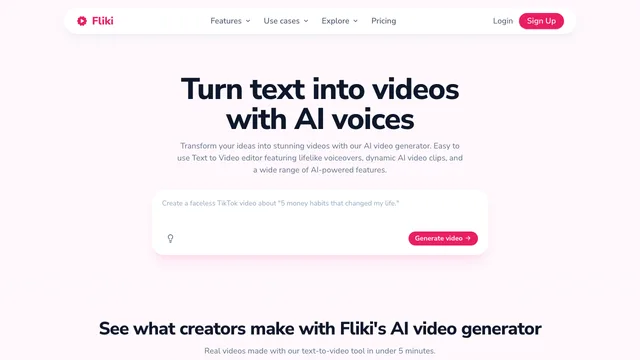
Fliki is an AI video generator that turns an idea, script, blog article, presentation, product page, or recording into an edited video or audio project. It can draft a script, divide it into scenes, select stock or AI-generated visuals, add an AI voiceover, captions, music, and an optional talking avatar, then export the result from a browser-based editor.
The platform is designed for narrated content rather than only generating a single cinematic clip. Its workflows cover explainers, training lessons, social videos, faceless YouTube content, podcasts, ads, localization, and presentation-to-video projects. Fliki also gives creators access to multiple image and video models inside the same timeline, although model access and credit cost depend on the active plan.
fliki ai video generator: AI video generator, voices, and avatar features
- Idea, script, blog, and PPT to video: Start with a prompt, paste a script, import an article URL, or upload slides. Fliki assembles a scene-based draft with narration, visuals, captions, and music.
- AI video and image generation: Generate short visual clips or still images with supported third-party models, or use uploaded and stock media at no generation-credit cost.
- Text to speech and AI voiceover: Choose from more than 2,000 voices across over 80 languages and 100 dialects. Pace, pitch, pauses, pronunciation, and supported emotion styles can be adjusted by scene.
- Voice cloning: Record or upload an authorized voice sample, verify consent, and reuse the resulting voice across projects. Current feature pages describe a 30-second sample and cross-language use in more than 30 languages.
- AI avatars and talking photos: Select from more than 70 public avatars, animate a single photo, or create a custom digital twin on qualifying paid plans. Avatars can be paired with stock voices or an authorized cloned voice and localized with lip sync.
- Translation and dubbing: Translate scripts, captions, voiceovers, and supported avatar videos into more than 80 languages.
- Editor and publishing tools: Edit scenes with text instructions, replace media, adjust branding, resize for social formats, generate captions, and export audio or video. Higher plans add more brand kits, custom fonts, API access, and team options.
Fliki pricing and free-plan limits
Fliki uses a freemium credit system. Its current public pricing and product pages show monthly list prices of $28 for Standard and $88 for Premium, with a 25% discount advertised for yearly billing. Enterprise pricing is custom. Prices, discounts, and included features can change, so confirm the checkout page before buying.
| Plan | Current public allowance | Important limits and benefits |
|---|---|---|
| Free | 3 credits per month; 36 shown in the yearly comparison | 1-minute exports, 720p, 50 scenes, 300 standard voices, limited workflows, and a Fliki watermark |
| Standard | 2,160 credits per year in the yearly comparison | Up to 15-minute exports, 1080p, 100 scenes, 1,000 voices including 500 ultra-realistic voices, commercial rights, voice cloning, and limited stock avatars |
| Premium | 7,200 credits per year in the yearly comparison | Up to 40-minute exports in the comparison table, 1080p, 150 scenes, 2,000+ voices, all AI avatars, photo avatars, multiple voice clones, API access, and more brand controls |
| Enterprise | Custom credits and annual pricing | Bulk discounts, invoicing, API access, personalized avatars, professional voice cloning, collaboration, and dedicated support |
One FAQ on the same pricing page still says Premium files are limited to 30 minutes while the current comparison table says 40 minutes. Treat the live in-app plan page as authoritative for a production purchase. The free-plan FAQ also describes five minutes of free audio and video, but the current allowance is credit-based; expensive AI video or avatar models can use those credits much faster than basic voiceover or stock-media projects.
Monthly quota credits reset each billing cycle and do not carry over. Purchased top-up credits can remain available after a subscription ends, but they do not unlock paid-plan models or higher limits by themselves.
How Fliki credits are charged
Credit use varies widely by media type and model. Fliki's credit guide, updated August 14, 2026, lists these ranges:
- AI voices cost 0.25, 0.5, 1, or 2 credits per generated minute, depending on the voice tier.
- AI images cost roughly 0.05 to 1.5 credits per image in the current summary.
- AI video costs 0.1 to 6 credits per second, depending on the model and resolution.
- Stock avatars cost 0.25 credits per generated second, with a flat 2-credit minimum for generations of eight seconds or less.
- Character lip sync uses a model-specific per-second rate.
- Idea, script, and blog workflows cost 0.5 credits per run; PPT workflows cost 1 credit per run.
- Video export costs 0.1 credits per minute, and translation costs 0.5 credits per run.
- Uploaded audio and stock or uploaded media do not consume generation credits.
Replaying an unchanged preview is free, but changing narration text regenerates that scene's audio and consumes credits again. AI visuals, avatar footage, lip sync, and another final export can also be charged again after edits. Finalize the script and low-cost still images before generating expensive video or avatar layers.
Fliki: Commercial rights and content ownership
Fliki's pricing FAQ says paid subscriptions include a commercial license for content you create, including monetized YouTube and social publishing, provided the source text is original and does not create a copyright conflict. Paid feature pages similarly describe AI voiceovers, avatars, stock footage, and music as commercially usable. Free-plan output is for evaluation or personal use and carries a watermark; do not assume it includes commercial rights.
The Terms say you retain your rights in content you create, post, or display, but you grant Fliki a broad license to access, host, store, cache, modify, reproduce, transmit, display, publish, and distribute that content to operate, improve, promote, and provide the service and develop new products. You are responsible for confirming that scripts, images, clips, music, trademarks, likenesses, and voice samples are yours or properly authorized.
Voice cloning requires consent. Fliki says the clone may be kept private to the account and removed, and it prohibits cloning a voice to impersonate, defraud, or mislead. A paid commercial license does not override another person's copyright, publicity, privacy, or voice rights.
fliki ai: Privacy and important limitations
Fliki's Privacy Policy says it collects account information, device and IP data, location information, cookies, and usage and content-generation data. Information may be shared with service providers, affiliates, and optional business partners to operate analytics, payments, support, marketing, and other platform functions. For users outside the United States, data may be transferred, stored, or processed in the United States.
Personal data is retained only as long as necessary for the stated purposes, legal obligations, disputes, and enforcement. Account data can be deleted through settings or by contacting support, subject to legal exceptions. Public-profile images or videos may be visible and reusable by others. The published privacy policy does not state a specific no-training commitment for uploaded or generated media, so teams with confidential material should obtain a clear answer or enterprise agreement before uploading it.
Consider these practical limitations:
- Three free credits can disappear quickly when AI video costs up to 6 credits per second or a short avatar generation has a 2-credit minimum.
- The Free plan limits exports to one minute, 720p, and a watermark, and restricts advanced models and workflows.
- Generated b-roll, scripts, voices, avatars, lip sync, and captions still require human review for factual accuracy, pronunciation, timing, visual relevance, and rights clearance.
- Editing narration, regenerating visuals, rerunning lip sync, or exporting again can consume more credits.
- Standard and Premium have per-file, scene, feature, and fair-use limits; the public pricing table and FAQ currently disagree about Premium's maximum file length.
- Subscriptions renew automatically. Canceling stops the next renewal but normally does not refund the current period; other refund requests are handled at Fliki's discretion.
- The Terms provide the service as-is and do not guarantee accuracy, copyright compliance, availability, or uninterrupted, error-free operation.
- Fliki receives a broad service, improvement, promotion, and product-development license to user content, so sensitive client assets need a separate privacy and contract review.
Who is Fliki best for?
Fliki is most useful for creators and teams that start with text and need a complete narrated video rather than only raw generated footage. It fits faceless channels, marketing explainers, training modules, course lessons, social clips, localized videos, podcasts, and slide-based presentations. It is less suitable when a project needs frame-by-frame control, a guaranteed cinematic result, or strict confidential-media terms without an enterprise agreement.
Fliki: Frequently asked questions
Is Fliki free?
Yes. The Free plan provides 3 credits each month without a credit card. It limits exports to one minute at 720p, includes a Fliki watermark, offers 300 standard voices, and restricts advanced workflows. Credit-heavy AI video and avatar generations may use the allowance very quickly.
How many credits does a Fliki video use?
It depends on the layers. A stock-media video with a low-cost voice can use much less than a project with generated video and an avatar. Current rates include 0.25 to 2 credits per voice minute, 0.1 to 6 credits per AI-video second, 0.25 credits per stock-avatar second with a 2-credit short-generation minimum, and 0.1 credits per exported minute.
Can I use Fliki videos commercially?
Paid subscriptions include commercial rights for content you create, subject to original text, authorized media, and third-party rights. Free output should be treated as non-commercial and includes a watermark. Check the current plan and the destination platform's advertising or AI-disclosure rules before publishing.
Does Fliki support AI avatars and talking photos?
Yes. Fliki offers public avatars, photo-based talking characters, custom digital twins on qualifying plans, voice pairing, lip sync, captions, and multilingual translation. Avatar generation is metered by the second and some avatar types require a paid plan.
Can Fliki clone my voice?
Yes. Fliki can create a voice clone from an authorized recording and reuse it across more than 30 languages. It requires you to confirm ownership or permission, allows private account use, and prohibits deceptive impersonation. Paid plans provide broader output limits and commercial rights.
Does Fliki support Chinese?
Yes. Fliki lists more than 80 languages and over 100 dialects, and its documentation includes Simplified Mandarin Chinese for supported voice-cloning workflows. Voice and feature availability differs by tier, so preview the exact Mandarin voice before committing to a long project.
Does Fliki use uploaded content to train AI models?
Fliki's public Terms grant it a license to use content to operate, improve, promote, and develop products, while the Privacy Policy does not publish a specific no-training promise. That is not enough evidence to claim either that every upload is used for model training or that training is excluded. Ask Fliki for written terms before submitting confidential media.
fliki ai: Official sources
Related tools
AI Image & Video Generators →
PixelcutFreemium
AI photo editing and product-content creation for sellers and brands
SeaArt AIFreemium
Generate images, videos, avatars, and voices with AI
PictoryPaid
Repurpose scripts, articles, slides, and recordings into branded videos with AI visuals, voices, and avatars.
InVideo AIFreemium
Turn prompts into publish-ready videos with AI models, avatars, voices, and stock media.
Leonardo AIFreemium
Generate, edit and upscale images, animate videos, and train custom AI models.