

CapCutFreemium
Create and edit social videos with AI captions, avatars, voices, templates, and generators.
HeyGen AI Avatar Generator & Video Platform
Create avatar-led videos, cloned voices, and multilingual translations from a script.
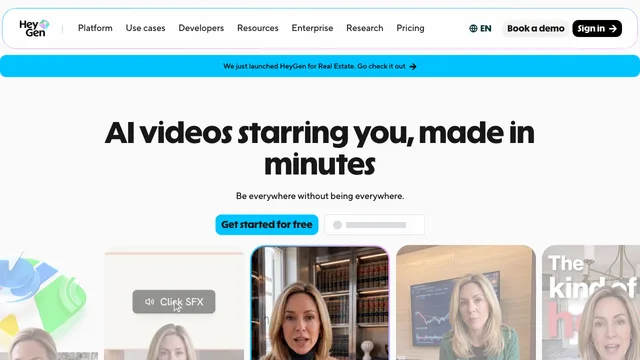
HeyGen AI avatar generator for presenter videos
HeyGen is a browser-based AI avatar generator and video production platform for turning scripts, photos, audio, presentations, and prompts into presenter-led videos. Its main workflow combines reusable stock or custom digital humans with generated speech, lip sync, captions, visual assets, and editing. It is aimed at creators and teams that need product explainers, training lessons, sales outreach, social clips, or localized versions without filming every update.
Unlike a cinematic clip generator that mainly creates short B-roll, HeyGen is strongest when a person or branded digital twin needs to deliver a message. You can start with a stock avatar, animate a photo, or train a Digital Twin from your own footage. HeyGen's current homepage also presents text-to-video, image-to-video, audio-to-video, AI Studio, voice cloning, and video translation as parts of the same workflow.
What can you create with HeyGen?
Stock avatars, photo avatars, and digital twins
Choose from HeyGen's stock digital twins or create a reusable avatar based on a photo or recording. Photo Avatars can animate a still image and synchronize it with a script, while the newer Avatar V workflow builds a more persistent digital identity from a short reference recording. Clear facial features, visible eyes and lips, and a well-framed source image generally produce more reliable motion and lip sync; HeyGen documents these input considerations in its Photo Avatar guide.
Script-to-video production and editing
A script can drive the presenter, pacing, voice, captions, and scene structure. HeyGen's AI Studio adds text-based control, visual assets, B-roll, captions, templates, and brand elements, so a generated draft can still be revised before export. This makes the platform practical for repeatable talking-head content rather than one-off experimental clips.
Voice cloning and multilingual video
Paid plans include voice cloning and broader language access. HeyGen's video translator can re-voice uploaded footage, preserve the speaker's voice, and optionally synchronize translated speech with the speaker's lips. It accepts local MP4, MOV, and WEBM files as well as supported links. The translation guide explains that the source should contain one spoken language and that a single job can target up to ten languages.
heygen pricing: Pricing and important limits
HeyGen uses a freemium, credit-based model. According to the current pricing page, the Free plan allows three videos per month, each up to one minute, with stock digital twins, one custom digital twin, Avatar IV, Video Agent, and more than 30 languages. It is enough to test the basic presenter workflow, but the short duration and monthly quota make it a trial tier rather than a production plan.
Creator costs $29 per month and includes 600 credits, videos up to 30 minutes, 1080p export, unlimited Photo Avatars, watermark removal, voice cloning, and access to more than 175 languages and dialects. Pro starts at $49 per month with 1,000 credits and 4K export. Business starts at $149 per month with 1,500 credits, videos up to 60 minutes, and team features; Enterprise pricing is custom. Prices, credit rates, and model availability can change, so confirm them before purchasing.
There are also workflow limits worth checking:
- Different generation, avatar, and translation engines consume credits at different rates.
- A video-based Digital Twin requires a consent recording from the person represented. HeyGen describes the requirement in its consent guide.
- Video Translation changes spoken audio and optional lip movement, but it does not translate text baked into the picture. Caption export is SRT only.
- No AI translation is guaranteed to be completely accurate. Pro, Business, and Enterprise users can edit and proofread a translation script before finalizing it.
- Content can be held for moderation or rejected under HeyGen's safety rules, as described in its moderation help article.
Who is HeyGen best for?
HeyGen is a practical choice for marketers, educators, enablement teams, and multilingual creators who regularly need a consistent presenter on screen. It is less suitable if your only goal is open-ended cinematic footage without a presenter, or if you need precise frame-by-frame editing. Test the Free plan with a representative script, avatar, voice, and export before committing to a paid credit allowance.
HeyGen: Frequently asked questions
What is HeyGen?
HeyGen is an online AI video platform with talking avatars. You select or create an avatar, add a script and voice, and generate a presenter video that can be edited, shared, or downloaded. HeyGen gives the same concise definition in its official FAQ.
Is HeyGen free?
Yes. The Free plan currently allows three videos per month with a maximum duration of one minute per video. Paid plans add more credits, longer videos, higher export options, voice cloning, watermark removal, and wider language access.
Can I create an AI avatar of myself?
Yes. You can create a Photo Avatar from images or a video-based Digital Twin from your own recording. A video-based twin requires a separate consent recording from the person shown, including when someone else is submitting the footage.
Can HeyGen translate an existing video?
Yes. Upload a supported file or link, select a source and target language, and choose an audio-only or lip-synced translation workflow. Results depend on the source audio, speaker angle, camera cuts, background noise, language support, and the selected translation engine.
Does HeyGen translate words already shown on screen?
No. Video Translation handles speech, optional lip movement, and optional captions; it does not replace graphics, hard-coded captions, or other text embedded in the original image.
What should I test before paying?
Use a real script and a representative avatar, then check voice quality, facial motion, pronunciation, translation accuracy, processing time, watermark and resolution, and how many credits the chosen model consumes. This gives a more useful cost estimate than comparing headline plan prices alone.
Related tools
AI Image & Video Generators →
VEEDFreemium
Generate, edit, subtitle and localize videos with AI in a browser-based workspace.
DescriptFreemium
Edit video and podcasts as easily as a document
RenderFlow AIFreemium
Create images, videos, avatars, and voice with multiple AI models in one workspace.
FavorePaid
Create an image, refine it, then turn it into motion in one workspace.
Rap Duo AIPaid
Turn two photos into an English rap duet with generated music and vocals.