

DescriptFreemium
Edit video and podcasts as easily as a document
VEED Online Video Editor, AI Tools & Pricing
Generate, edit, subtitle and localize videos with AI in a browser-based workspace.
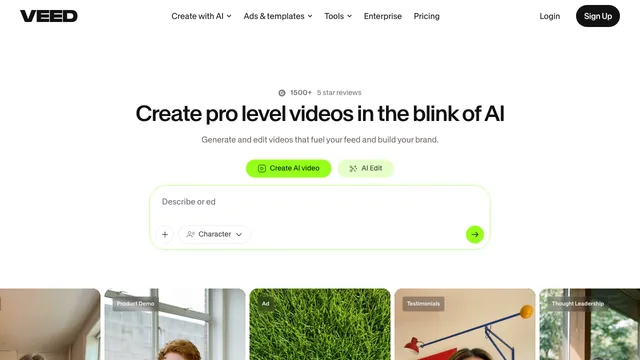
VEED online video editor at a glance
VEED is a browser-based online video editor and AI video creation platform. It combines prompt-based generation, a conventional video editor, automatic subtitles, translation, recording, stock media and team review tools in one workspace. You can start with an uploaded recording, a script, a text prompt or a still image, then refine the result without moving to another editor.
It is designed for social posts, marketing videos, training material, presentations, podcasts, product demos and talking-head content. The interface is easier to approach than a traditional desktop editing suite, although most AI features consume credits and the free workspace has meaningful export limits.
What can you create with VEED?
VEED covers both generative and editing workflows:
- Generate video scenes from text prompts, scripts or reference images with a selection of third-party AI models.
- Turn a script into a narrated video with AI visuals, stock media, subtitles, background music and a generated voice.
- Add one of more than 60 stock AI avatars or create a personal avatar for presenter-style videos.
- Create voiceovers with text to speech, clone a voice, dub speech and translate videos for other audiences.
- Trim, crop, resize and arrange footage, then add text, transitions, music, captions and brand assets.
- Automatically transcribe speech, style subtitles and translate content into more than 50 languages on eligible plans.
- Remove background noise, improve eye contact, remove video backgrounds and repurpose long recordings into short clips.
- Record a screen, webcam or audio source and invite teammates to review projects.
Because the generator and editor share the same workspace, generated scenes can be adjusted on the timeline instead of being treated as a fixed final export.
VEED pricing and free-plan limits
Pricing was checked in August 2026 and is shown in US dollars per user.
- Free: Basic editing is available without paying, but exports are limited to 720p and include a VEED watermark. Free uploads are limited to 1GB per file, and several AI editing tools are limited to a one-time trial or a small quota.
- Creator: $20 per user per month when paid monthly. The annual page displays an equivalent of $10 per month, billed as $116 for the year. It includes 500 monthly credits or 6,000 annual credits, removes the watermark, unlocks unlimited automatic subtitles and supports exports up to 1080p.
- Pro: $44 per user per month, or an annual equivalent of $21 per month billed as $257. It includes 2,500 monthly or 30,000 annual credits, multiple Brand Kits, translation into more than 50 languages, AI voice allowances and exports up to 4K.
- Studio: $70 per user per month, or an annual equivalent of $35 per month billed as $414. It includes 15,000 monthly or 180,000 annual credits, custom templates, larger AI voice allowances and 4K export.
- Enterprise: Custom pricing and credit allowances, with additional administration, security, onboarding and support options.
AI credits are shared across supported generation tools. The exact cost depends on the selected model and is displayed before generation. Monthly credits expire at the end of the billing month, annual credits expire at the end of the annual period, and unused credits do not roll over.
veed ai: Important limitations and licensing details
Free exports include a hardcoded VEED watermark. If you upgrade after exporting, you must reopen the original project and export it again; removing the mark from the already exported file is not supported.
Export quality also depends on the plan. Free accounts can export at up to 720p, Creator at up to 1080p, and Pro, Studio or Enterprise at up to 4K. Selecting a higher export resolution does not restore detail missing from a lower-resolution source file.
VEED says users retain ownership rights in uploaded and generated content, and its AI video FAQ allows commercial use. You remain responsible for copyright, trademark, privacy, consent and other third-party rights.
The Terms of Use contain an additional consideration for free accounts: free users grant VEED a licence to use uploaded content to develop and improve its applications and to train, test and develop AI models. VEED states that this provision does not apply to paid or Enterprise customers. Teams handling confidential client footage should review the current terms and plan choice before uploading it.
VEED is primarily a cloud and browser workflow. Large files must be uploaded and processed, AI model availability can change, and the company recommends keeping a backup of important source material.
Who is VEED best for?
VEED is a strong fit for creators, marketers, educators and small teams that want quick web-based production, automatic subtitles, localization and AI-assisted generation without learning a complex desktop editor. Pro and Studio are more suitable when 4K output, higher AI usage, multiple Brand Kits or reusable team templates are required.
The free workspace is useful for testing the interface, but its watermark, 720p ceiling and limited AI access make it less practical for ongoing branded or client work.
VEED: Frequently asked questions
Is VEED free to use?
Yes. VEED provides a free browser editor, but free exports are limited to 720p and include a VEED watermark. AI tools may have small quotas or one-time trials, and free uploads are limited to 1GB per file.
How do I remove the VEED watermark?
A paid Creator, Pro, Studio or Enterprise plan removes the watermark. After upgrading, re-export the original project; the watermark cannot simply be removed from an already exported free video.
Does VEED create AI avatars and AI voices?
Yes. VEED offers more than 60 stock avatars, personal avatar creation, text-to-speech voices, voice cloning and AI dubbing. Avatar and voice generation consume plan allowances or AI credits.
Can I use VEED videos commercially?
VEED says users retain rights in their content and permits commercial use of AI-generated videos. You must still own or license all source material and obtain any required permissions for people, brands, music and other protected content.
Do unused VEED AI credits roll over?
No. Monthly credits expire at the end of the monthly billing period, and annual credits expire at the end of the annual period. Credit cost varies by model.
What is the maximum VEED export resolution?
The free plan supports up to 720p, Creator up to 1080p, and Pro, Studio and Enterprise up to 4K. The source file must contain enough detail for the higher setting to be useful.
Is free-account content used for AI training?
VEED's current Terms of Use grant an additional licence for content uploaded by free users to be used for application improvement and AI model training, testing and development. The terms state that this provision does not apply to paid or Enterprise customers.
Related tools
AI Image & Video Generators →
SynthesiaFreemium
Turn scripts, documents and presentations into multilingual videos with AI presenters and voices.
MagnificFreemium
The all-in-one AI creative suite formerly known as Freepik
CapCutFreemium
Create and edit social videos with AI captions, avatars, voices, templates, and generators.
HeyGenFreemium
Create avatar-led videos, cloned voices, and multilingual translations from a script.
RenderFlow AIFreemium
Create images, videos, avatars, and voice with multiple AI models in one workspace.