

Teamily AIFreemium
People and AI agents work together in one messenger
Magpie: AI bookmark manager
Magpie brings social saves and browser bookmarks into one visual library, with AI tags, semantic and colour search, projects, and clear free-plan limits.
What is Magpie, in plain English?
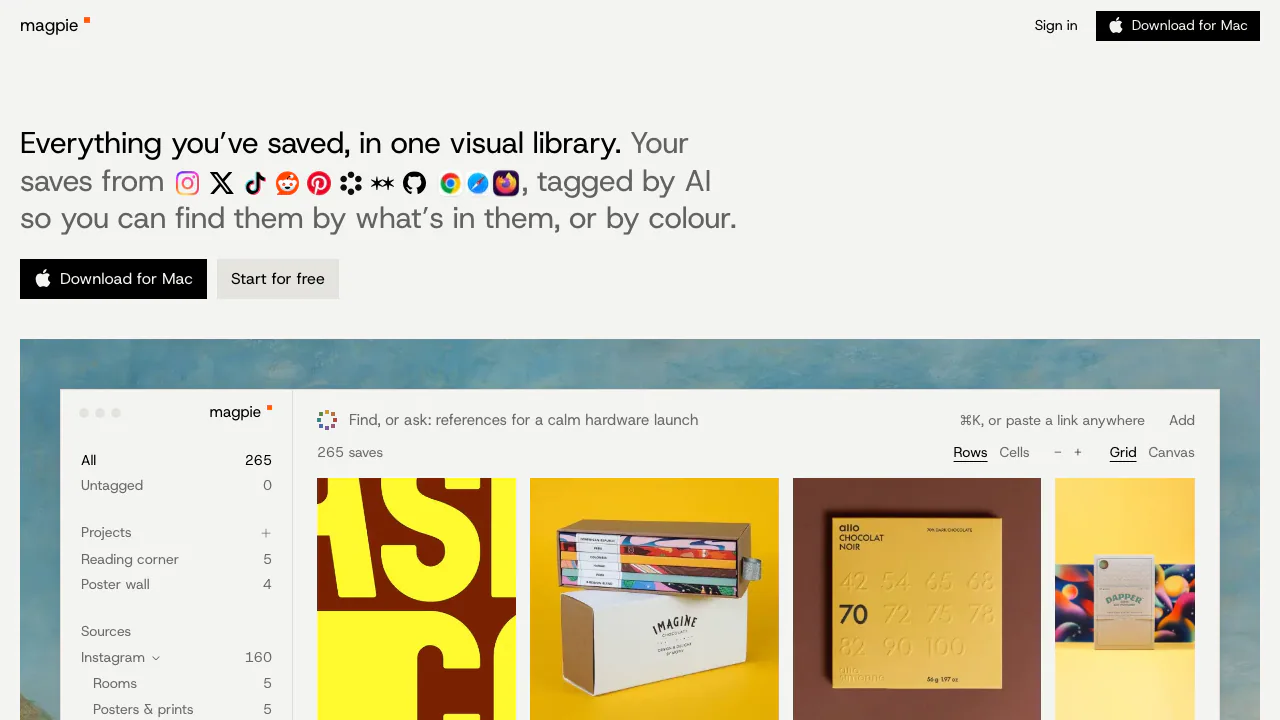
Magpie is an AI bookmark manager that turns things you save online into a searchable visual library. It brings together social posts, browser bookmarks, pictures and videos, then adds AI descriptions and tags. If you remember a blue poster or a warmly lit room but forget where you saved it, that remembered content becomes a way to find it again.
This suits designers collecting references, researchers maintaining reading material and developers who want their AI tools to work from chosen examples. The focus is your existing collection; project suggestions are grounded in what you have saved.
Bring scattered saves into one collection
The advertised sources include Instagram, X, TikTok, Reddit, Pinterest, Cosmos, Are.na, GitHub stars and browser bookmarks. After initial sync, the Chromium extension catches new saves on Instagram, X, TikTok and Reddit. Other sources arrive on subsequent syncs. These routes should not be treated as identical real-time integrations.
Magpie retains image and video copies, rather than relying only on a post URL. That helps when an original disappears, subject to storage and plan conditions. External platforms can still block or change imports, so inspect the results of an important migration.
Find references by meaning, colour and project purpose
AI generates titles, descriptions and tags from saved material. Search can use what you remember about its content instead of the exact page title. Colour search offers another route: choose a colour to see predominantly matching saved images.
For a project, describe what you are making. Ask can collect relevant saves, explain why each belongs and identify missing references. Review the selections before using them: AI descriptions and relevance judgements can be wrong. Pro also connects the library to AI tools through MCP; the site names Claude, Claude Code, Cursor, Codex and OpenCode. Keys can read, search and add, but cannot delete saves.
A practical first workflow
- Open the official sign-in page and check current account access. The homepage advertises starting free, while the terms still describe invitations and a waitlist; immediate public registration is not confirmed.
- Install the official extension or Mac app. Sign in to the source service in your browser and choose what to sync or import.
- Check a small batch: correct source, visible media, useful titles and tags. The Mac app can import selected browser bookmark folders; policy pages also describe file imports from Raindrop, Pocket, Readwise Reader and mymind.
- Search for a remembered detail, inspect the matching save and original link, then add useful references to a project. Use Ask or MCP only where your plan includes them.
Free access, paid plans and device limits
Checked 3 November 2026: Free lists 500 saves and 2 GB of media copies, with AI tags, meaning/colour search and projects. Saves beyond 500 are retained awaiting a paid plan. Plus lists unlimited saves, 100 GB, Ask, self-filling projects and imports up to 15,000 at once. Pro raises storage to 500 GB and imports to 50,000, includes original-quality video and MCP access.
Published euro web prices include VAT: Plus €8.99/month or €99/year; Pro €14.99/month or €165/year. For the US, monthly prices are $9.99 and $16.99 plus tax. Check the current plans before buying; unlimited saves does not mean unlimited storage.
Web, a Mac download and a Chromium extension are advertised. The iPhone app is waitlisted; Safari and Firefox extensions are forthcoming; Android is in development, with mobile web suggested meanwhile. Importing Safari or Firefox bookmarks is different from having an extension for those browsers.
Privacy and reuse of saved work
Magpie is operated by Deus Labs Stockholm AB in Sweden. Its privacy policy says it does not sell data or train AI models on your content, but content and search text can be processed by external AI providers. This is not a local-only archive. Settings provides library download, deletion and key revocation. File uploads retain embedded metadata, so remove details you do not want stored.
Keeping a copy does not transfer copyright or permission to republish it. Treat the collection as reference material and verify rights before reuse. Official pages differ on project-sharing availability, so confirm visibility and access before sharing sensitive material.
Common questions
Can I import existing bookmarks?
Yes. The Mac app supports browser bookmark import, and the policy describes imports from several read-later services. Test a sample and inspect completeness before moving a large collection.
Can I use Safari, Firefox or my phone?
You can import bookmarks from supported browsers through the Mac route, but Safari/Firefox extensions are still forthcoming. The homepage places iPhone on a waitlist and Android in development; mobile web is the stated interim option.
Is Magpie free?
The published Free plan has 500 saves and 2 GB, with access subject to current onboarding. Ask features are promoted on Plus and MCP on Pro; check checkout conditions for your region.
Official resources
- Official Chrome extension: install the advertised browser integration.
- Terms of service: account access, source limitations and saved-content rights.
- Privacy and support contact: processing details and the official support address.
Related tools
AI Bookmark Managers →
VoyagerFree
Browse local folders, save searches and give selected files to your own AI agents.
ClawsGO ScienceFreemium
Research papers, run analyses and prepare figures and LaTeX drafts in one workspace.
TheySaidFreemium
Understand product friction with AI-moderated studies and feedback you can inspect.
Strawberry BrowserFreemium
A desktop browser with AI companions for research, recurring work, meeting notes and reviewed actions across your tabs.
UnoRouterFreemium
One key for multiple AI models, with provider routing and browser chat