

PhonableFreemium
Read missed-call messages and send callers a useful text reply.
Murmur: AI Voice Notes, Transcription and Memory Search
Speak an idea, keep the recording and find the thought again.
What is Murmur, in plain English?
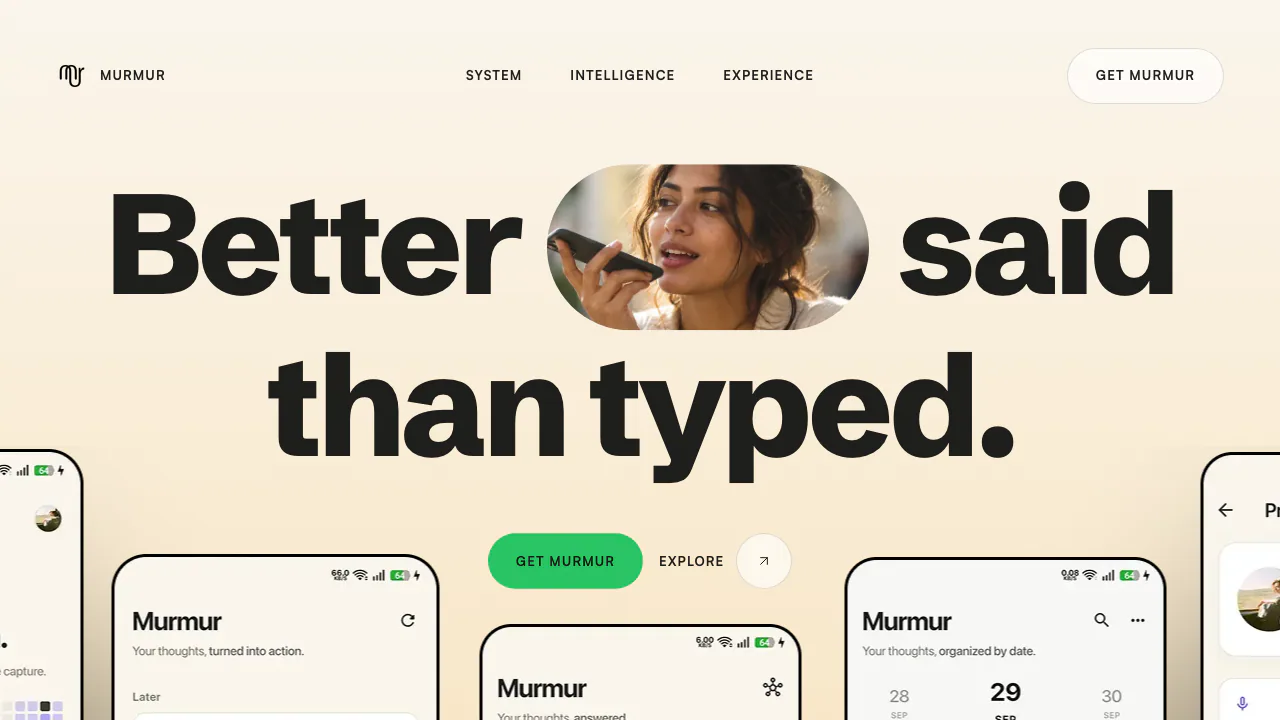
Murmur is an AI voice notes app for capturing personal thoughts and finding them later. Speak an idea, plan or reminder, and the product turns the recording into text, a title and organised information. Its website explains the product and links to the Android app; recording happens in the app rather than in the marketing page.
It is aimed at adults who think aloud, capture creative ideas or keep a spoken journal. The useful distinction is what happens after recording: a memo becomes material you can review, search and turn into a task.
Capture a thought you can check later
The documented gesture is hold, speak and release. Swipe up to continue recording without holding. Preview the audio before keeping it, discarding it or trying again. AI-generated transcripts and titles remain alongside the original recording and can be corrected.
To try a complete workflow:
- Follow the official Google Play link and check installation availability for your device and country.
- Review account and AI-processing permissions, then record one clear thought.
- Preview and save it. Check names, numbers, dates and any extracted action against the audio.
- Later, use Mind to find the thought and replay the relevant passage.
Background noise, accents and unusual words can affect transcription. A readable note is useful, but it is still worth checking the details that determine what you will do next.
Find the idea, even if you forgot the wording
Ask My Mind searches saved thoughts by meaning. The official description includes jumping from a result to a timestamp in the original recording. You might ask about a previous pricing decision without remembering the exact sentence or recording date.
Semantic retrieval is approximate. A result can be related without answering your question, and a useful memo can be missed. Treat search as a route back to evidence and verify the original voice before relying on an important detail.
Turn a ramble into actions or a future message
Murmur describes extracting actions with due dates, decisions and ideas. Tasks holds actions, Mind handles retrieval, and Library contains recordings and Future Capsules. Check extracted dates before treating them as commitments.
A Future Capsule keeps a thought for a future date you choose. It can support a later reflection on a goal or decision. These documented features do not establish external calendar sync, team task assignment or a public automation API.
Cloud processing and personal privacy
The privacy policy describes sending audio and transcripts to OpenAI for AI processing and storing recordings in the cloud. The security policy explicitly says the current architecture is not end-to-end encrypted, despite conflicting wording on a feature page. Do not assume all processing stays on your phone.
Offline recording and later syncing are advertised; fully offline AI is not established. The policy says personal content is not used for model training unless disclosed and separately consented to. You retain ownership and can request deletion or export, but retention exceptions and backups mean deletion is not necessarily immediate everywhere.
Availability, pricing and limits to check
As checked on October 12, 2026, Android is the verified download route. An iOS app or working browser recorder was not verified. The site names English, Hindi, Bengali, Urdu and mixed-language speech, rather than providing a complete supported-language list.
The terms say there are no paid subscriptions, while the US English Google Play listing marks in-app purchases and mentions Murmur Pro billing. Public sources do not settle current prices, free allowances or maximum recording length. Check the offer shown in your own app and country. The terms require users to be at least 18, or the local age of majority if higher.
Frequently asked questions
Can Murmur turn a voice note into editable text?
Yes. Official documentation describes transcription, automatic titles and corrections. Keep the audio as the reference for details the AI may mishear.
Is Murmur free, and is usage unlimited?
Unlimited free use is not verified. The terms and store information conflict, and a reliable quota table was not found. Confirm the current plan inside the app.
Does Murmur work on iPhone?
The verified official link is for Android on Google Play. An iPhone app or independent web app was not confirmed during this review.
Official resources
- Murmur on Google Play: installation, release notes and purchase information.
- Capture and app navigation guide: recording gestures, Tasks, Mind and Library.
- Ask My Mind and Future Capsules: the documented retrieval and reflection features.
Related tools
AI Workspace & Notes Tools →
Circle PanelPaid
Plan studies, interview real users and turn recordings into reviewable findings.
TuckyFreemium
Screen-edge Mac notes with optional AI rewriting, voice and connectors.
KrispFreemium
Clean meeting audio, transcribe conversations and generate editable notes
GranolaFreemium
A bot-free AI notepad that combines your notes with meeting transcripts
FathomFreemium
AI meeting notetaker for recording, transcription, summaries, action items, clips and searchable call history.