
ClumiFreemium
Browser AI vocal remover and stem splitter for karaoke, practice, and remixes
Norah Studio: Offline AI Vocal Remover for Apple Devices
Separate songs, practise passages and export stems or MIDI on your Apple device.
What is Norah Studio, in plain language?
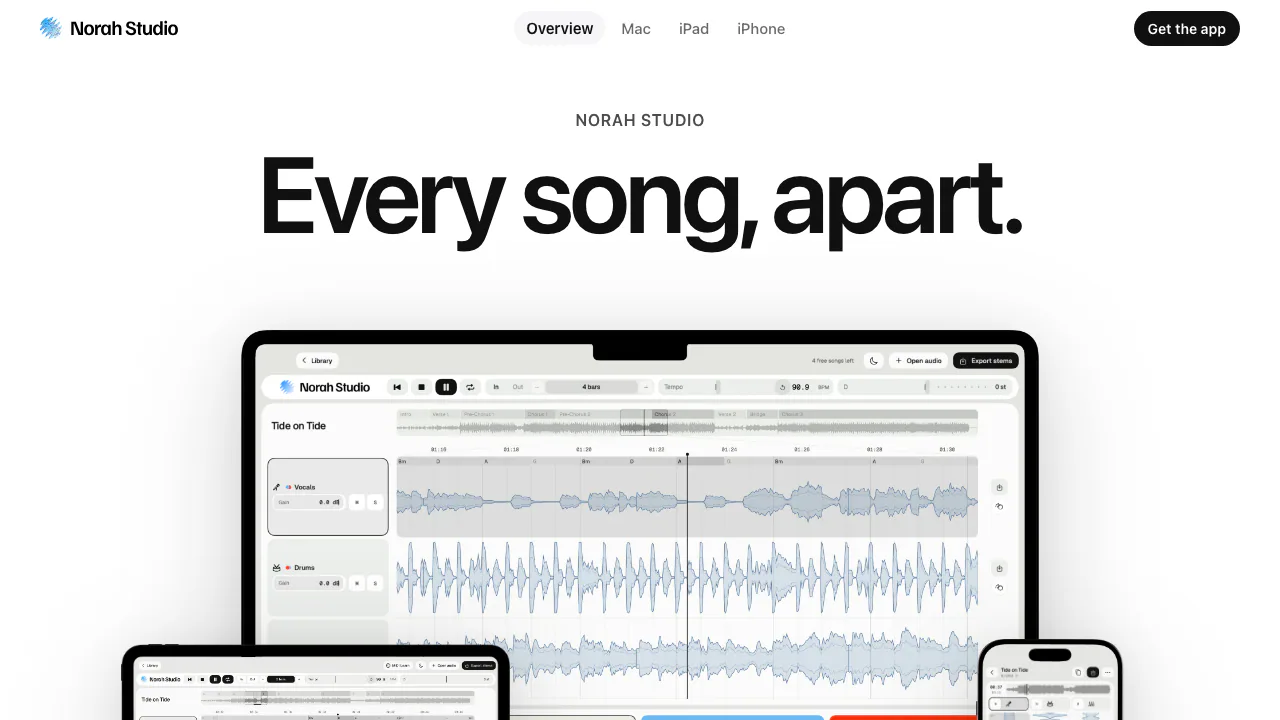
Norah Studio is an offline AI vocal remover and stem splitter for Mac, iPad and iPhone. Give it an audio file you already own and it separates the recording into three controllable parts: vocals, drums and instrumental. You can remove the singer to make a backing track, hear a drum part on its own, or slow a difficult passage for practice.
The website explains the product and links to the App Store; the separation happens in the installed app. It suits singers, instrumental learners and producers who want to work with existing recordings on an Apple device.
Turn a song into a practice backing track
Start with a local audio file that the device can decode, no longer than ten minutes. On Mac, choose Open audio, press Command–O, or drop the file onto the window, then press Space. The beginning becomes playable while the rest is still separating.
- Use M on the vocal lane to hear the accompaniment, or S to study one lane alone.
- Adjust individual gains to hear the part you need.
- On Mac, double-click a section to loop it, or set In and Out points. Halve or double the loop length by bars.
- Slow the tempo without lowering the pitch, or transpose the key without changing speed. The Mac guide documents a range of twelve semitones in either direction.
- Listen for residual vocals or missing detail before treating the result as a finished backing track.
Tempo, key, chords and sections are estimates. A live performance or changing tempo can make the bar grid less reliable, so use your ears alongside the visual guide.
Shape the stems and take the melody into a DAW
Each lane has its own effects stack and EQ. The official guide lists 24 effects and four visualizers, with voice and rhythm effects appearing on suitable lanes. Reordering effects changes the processing chain; exported stems include the applied effects.
Melody Synth replays the estimated vocal melody with 19 sounds. Harmonize adds chord-following vocal layers. MIDI Learn can connect a hardware controller knob to an app control.
The official melody-to-MIDI guide explains export of the tempo map, vocal melody and named chord track. This is editable musical information for a compatible DAW, rather than a promise to transcribe every instrument perfectly. On Mac, use Export stems or drag a lane to Finder. Export anything you want to keep: working stems are temporary, and a saved project references the original song file.
Check your device and source file first
Mac requires Apple silicon, M1 or later, with macOS 15 or newer. iPad requires iPadOS 26 or newer, and iPhone requires iOS 26 or newer. Intel Macs are unsupported.
Supported inputs include system-decodable mono or stereo MP3, M4A/AAC, WAV, AIFF, FLAC and CAF audio. The support page excludes video files and files another app is still writing. Spotify, YouTube and other streaming links are not import sources; Norah Studio does not download or capture those services.
Five songs free, then optional unlimited processing
Checked on 1 November 2026: every feature is available for five distinct songs. Reopening a previously separated song does not spend another free song. Pro removes the new-song limit.
The website lists €7.99 monthly or €69.99 once for Lifetime as EUR reference prices. The amount shown in your regional App Store/app at purchase applies. Monthly renews automatically; Lifetime does not renew and is defined by the continued availability and compatibility of the app. Either purchase covers supported devices using the same Apple Account, with Restore purchases available. When a subscription ends, only the unused part of the original free allowance returns; it does not reset to five. See the current purchase terms before buying.
Local audio, purchase records and reuse rights
The models are bundled with the app, so music processing works offline and audio stays on the device. The privacy policy separately describes purchase-event records handled by RevenueCat, with behavior qualified by app version. Local audio processing should therefore not be read as a blanket statement that every version transmits no data.
Use recordings you own, have permission to process, or may lawfully reuse. Separating a song grants no new rights to publish or commercialize the result.
Frequently asked questions
Is Norah Studio free?
The first five distinct songs include all features. Unlimited new songs require Pro; reopening a song already counted is free.
Does it upload my music?
The official policy says audio and its derived content stay local. Purchase records are a separate disclosure, so review the policy if that distinction matters to you.
Can it isolate every instrument perfectly?
It produces vocals, drums and instrumental, not a separate lane for every instrument. Dense mixes can leave bleed, and detected chords or melody notes need checking.
Official guides and support
- Mac guide: keyboard controls, loops and exports.
- iPad guide and iPhone guide: device-specific touch controls.
- Official support: file problems, project storage and purchase restoration.
Related tools
AI Vocal Removers →
FayleeFreemium
Record a web bug once and share its screen, console, requests and steps with your team or coding agent.
fastbrowseFreemium
Give AI agents a browser and inspect the evidence.
VaaniPaid
Build multilingual calling agents with business knowledge, tools and memory.
CluinnPaid
Ask during calls, follow up afterwards and dictate into any Mac app.
NuvioPaid
Nuvio AI accounting software for small businesses