

VaaniPaid
Build multilingual calling agents with business knowledge, tools and memory.
Cluinn — AI meeting assistant and voice typing for Mac
Ask during calls, follow up afterwards and dictate into any Mac app.
What does Cluinn actually do?
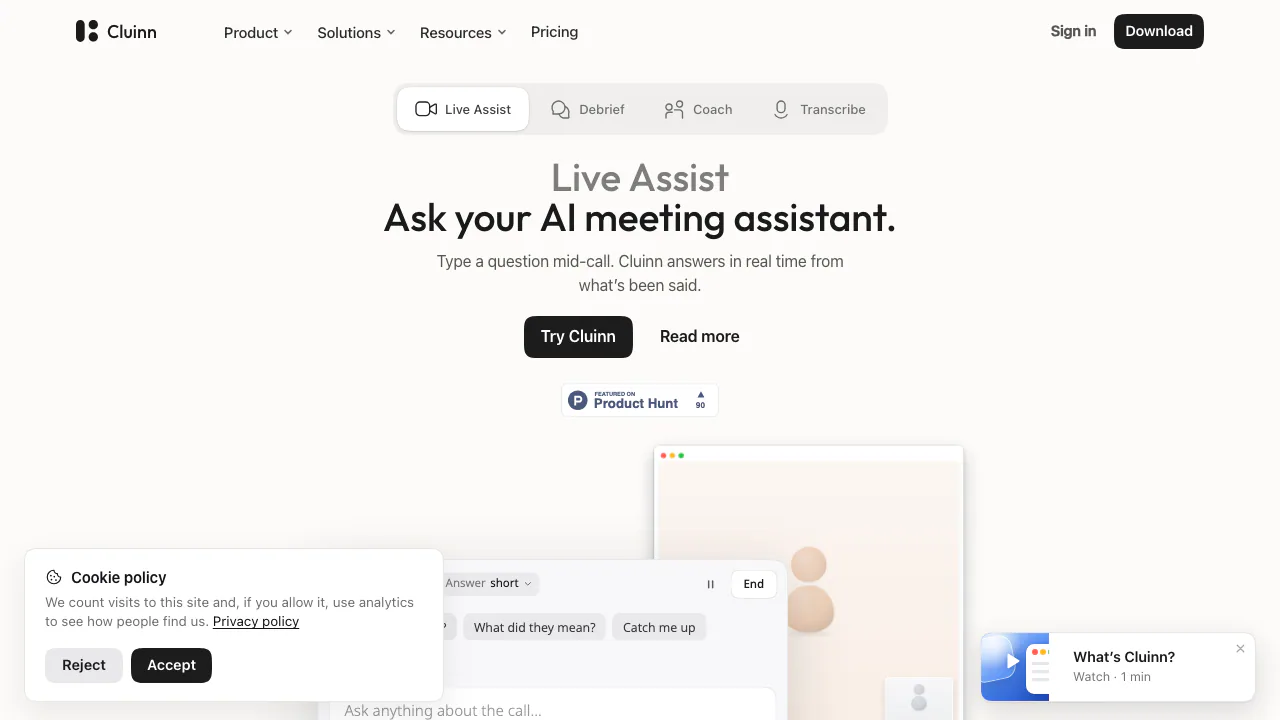
Cluinn is an AI meeting assistant for Apple silicon Macs. It listens through your microphone and system audio, writes a live transcript and lets you ask questions about what has been said while the call continues. Afterwards, it extracts follow-up work and lets you question saved conversations. A separate dictation mode turns speech into polished text in other Mac apps.
The website is where you download and manage the app; the meeting assistant runs on your Mac. Cluinn is operated by QooQee Inc. in Toronto. It suits people handling client calls, interviews or project discussions who need both immediate recall and useful notes afterwards. It requires macOS 12 or later and an M1 or newer chip; Intel Macs are unsupported.
Get answers before the conversation moves on
Live Assist answers typed questions using the call so far, including earlier discussion and follow-up context. Ask which deadline was mentioned or what a participant agreed to, then check the relevant transcript before acting. Smart Cards proactively flag loose ends such as an unanswered question, inconsistent figures or a promise without a date.
Speaker turns receive labels. Separation happens on the Mac; actual names can be read from captures of the meeting window processed on Cluinn's servers. No voiceprint is retained. Optional Visual awareness adds a screen capture to your question so the assistant can consider a slide or shared document. The panel is a separate movable window: put it on an unshared display when presenting.
Turn saved calls into follow-up work
Debrief extracts action items, reminders and key points; action items have checkboxes. Calls shorter than about 90 seconds do not receive these takeaways. Ask a saved call for a summary, commitments or a follow-up email. Cross-call questions can draw on saved conversations and show which calls were used; a chat can be pinned to up to eight calls.
Folders, colour tags and transcript search help organize projects and clients. Coach adds another use for the record: choose a habit such as ending calls with a dated next step, then review recurring patterns, quoted moments and suggested phrasing. Feedback can appear during calls, after them or both. Transcripts remain viewable and downloadable on Basic after recording them on Pro or trial; exporting an AI answer as a PDF requires Pro.
Dictate emails and documents in your existing apps
Transcribe inserts cleaned speech at the cursor in Mail, Slack, editors and browser forms. Personas adjust tone by app or site, a dictionary handles names and jargon, and snippets expand a spoken trigger into saved text. Dictation supports 35 languages, or 39 options including regional variants, with automatic detection. Smart translation can write in the language detected on screen. This count describes dictation, not a separately verified list of meeting languages.
Start a first call on your Mac
- Follow the official installation guide: download the DMG, drag Cluinn to Applications and sign in.
- Grant Accessibility, Microphone and screen/audio capture permissions, then choose your language and backup preferences. Tell participants before transcribing.
- On Pro or an eligible trial, open a meeting. Cluinn detects Zoom, Google Meet, Webex, GoTo Meeting, Whereby, Slack huddles, Discord and Teams in a browser. Choose a preset and press Start. Use Command + backslash for other apps, including a Teams desktop call it misses.
- Ask one specific question, end the call and verify names, figures, owners and dates in the transcript before using the takeaways.
For dictation, place the cursor in a text field and use Command + Shift + Space. Text can be pasted, copied or both. No personal AI API key is required.
Plans, trial and practical limits
Checked on 1 November 2026: the public pricing page lists Basic at USD 9/month or USD 84/year, and Pro at USD 15/month or USD 120/year. The annual equivalents are USD 7 and USD 10 per month, billed annually. Basic covers dictation; Pro adds Calls, saved-call AI chat, Coach and AI-answer PDFs. Tax and the checkout amount apply; these are not local-currency quotes.
The eligible 14-day trial requires a payment method, includes Pro features and automatically converts to the selected paid plan unless cancelled. Its fixed pool is 10 call hours and 3 dictation hours. Current paid fair use allows 60 call hours/month, three hours per call and 50 questions per saved call; live-call questions are not metered. Dictation allows 40 hours/month, about five hours/day and ten minutes per recording. Monthly pools reset on the first calendar day. Account limits can vary: consult the current terms. Cancelling a trial ends access immediately; paid cancellation preserves the paid period. Refund exceptions follow the policy and applicable law.
Understand what stays local and what reaches the cloud
On-device transcription is used wherever possible with an active plan on supported Apple silicon. During a trial, or when the local model cannot run, audio goes to a server for transcription and is discarded afterwards. AI cleanup, questions, takeaways and Coach still send text to servers and AI providers. Some providers may retain data briefly for security checks. Cluinn says it does not use your content for AI training.
Transcripts and calls live on the Mac. Optional encrypted backup is off until enabled, stores an encrypted copy in the US and never backs up audio. Unprocessed call audio waits locally until transcribed, then is deleted. Settings, personas, snippets and dictionary sync separately in a form the operator can read. Review the privacy policy before using confidential content. You own your content, but must arrange any required consent and review automated answers for errors.
Frequently asked questions
Is Cluinn free to use?
Downloading is free; working dictation and call features need a paid plan or eligible trial. The trial requires a card and renews into your chosen subscription unless cancelled.
Does a bot join my meeting?
No. Cluinn captures audio on your Mac. This does not remove the need to inform participants, and the panel can appear if you share its display.
Does everything stay on my Mac?
No. Transcription can be local under the stated conditions, but AI text processing, certain screen features and optional encrypted backup involve servers.
Official guides and support
- Help centre: feature guides and troubleshooting.
- Contact support: account, billing and technical questions.
Related tools
AI Meeting Assistants →
TheySaidFreemium
Understand product friction with AI-moderated studies and feedback you can inspect.
Strawberry BrowserFreemium
A desktop browser with AI companions for research, recurring work, meeting notes and reviewed actions across your tabs.
LoquiFreemium
Speak naturally and insert polished text into the app you are using.
ParrotFree
Record, transcribe and review meetings on your Mac, with live help from your own documents.
EarnoteFreemium
Turn recordings into structured notes, tasks, flashcards and PDF study sheets on Apple devices.