

VaaniPaid
Build multilingual calling agents with business knowledge, tools and memory.
fastbrowse — AI browser automation with verifiable results
Give AI agents a browser and inspect the evidence.
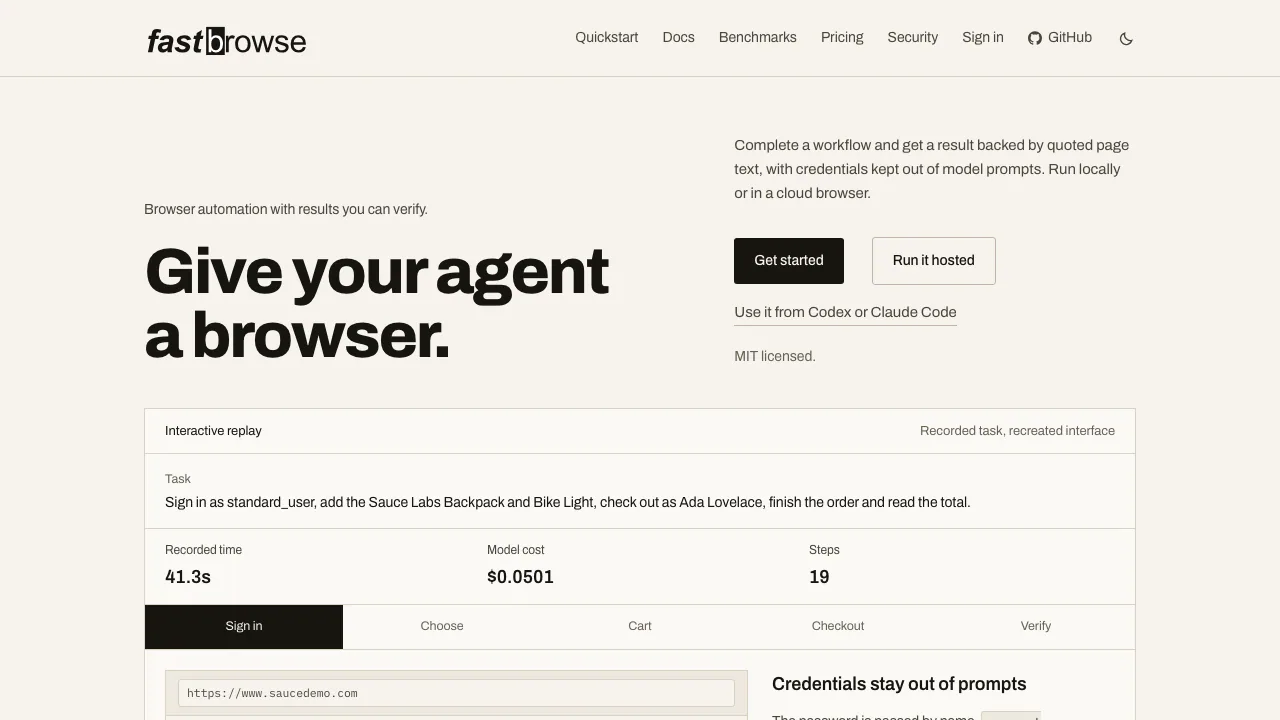
fastbrowse is an open-source tool for AI browser automation. Give an agent a website task and it can read pages, choose controls, enter text and check the outcome. Developers can use a CLI, Python or JavaScript SDK, MCP server, or a separately operated hosted API. Its distinguishing focus is evidence: answers include page quotations, and completion must pass checks.
What does this website actually help you do?
Think of fastbrowse as the browser-operating part of an AI agent. Instead of explaining how you should click through a site, it carries out a stated task and gathers evidence from the pages it encounters. Finding a package version, extracting product details or completing an authorized form workflow are practical examples.
The website provides installation instructions and access to the hosted service. Running the open-source software yourself requires model credentials and a browser; the hosted version manages those execution resources. This makes it relevant to developers building browser work into an application, and technical users who want inspectable runs.
Get an answer you can check
Jev chooses an operation and target from indexed page controls while an LLM plans and reads. After an action, the agent observes the page again. The result exposes steps, evidence and costs, so you can investigate what happened.
For research tasks, specify the page, fields and scope you need, then compare the returned quotations with the answer. For multi-step workflows, completion checks also look for page evidence that requested actions occurred. Python and JavaScript support schema-validated output for downstream code; matching a schema still requires checking whether the extracted facts answer your question.
Treat complete as the tool's verified completion state. An unverified result may contain useful evidence, but has not passed every check. A citation cannot make an inaccurate or outdated source correct.
Run a first read-only task locally
The first-run guide calls for uv, Chrome or Chromium, and an OpenRouter key. Configure OPENROUTER_API_KEY in the environment, then start with a public page:
uvx fastbrowse "Read the current top story title and cite the page" --start https://news.ycombinator.com/ --local --json
--local selects your machine's browser; --json returns status, steps, quotations and costs. Check the status before using the answer, follow its evidence and inspect any stopping reason. Configure step, model-spend and time limits for ongoing use. A step or dollar cap alone does not impose an overall deadline. Model usage can incur charges even with a local browser.
Choose an integration and browser
Use local Chrome for development, Browser Use Cloud with its own credentials, or CDP to attach to a running browser. Signed-in profiles can be reused. The Python SDK embeds run_task; JavaScript/TypeScript requires Node.js 20+ without a separate Python installation.
fastbrowse-mcp exposes a browse tool with server-side permission and budget ceilings. An optional agent skill supplies instructions, while model keys and browser configuration are still required. Hosted tasks use POST /v1/runs; a test key exercises a simulator without visiting a real website, making it useful for integration testing rather than proving live task success.
Free use, hosted plans and run charges
Checked 1 November 2026: official hosted prices are monthly USD amounts excluding applicable taxes. The pricing page gives current limits.
- Self-running: MIT-licensed software, with your own model and optional cloud-browser expenses.
- Free: $2 monthly run allowance, one concurrent run, seven-day history and a 500-run monthly cap including top-ups; no card required. The allowance covers at most 400 minimum-price runs, and often fewer.
- Starter: $29/month, $35 run allowance, five concurrent runs, 30-day history.
- Pro: $199/month, $250 allowance, 25 concurrent runs, 90-day history.
- Scale: $999/month, $1,400 allowance, 100 concurrent runs, 180-day history.
- Enterprise: negotiated resources, retention and residency terms.
A hosted run costs a per-run fee plus usage, with a $0.005 minimum. Monthly allowances do not roll over; purchased top-ups do not expire. Work that stops at login, a bot check or confirmation can still be charged. Platform errors, unavailable providers, cancellation, queue expiry and test-key runs are not charged.
Credentials, page data and action limits
Secrets resolve only when typed into an allowed origin; models see their names rather than their values. Profiles and the unlocked Bitwarden CLI provide other documented login paths. Hosted secrets are encrypted at rest.
Page privacy is a separate question. The privacy policy says model providers receive the task text and page content needed for execution. Hosted run records follow the plan's retention window. A local browser therefore does not imply fully offline AI.
Classified irreversible actions stop at needs_confirmation without authorization, but the classifier can miss an action. Define what a task may change and review consequential results. Login requirements, CAPTCHAs and insufficient evidence can still prevent completion.
Frequently asked questions
Is fastbrowse completely free?
The MIT software is free to use under its licence. Model calls and optional browser infrastructure have separate costs; hosted Free has a limited allowance and usage caps.
Can it work on sites where I am signed in?
Yes, documented options include saved browser profiles and scoped secrets. Give it only the session access needed for the task, and remember that readable page content may reach the model provider.
How do I know whether the task succeeded?
Inspect status, evidence and the final page. Only complete passes the tool's success checks. needs_login, blocked and budget_exceeded identify different conditions that need attention before retrying.
Official resources
- Documentation: CLI, SDK and MCP setup.
- GitHub source and issues: implementation, licence and bug reporting.
- Service health guidance: health endpoints and troubleshooting; the page does not provide a live incident feed or uptime percentage.
Related tools
AI Browser Tools →
NuvioPaid
Nuvio AI accounting software for small businesses
NINFreemium
Local chat, voice typing and approved tools in NINX, with optional app connections.
Strawberry BrowserFreemium
A desktop browser with AI companions for research, recurring work, meeting notes and reviewed actions across your tabs.
Lexmount BrowserFreemium
Search, extract and automate webpages with managed cloud browsers
Retriever AI (rtrvr.ai)Freemium
Turn browser instructions into checked tables and completed web tasks.