

LoquiFreemium
Speak naturally and insert polished text into the app you are using.
sideOS: an AI assistant that works in your Mac apps
Voice commands, local dictation and tasks in your Mac apps
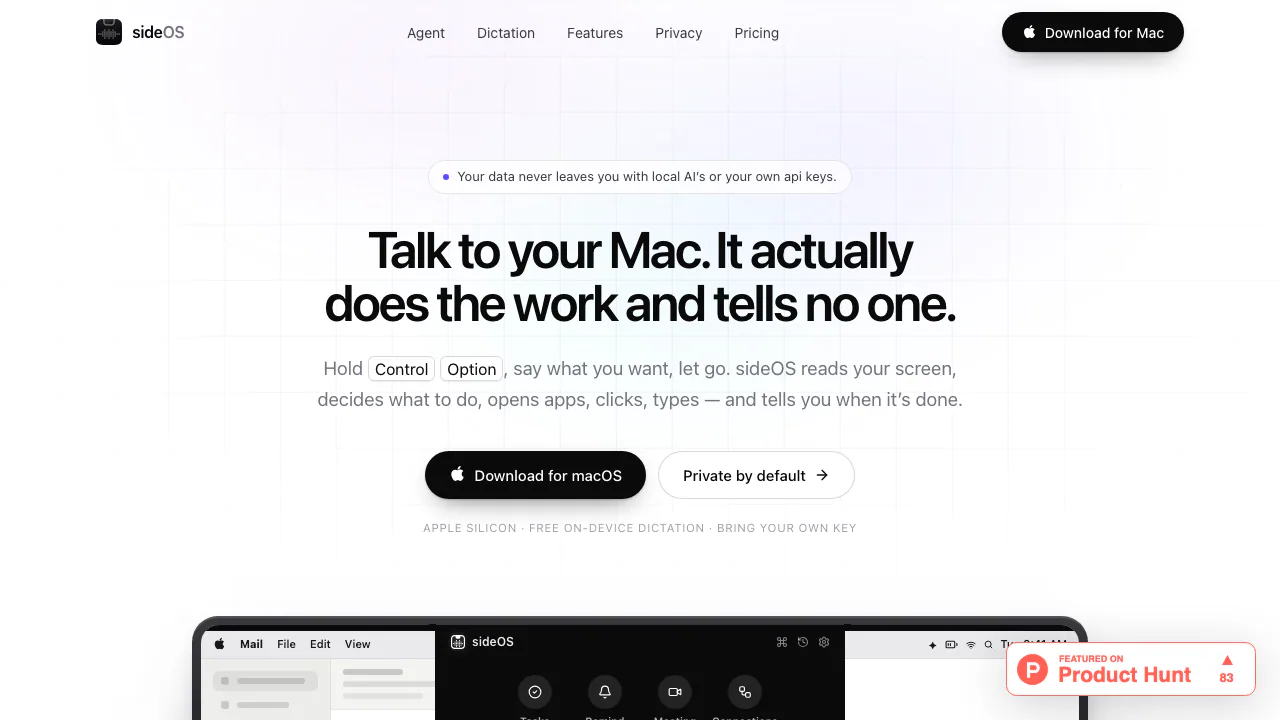
sideOS is an AI assistant for Mac that reads the current screen and carries out work in your apps. It combines voice commands, on-device dictation, background jobs, meeting notes and MCP connections. Stockimg AI, Inc. makes and sells the app, which requires an Apple Silicon Mac running macOS 14 or later.
What does sideOS actually do?
Think of it as a helper in the notch at the top of your screen. Ask it to turn the page you are reading into a note, and the agent can inspect the page, open an app and enter the result. The website provides downloads, licence purchasing and support; the work happens in the installed Mac application.
Agent mode pursues a task, while dictation puts spoken words at your cursor. This distinction matters: speaking an email draft is different from asking an agent to find an email and prepare a response. sideOS is useful for people moving between browser pages, documents, mail and notes who want fewer manual transfers of information.
Work from a screen, document or connected app
The agent uses macOS accessibility information to identify text fields, buttons and window contents. Its tools can open apps, click, type, press shortcuts and run AppleScript. For a chart or visual detail, select a screen region while making the request; image capture supplements the structured screen information when necessary.
You can also drop images, PDFs, Markdown, CSV, JSON or code into the notch and ask questions about them. Check extracted numbers and conclusions against the original. MCP connections extend the tool list with services such as Gmail, Calendar, Notion, Slack and GitHub. HTTP, stdio and OAuth are supported, and tools that send, change or delete data start disabled until you enable them.
Complete a first task and check the result
- Install sideOS, finish the welcome tour and activate your licence. Check Accessibility, Microphone and Speech Recognition in Settings › Permissions.
- Choose a model in Settings › AI. A cloud model needs your own provider API key and available credit; local inference needs a suitable downloaded model.
- Open a page you want to summarize. Hold Control + Option, explain what to extract and where to save it, then release the keys.
- Open the resulting note and verify its contents and destination. Press Esc to stop a run if it heads in the wrong direction.
Double-tap Control for a typed conversation. Keep important outgoing messages, deletions and purchases under review: the model can make mistakes, and a spoken completion report does not establish that every app action succeeded.
Dictate text without a model API call
Hold Control + fn to dictate into the focused field, or use hands-free dictation. If no editable field is focused, the text waits on the clipboard. Default dictation uses macOS speech recognition on the device, with no model API key or per-word charge.
The classic engine lists 62 languages and roughly one minute per take. SpeechAnalyzer on macOS 26 lists 30 languages without that take-length limit. Language and engine availability differ, so check the combination you intend to use rather than assuming every language has identical capabilities.
Carry research and meetings into follow-up work
Background tasks can search the web, work with files and render a PDF while you continue working. Their output goes to Documents › sideOS Tasks, and commands with irreversible effects require approval. Review the actual report and its sources when it finishes.
For meetings, sideOS offers recording when it notices Zoom, Meet or Teams; recording does not begin automatically. Whisper transcription runs locally, and action items can become reminders. Summaries can be copied as Markdown or exported with transcripts as Markdown or HTML. Arrange any required recording consent, and remember that cloud-generated summaries still follow your model's data path.
Memory can be inspected, edited, deleted or switched off. Activity history is a separate opt-in feature with retention and app exclusions; password managers are always excluded. Recurring reminders can also prepare a task result before the reminder appears.
One-time licence and separate model costs
Checked October 25, 2026: the public price is USD 89.90 once, covering one Mac at a time, licence transfer and future app updates. Check current pricing for the final checkout amount and taxes. Cloud usage is billed separately by your chosen Anthropic, OpenAI, Google or xAI account. Local MLX models avoid cloud inference charges, subject to available memory and model capability.
Dictation has no additional usage fee; this does not make the entire app permanently free. The licence terms also require activation and periodic renewal: a renewed licence works offline for up to 30 days.
Understand local storage and cloud access
Recordings, transcripts, memory and history are stored locally, and keys use macOS Keychain. Cloud requests send the necessary instructions, screen text and occasional images directly to your selected provider. MCP services receive data needed for their tools. Optional cloud dictation, voice chat or cloud reply voices introduce additional transfers when enabled.
Daily usage counters can be disabled. Licence activation sends licence/device information, and a submitted problem report can contain session prompts and dictated text in its log. Inspect that log first. The privacy policy explains these separate data flows.
Frequently asked questions
Is sideOS free or a subscription?
It is a paid, one-time app licence. Cloud model consumption is separate; included on-device dictation has no additional metering.
Can I use it without an API key or internet?
Default dictation needs no model key, and prepared local models support offline inference. Web search and external connections still need a network; the renewed licence's offline allowance is up to 30 days.
What is sent to a cloud model?
Task-relevant instructions and screen or document context can be sent directly to the provider you select. Local storage does not mean cloud requests remain entirely on the Mac.
Which Macs and permissions does it require?
Apple Silicon and macOS 14 or later, plus Accessibility, Microphone and Speech Recognition permissions. Intel Macs are unsupported.
Official help and updates
- Support: installation, permission, model connection and licence troubleshooting.
- Release history: current local-model support, exports and fixes.
Related tools
AI Automation Tools →
Strawberry BrowserFreemium
A desktop browser with AI companions for research, recurring work, meeting notes and reviewed actions across your tabs.
TheySaidFreemium
Understand product friction with AI-moderated studies and feedback you can inspect.Kente LabsFreemium
AI tools for family memories, voice journals and jewellery ideas.
ParrotFree
Record, transcribe and review meetings on your Mac, with live help from your own documents.
EarnoteFreemium
Turn recordings into structured notes, tasks, flashcards and PDF study sheets on Apple devices.