

VEEDFreemium
Generate, edit, subtitle and localize videos with AI in a browser-based workspace.
Canva AI Design Generator: Features, Pricing & Limits
Generate and edit visual content with AI, templates, brand tools, and collaborative design workflows.
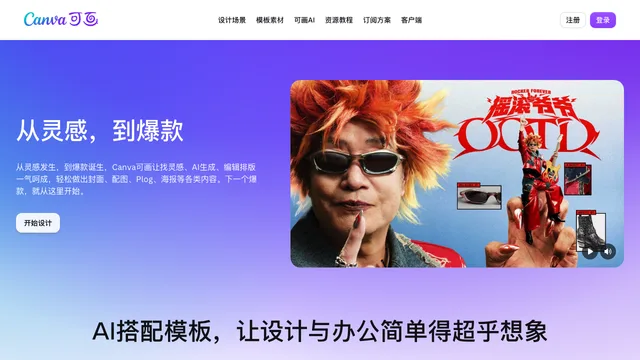
Canva is an online visual communication platform with Canva AI tools for generating and editing images, videos, presentations, documents, social posts, and branded designs. It combines conversational generation, editable layouts, templates, stock media, and team collaboration in one workspace.
What can Canva AI create?
Canva AI can turn a written or spoken request into editable design drafts, images, presentations, documents, social graphics, and interactive experiences. Generated designs remain inside Canva's editor, where individual text, image, shape, and layout elements can be adjusted.
Its visual tools include an AI photo and image generator, video generator, AI-powered templates, Magic Layers, background generation, object removal, image expansion, resizing, style matching, and branded design generation.
Canva also provides Magic Write for copy, Canva Code for interactive experiences, Canva Sheets for data-driven content, and tools for captions, translation, charts, and social publishing.
canva ai: AI voice and avatar workflows
Canva's AI voice generator turns up to 1,000 characters of text per conversion into narration. Users can select from multiple voices, languages, and accents, then add the result to a video, presentation, ad, or podcast design.
Profile avatars, AI characters, headshots, and talking presenter videos are available through Canva tools and integrated apps such as HeyGen, NeiroAI, and DeepReel. Availability, free usage, and separate app terms can vary.
Canva Free, Pro, and Business pricing
Canva Free includes templates, basic design tools, cloud storage, and access to a selection of AI features with lower usage limits.
Current public US pricing includes:
- Canva Free: $0
- Canva Pro: $15 per month or $120 per year for one person
- Canva Business: $20 per person per month
- Canva Enterprise: custom pricing
Paid plans unlock premium content, brand tools, background removal, resizing, additional AI access, and larger storage. Business adds higher AI limits, collaboration, brand controls, approvals, and analytics.
Canva does not define every AI allowance as a permanent entitlement. Usage limits can vary by feature and plan and may be changed to manage performance, security, or fair use. Reaching a limit can cause slowdowns or pauses until it resets.
Canva: Commercial use and licensing
Canva says AI output may be used for lawful personal and commercial purposes, subject to its AI Product Terms and any applicable content licences.
Ownership is not absolute in every situation. Output that incorporates Canva library content remains subject to that content's licence, AI outputs may not be unique, and copyright protection for fully AI-generated work is uncertain in many jurisdictions.
Canva content cannot be resold as a standalone stock asset. AI-generated audio may be used in videos, advertisements, podcasts, and presentations, but it cannot be sold or distributed as a standalone track, sublicensed, or claimed as intellectual property.
Always review the selected template, stock asset, app, and AI model terms before using a design for merchandise, client work, trademarks, or high-visibility advertising.
canva ai: Important drawbacks
- AI limits are variable and may cause pauses or reduced access.
- Some AI tools are unavailable in certain countries, languages, or plans.
- Canva.com and the localized Canva China service have different pricing, feature catalogues, storage, and licensing rules.
- Avatar and some specialist AI workflows rely on third-party apps with separate availability and terms.
- Generated output may be inaccurate, similar to another user's output, or unsuitable without manual editing.
- Designs containing licensed Canva content cannot be treated as wholly original standalone assets.
Who is Canva best for?
Canva is most useful for creators, marketers, educators, small businesses, and teams that need fast, editable content for multiple channels without adopting a specialist design application for every task.
It is less suitable when a project requires guaranteed ownership of every generated element, fixed AI quotas, unrestricted resale of source assets, or highly specialized frame-level video and image controls.
Canva: Frequently asked questions
Is Canva AI free?
Canva Free includes access to a selection of AI tools with lower usage limits. Pro and Business plans unlock more AI usage and additional premium features.
Can Canva AI generate images and videos?
Yes. Canva provides image, photo, background, element, and video generation, together with AI-assisted editing and reusable templates.
How much does Canva Pro cost?
Canva's current public US pricing lists Pro at $15 per month or $120 per year for one person. Regional prices and promotions may differ.
Can Canva AI output be used commercially?
Generally yes, for lawful projects. However, Canva library content, third-party apps, AI-generated audio, trademarks, and non-unique output each have additional restrictions that must be reviewed.
Does Canva have an AI voice generator?
Yes. Canva can turn text into multilingual AI narration and add the result to videos, presentations, ads, and other designs. Free voice choices are available, with more options on paid access.
Does Canva create AI avatars?
Yes. Canva supports profile avatars and characters and provides integrated apps for AI headshots and talking video presenters.
What are Canva AI's main limitations?
Usage limits can change, outputs may be inaccurate or non-unique, availability differs by region and plan, and designs containing licensed stock content remain subject to Canva's content licence.
Related tools
AI Image & Video Generators →
DescriptFreemium
Edit video and podcasts as easily as a document
SynthesiaFreemium
Turn scripts, documents and presentations into multilingual videos with AI presenters and voices.
CapCutFreemium
Create and edit social videos with AI captions, avatars, voices, templates, and generators.
HeyGenFreemium
Create avatar-led videos, cloned voices, and multilingual translations from a script.
RenderFlow AIFreemium
Create images, videos, avatars, and voice with multiple AI models in one workspace.