

EmbageFreemium
Build customer agents that answer from your documents, capture requests and act in connected apps.
Click: a managed AI agent API for your application
Run agents with your model keys, tools and durable sessions
What does Click do, in plain English?
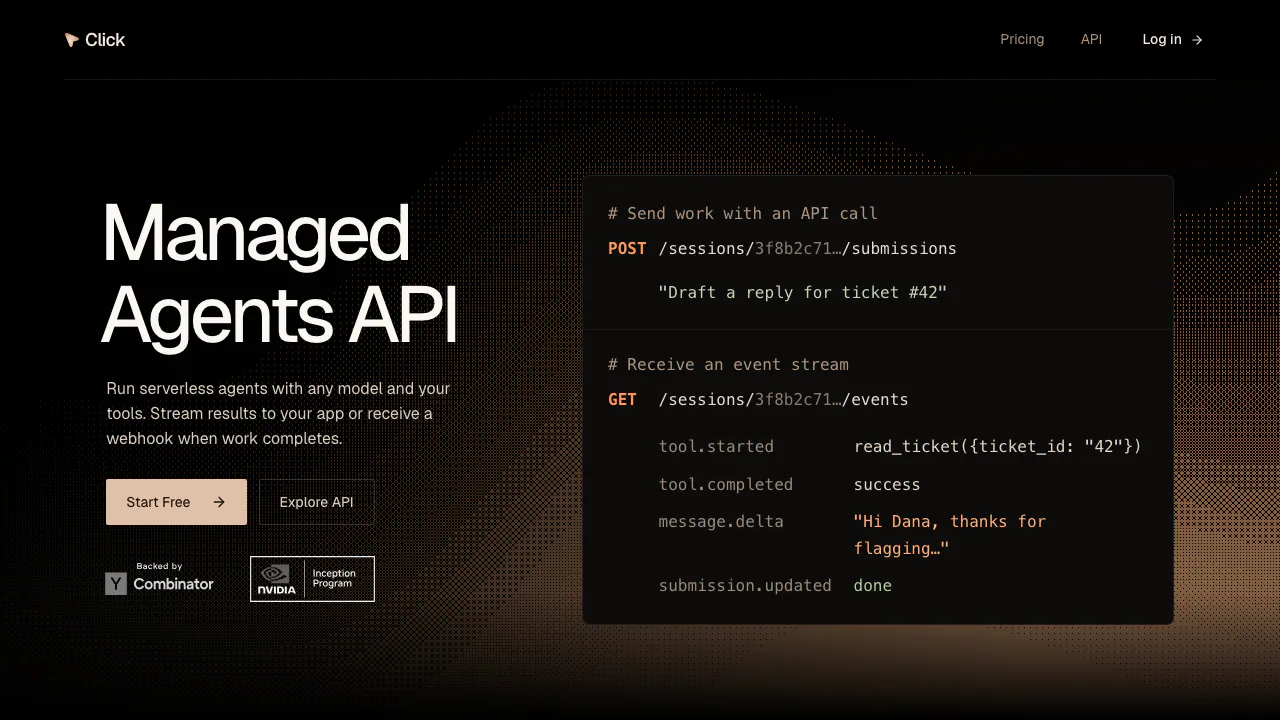
Click is a managed AI agent API for developers building agents into their own applications. You provide a model key, instructions and approved tools; Click runs the model and tool loop, keeps conversation history and handles execution recovery. Your backend submits work and receives results through API reads, live events or webhooks.
For example, a product could ask an agent to inspect an uploaded sales CSV and deliver a Markdown report. The application provides the user interface, checks who may access the data and decides what to do with the report. Click supplies the agent execution layer. This makes it useful for product assistants, document workflows and background tasks that need more than one model response.
The service is operated by Click AI Labs, Inc. It suits teams willing to integrate an HTTP API and retain control over product behavior, budgets and approvals. Generated answers and actions still need application-level checks.
Build an agent into your product
Start with a Click platform API key and an API key from a supported model provider. The documented setup requires card verification before creating or changing resources, although Click may waive it for existing accounts. Verification itself does not charge the account or start a paid subscription.
- Store the model key through
POST /credentialsand retain the returned credential ID. Keep both platform and provider keys on your backend. - Call
GET /modelsand select a model belonging to that credential's provider. Use the current catalog rather than assuming every model is available. - Create an agent through
POST /agents, specifying its model, instructions and tool grants. Savelatest_version.id. - Create a session with
POST /sessionsusing that agent version. Store the session ID alongside your ticket, document or task. - Send work to
POST /sessions/{session_id}/submissions. Arequest_idlets retries return the original submission. - Read the submission until it reaches
done,cancelledorfailed. For a completed submission, fetch the answer entry it identifies; otherwise inspect the recorded reason.
A 202 response means the input was saved. It does not establish that the task succeeded. Reusing the session lets follow-up submissions continue with its history, while your application must check end-user access before forwarding input or returning session data.
Connect MCP, HTTP tools and sandbox work
Click connects to MCP Streamable HTTP servers and custom HTTP endpoints over public HTTPS. Create a connection, then explicitly grant the tools the agent may use. HTTP tools declare arguments with JSON Schema; Click sends a JSON POST to the endpoint, with a documented 120-second timeout.
For a ticket assistant, your endpoint can authorize a customer-scoped token and return only the permitted ticket details. Short-lived, user-scoped credentials and session-specific grants help match access to the task. Your application remains responsible for end-user authentication, budgets, approvals and business checks.
Built-in capabilities cover web search, remote browser automation and sandbox file or shell operations. The documentation also describes Blaxel and Daytona sandbox options, plus a browser supplied through your own Browserbase credentials. Check each provider's configuration and costs before choosing an environment.
Stream progress and collect finished files
GET /sessions/{session_id}/events sends an initial state snapshot followed by message, tool and submission updates. On reconnection, replace your local state with the new snapshot. Work continues when a stream disconnects; streams close when a session enters standby, and reading a standby stream does not wake it.
For background completion, register signed webhooks for submission.updated or artifact.created, then read the referenced resource for its current state. This supports tasks that continue after a user closes the page, while your integration handles signature verification and delivery into the product.
File workflows use a Click-managed sandbox. Upload input through POST /files, reference its file ID in a submission and let the agent work on a copy. The agent must call publish_file to save a durable deliverable. List session artifacts and download the published result through GET /files/{file_id}. A sandbox working file and a published artifact serve different purposes; inspect the actual output before presenting it as finished.
Free and Pro: what the platform price covers
The following public USD monthly prices were checked on November 3, 2026. Consult Click's current pricing for purchase conditions.
- Free: $0/month. Two concurrent resident sessions, 100 MB file storage, one managed sandbox hour, one managed browser hour and 100 managed searches per month.
- Pro: $199/month. Fifty concurrent resident sessions, 10 GB storage, 100 managed sandbox hours, 100 managed browser hours and 5,000 managed searches per month.
- Enterprise: custom pricing and capacity.
Model access is BYOK, so budget for your model provider separately. Customer-supplied sandbox, browser or other services can also have their own charges. Storage is current capacity rather than a fresh monthly allowance. Managed quotas are shared across the tenant; Free resets follow UTC calendar months, while Pro allowances follow the paid billing period.
Concurrency includes active and idle sessions with a live runtime owner, excluding standby. Exhausted managed allowances can reject tool access and stop current work. The documentation states that there are no automatic overage charges. A free prototype therefore still needs model-cost monitoring and realistic resource budgeting.
Data handling and application responsibilities
The privacy statement describes processing of instructions, messages, uploaded and generated files, tool requests and results, and supplied credentials. Content may be shared with model or tool providers to carry out the task, and their own policies may apply.
Click staff may access service content for onboarding, support, troubleshooting and service improvement. Retention depends on reasonable service and legal needs; the statement gives no universal fixed deletion period. Processing may occur in the United States and other countries. These disclosures do not establish zero retention, local-only hosting or a blanket no-training guarantee.
Put secrets in designated credential settings or endpoints, rather than prompts or files. The policy says not to submit highly sensitive regulated information. Define allowed data, tool permissions and review rules before connecting a production workflow.
Frequently asked questions
Is Click free to use?
Free includes limited platform capacity and managed resources. Model calls use your own provider credentials and can incur provider charges. Resource writes generally require card verification first.
Do I need my own model API key?
Yes. The quick start stores a provider key and selects a compatible model from GET /models. The Click platform key and model-provider key have separate roles and should remain on your backend.
Can Click connect to my existing tools?
Yes, through MCP Streamable HTTP connections or custom HTTPS tools with explicit grants. Your system must still enforce customer access, handle credentials and approve consequential business actions.
Official developer resources
- API reference: exact contracts for tools, events, webhooks and files.
- Quick start: credential, agent, session and submission setup.
- Service terms and support information: hosted-service conditions and the official support route.
Related tools
AI Model APIs & Infrastructure →
Riverside AgentsFreemium
A native AI production team for preparing, editing, clipping and publishing recorded conversations.
AgentMashFreemium
A shared workspace that tells coding agents what teammates are changing before their work overlaps.
fastbrowseFreemium
Give AI agents a browser and inspect the evidence.
VaaniPaid
Build multilingual calling agents with business knowledge, tools and memory.
NuvioPaid
Nuvio AI accounting software for small businesses