

FastRouterFreemium
One API for model access, routing and spending visibility
Edgee AI gateway for coding agents and token cost control
Route coding agents, compress tokens and track model costs.
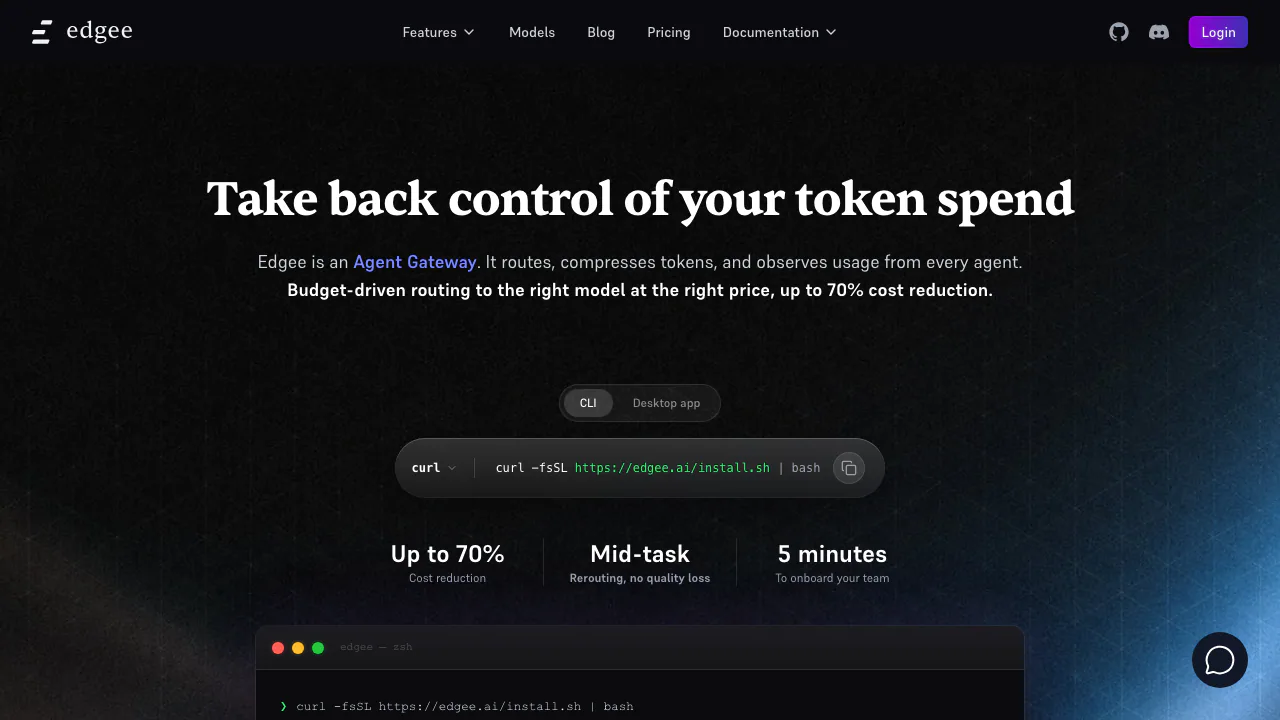
Edgee is an AI gateway for developers who want to manage the models, token usage and costs behind their coding agents. Its Agent Gateway combines model routing, token compression and usage reporting, with support for tools such as Claude Code, Codex, Cursor, OpenCode and GitHub Copilot. It is especially useful when a team needs to connect existing agents to shared policies and understand where its model budget goes.
What does Edgee do, in plain English?
Think of Edgee as a traffic desk between your coding assistant and the AI models it calls. You keep asking your agent to investigate code, make changes or run a task. Edgee handles the model traffic in between: it can choose a route, reduce eligible redundant content and record usage.
The inputs are model requests, including context and tool results; the outputs remain model responses, accompanied by operational information in Edgee's dashboard. Edgee supplies a control layer around an existing coding workflow. You still need a supported agent, access to the selected models and a way to pay for model usage. A developer using one predictable model may mainly value compression and personal reporting; an engineering lead may need team attribution and shared routing controls.
Connect your first coding session
The official quickstart provides installation options for macOS, Linux, Homebrew and Windows PowerShell. Prepare an Edgee account, access to an organization and an installed coding agent.
- Install the CLI using the instructions for your operating system, then run
edgee --versionto verify it. - From your project directory, launch a supported agent through Edgee, for example with
edgee launch claudeoredgee launch codex. - Complete browser sign-in and select the intended organization when prompted.
- Give the agent a small task that makes an actual model request.
- Open Sessions in the same organization and inspect the agent, model requests, usage and cost. You can also use
edgee stats.
Launching the process alone does not necessarily generate a session report: there must be model traffic. Once the first request is visible, test a representative development task before changing team-wide settings. For applications with their own API clients, Edgee also provides OpenAI- and Anthropic-compatible API access; follow the relevant documentation for the gateway endpoint and credentials.
Route models around budgets and availability
Routing strategies let you rewrite model selections, define eligible fallback routes and change routing as a budget is consumed. This helps teams reserve selected models for the work that needs them while moving other requests to configured alternatives.
Smart routing is currently a beta capability that classifies task complexity and selects from configured models. Treat its choices as something to evaluate on real tasks. A fallback still requires a usable route, valid credentials and an available provider; it does not remove provider restrictions.
A routing budget is also not automatically a spending hard stop. A strategy can continue at its final stage or block requests, depending on configuration. Check the end-of-budget behavior before assuming it prevents all further charges.
Reduce token traffic and measure the result
Edgee's compression documentation separates three controls:
- Tool-result trimming reduces eligible redundant content returned by tools.
- Tool-surface reduction reduces tool definitions exposed to the model.
- Output brevity encourages more concise model responses.
The documented CLI default enables tool-result trimming. Tool-surface reduction and output brevity are opt-in for coding sessions. After changing these settings, start a fresh, representative session and inspect the compression indicators in Sessions or Logs alongside the quality of the completed task.
Different savings figures describe different conditions. Edgee reports a 15–20% reduction in production token bills from compression alone and a 50% result in a controlled SWE-bench Lite benchmark. Its homepage advertises up to 70% from routing and compression together. These are vendor-reported measurements or upper bounds, not a forecast for your workload. A request without eligible tool content may show no input savings.
Understand seats, credits and BYOK costs
As checked on October 13, 2026, the official pricing page lists Free at US$0 for one developer, Team at US$30 per developer per month and custom Enterprise pricing. Model usage and applicable taxes are separate from the seat price.
Free includes compression and personal reporting. Team adds collaboration features such as developer and squad management, GitHub attribution, plugin management for skills, hooks and MCP servers, and data destinations. Enterprise offers additional controls such as SSO/SAML and private gateways.
There are two important payment paths. With Edgee-provided tokens, the provider's model price applies; credit top-ups have a 5% fee on Free and 0% on Team or Enterprise. With your own provider keys, Edgee lists 0% BYOK commission on all plans, while you continue paying the provider. A free gateway plan therefore does not make inference free. The BYOK guide covers providers including OpenAI, Anthropic and Google, plus custom compatible endpoints.
The pricing and routing pages currently differ on which plan includes rerouting strategies. Confirm that particular entitlement in the console or with Edgee before choosing a plan around it.
Check code privacy and deployment requirements
Team reporting can associate costs with developers, repositories and pull requests through the GitHub integration. This is useful for investigating usage patterns, but it makes data-handling settings part of the deployment decision.
Under Edgee's privacy policy, prompt and completion content is processed in memory and is not stored by default. Enabling Debug permits retention for up to 30 days, while usage and operational metadata may be retained for up to 25 months. Edgee says these customer prompts, completions and metadata are not used to train or fine-tune models. Downstream providers have their own terms.
Debug capture can contain source code and tool results, so review Debug settings before using sensitive repositories. BYOK credentials are encrypted at rest and used by the gateway to call the provider; BYOK should not be interpreted as keeping all traffic on your device.
For private infrastructure, self-hosting documentation describes licensed deployment of a proprietary gateway with Docker Compose or Kubernetes/Helm. Connected and headless modes have different operating requirements. Verify the intended network and model-provider setup.
Frequently asked questions
Is Edgee free to use?
The single-developer Free plan has no seat subscription fee. You still need paid model access or another valid provider arrangement. Team seats, model consumption and credit top-up fees are distinct cost items.
Will Edgee always cut token costs by 70%?
No. That is the advertised upper bound for a combination of routing and compression. Actual savings depend on your requests, eligible content, chosen models and configuration; compare representative sessions and task results.
Does Edgee store code or train models on it?
Edgee says prompt and completion content is not stored by default or used for model training. Optional Debug logging changes retention, and operational metadata follows a separate retention policy. Check both Edgee's settings and the selected model provider's terms.
Is the whole Edgee gateway open source?
No. The public CLI repository does not establish that the gateway is open source. Edgee's self-hosting documentation describes a proprietary gateway distributed under a license.
Official resources and developer community
- Product documentation: integration guides, gateway concepts and feature references.
- Official CLI repository: CLI code and development information.
- Edgee Discord: the community entry linked from the official website.
- Service status: check current service notices when troubleshooting.
- Contact Edgee: confirm plan entitlements or discuss an enterprise deployment.
Related tools
AI Model APIs & Infrastructure →
teai.ioFreemium
Connect multiple AI models through one API and a shared credit balance.
Experiential LabsFreemium
One model API with provider routing, spend controls and an open-source gateway.
ReflectionFree
Build with Beam through an API, Mirror CLI, or your own infrastructure.
shimFreemium
Mask sensitive AI traffic, track spending and inspect coding-agent exposure.
StepFunPaid
Explore StepFun models in AI Studio or integrate coding, multimodal and voice capabilities through an API.