

teai.ioFreemium
Connect multiple AI models through one API and a shared credit balance.
Experiential Labs: an open-source AI gateway
One model API with provider routing, spend controls and an open-source gateway.
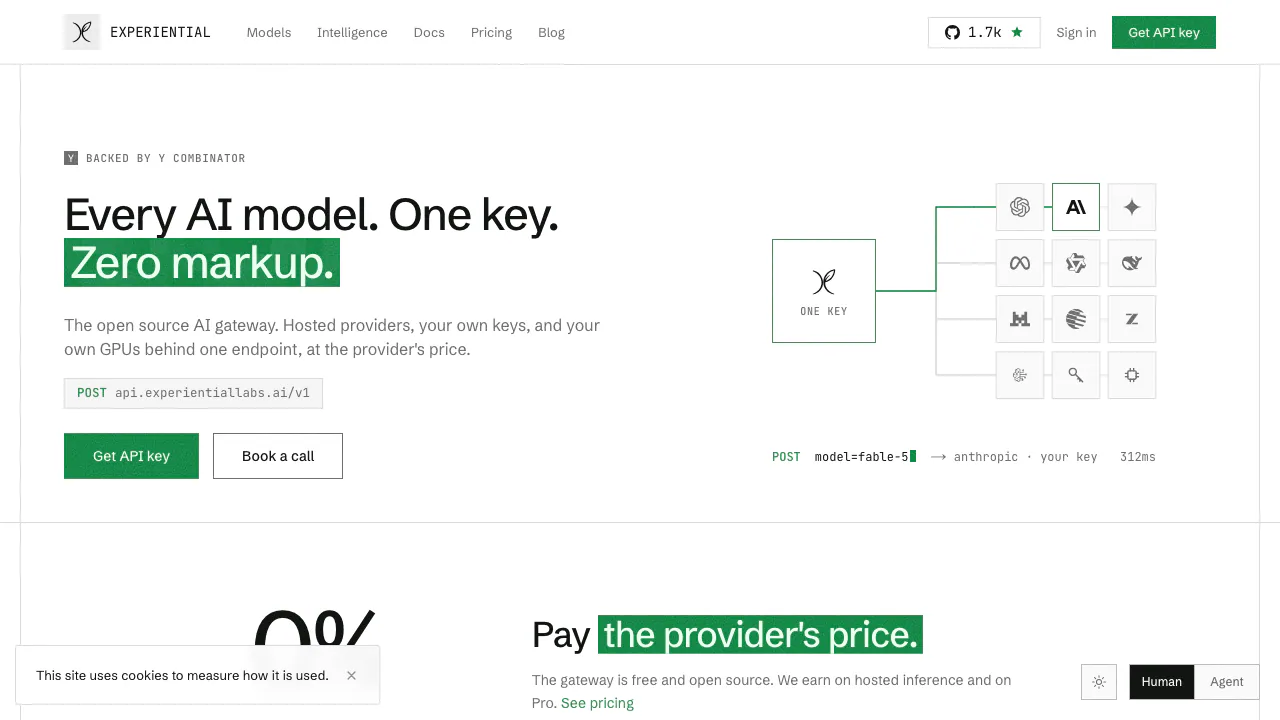
Experiential Labs is an AI gateway for developers and teams that need several model providers behind one API. It combines model access with routing, usage attribution and spending controls, and offers both a hosted platform and a gateway you can run yourself.
What does this website do, in plain English?
Think of it as a shared reception desk for your application's AI requests. Your application sends a request to one address, naming the model it needs. The gateway finds a configured provider for that model, applies your access and budget rules, and returns the response. This saves each application from having to maintain separate provider connections and cost tracking.
The website introduces that service; the linked platform is where you manage keys, models and usage. Its operator is Resolute Labs AI, Inc., trading as Experiential Labs. It is particularly relevant to product developers, agent builders and infrastructure teams managing multiple AI workloads.
Connect an existing client and verify your first request
The API supports OpenAI-compatible Chat Completions and Responses, including streaming. Follow the official quickstart:
- Sign in to the platform and create a gateway key under Settings → API keys. Copy the secret when it appears; it is shown once.
- Store it in your environment as
EXPLABS_API_KEY. Set your client's base URL tohttps://api.experientiallabs.ai/v1and supply that key. - Choose a current model slug from the catalog and send a short test message. Use the catalog identifier, rather than guessing a model name.
- Check the returned answer and the console's route, token and cost information. For streaming, enable
stream: trueand check that incremental responses arrive.
This standardizes the connection, while individual models retain their own context limits and input/output capabilities. OpenAI, Anthropic and Gemini models also have incoming-request region checks. Catalog visibility, BYOK and fallback routing do not remove those checks.
Keep provider failures and team spending visible
A model's provider waterfall is an ordered set of deployments that can serve it. Capacity or transport failures can trigger another configured route. That provider fallback is distinct from choosing a different model to suit a task.
Budget caps, model allowlists and scoped keys help control what each workload can use. Request logs and attribution show where traffic went and how much it consumed. A useful first rollout is one agent with its own key and a modest cap, followed by checking its actual usage before expanding access.
Use real traffic to evaluate optimization
The Intelligence offering analyzes traces for model-selection, caching, prompt-compression, batch-processing and reasoning-effort opportunities. Officially listed trace sources include Arize, Braintrust, LangChain and databases; gateway traffic can also supply traces.
An enterprise engagement can extend to a custom model trained through distillation, reinforcement learning or supervised fine-tuning. The proposed model is evaluated before serving and requires opt-in activation. Treat published savings examples as workload-specific results, and evaluate changes against your own quality requirements.
Free credits, Pro and the limits of zero markup
Checked on September 6, 2026, the public USD pricing page shows Free at $0/month with 500 monthly credits, Pro starting at $20/month with 2,000 credits, and custom Enterprise arrangements. It states one credit is $0.01 and routed tokens have no added markup. Model inference still consumes credits, or is billed directly by your provider when using BYOK.
There is a material inconsistency: the plan table places BYOK and local models in Pro, while the FAQ says BYOK is available on every plan. Confirm your actual entitlement in the platform before relying on free BYOK. Purchase-time platform pricing takes precedence; these figures are not a local-currency or tax-inclusive quote.
Self-hosting and data controls need separate decisions
The gateway repository uses Apache-2.0, and the documented self-hosting start command is uvx --from experiential exp run. Software availability does not pay for your infrastructure or model inference, and the gateway's license does not determine a model's output rights.
The security page describes provider allowlists, zero-data-retention routing and no-training provider policies. Configure them for your workload rather than assuming they establish every hosted-platform default. The public website privacy policy explicitly excludes signed-in platform activity and gateway requests. Verify platform data terms before sending sensitive production traffic. Self-hosting a gateway still sends requests outside your environment when you configure an external provider. Built-in PII masking and prompt-injection guardrails are described as not yet shipped.
Frequently asked questions
Does the free plan mean free, unlimited model calls?
No. The published Free plan includes a monthly credit allowance. Token usage consumes that allowance, and paid usage or provider charges remain separate from the claim of zero markup.
Can I keep my existing OpenAI-compatible application?
The documented integration changes the base URL and key, with a catalog model slug in the request. Check the particular model's supported features and region eligibility before moving a complete workflow.
Does self-hosting guarantee that no provider sees my prompts?
Only the configured route tells you where prompts go. A self-hosted gateway can forward them to external model APIs. Local deployment, provider policies and platform retention are separate questions.
Official resources and developer community
- GitHub repository: source, license and deployment instructions.
- Official Discord link: community entry linked from the homepage.
- Service status: check current incidents.
- Intelligence overview: evaluate trace-based optimization and custom-model engagements.
Related tools
AI Model APIs & Infrastructure →
FastRouterFreemium
One API for model access, routing and spending visibility
EdgeeFreemium
Route coding agents, compress tokens and track model costs.
TrustedRouterPaid
A privacy-first, OpenAI-compatible gateway for routing AI requests across models and providers.
OpenRouterFreemium
Unified API Gateway and Router for Frontier AI Models
JevModelFreemium
Turn text or JSON into labels, scores and probabilities with Jev.