

RecraftFreemium
Generate and edit raster, vector and product visuals in one design workspace
Grok AI Review: Real-Time Research, Media and Pricing
Real-time AI chat, research, code, images, video and voice from xAI.
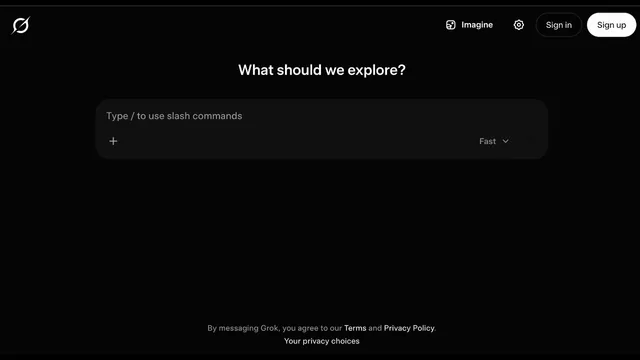
Grok AI is xAI’s general-purpose assistant for people who want current web and X information, conversational research, coding help, file analysis, and generative media in one interface. It is available on the web and mobile, with a free starting tier and paid SuperGrok plans. This review explains where Grok is genuinely useful, how its shared weekly allowance works, what to verify in research results, and what its privacy policy means before you upload sensitive material.
What Grok AI does
According to the official Grok overview, the product combines chat, web and X search, file handling, connectors, voice, and Imagine image or video generation. That breadth makes it more than a question-answer bot: a user can investigate a current topic, inspect a PDF, draft a response, write code, and create supporting visuals without moving between several services.
Its strongest distinction is access to real-time public information from both the wider web and X. That is useful for monitoring product launches, public reactions, breaking stories, market narratives, or newly published technical material. Real-time access does not make every answer correct, however, so important claims still need source inspection.
Grok AI for research and live search
For research, start with a narrow question, ask Grok AI to separate established facts from recent reports, and request links for every time-sensitive claim. Follow-up prompts can compare sources, identify disagreement, create a chronology, or turn findings into an executive brief. Deep-research and multi-agent modes are designed for broader questions where one search path would be insufficient.
The practical advantage is speed: it can move from discovery to synthesis in the same conversation. The limitation is the same one faced by every AI research assistant—summaries may omit context, sources can conflict, and social posts can be unverified. Open the cited pages, prefer primary sources, and do not treat confident wording as evidence.
Grok chatbot, files and connectors
The Grok chatbot supports long conversational workflows, uploaded documents, images, and connected information sources. A useful file-analysis prompt states the task, the decision being made, and the output format. For example, ask for a contract-risk table with quoted clause locations instead of a vague summary, or ask for a paper’s methods, limitations, and unsupported conclusions separately.
Connectors can reduce copy-and-paste work, but permissions matter. Connect only the accounts required for the task, review the access scope, and avoid placing confidential client, medical, legal, or unreleased company information into a consumer AI service unless organizational policy explicitly allows it.
Grok AI for coding and structured work
Grok AI can explain code, propose implementations, diagnose errors, generate tests, and work inside a Canvas-style drafting space. It is most effective when you provide the runtime, dependency versions, expected behavior, failing output, and constraints. Ask it to explain trade-offs and provide tests rather than accepting a large unreviewed patch.
Generated code still requires review for security, licensing, correctness, and maintainability. Run it in an isolated branch or disposable environment, scan dependencies, and verify authentication, authorization, data handling, and error paths before production use.
Grok Imagine for images, video and voice
Imagine extends Grok into image and video generation, while voice mode supports spoken interaction. These features are convenient for concept art, storyboards, social drafts, thumbnails, visual variations, or hands-free brainstorming. Paid tiers offer higher limits, and the top plan advertises 1080p video generation.
Media generation should be treated as a creative draft process. Check likeness rights, trademarks, disclosure requirements, and platform policies. For commercial work, keep prompt and asset records and verify whether generated details, text, or representations are accurate before publishing.
Grok AI pricing and weekly limits
The official Grok pricing page lists a free plan and paid SuperGrok tiers. The free tier includes real-time Web and X search, voice, connectors, and basic access. SuperGrok is listed at $30 per month and adds higher limits and advanced model access; SuperGrok Plus is listed at $100 per month with much higher Chat, Imagine, Voice, and Build limits plus priority access. Prices and entitlements can change, so confirm them at checkout.
A key detail is that paid usage is shared across a weekly allowance rather than being a simple unlimited subscription. The official usage FAQ explains the shared pool, resets, and top-ups. Heavy video, voice, or advanced-model use can consume capacity faster than light chat, so teams should test a representative week before choosing a plan.
Grok AI accuracy, citations and safety
Current information is valuable only when it is traceable. Ask Grok AI to cite its sources, open the sources, check dates, and distinguish reporting from opinion. For X posts, verify the author, original context, and whether later updates changed the story. For numerical work, reproduce calculations independently.
Do not use the assistant as the sole authority for medical, legal, financial, safety, or compliance decisions. It can organize questions and surface sources, but a qualified professional and the relevant primary documents should make the final call.
Grok AI privacy and data controls
The xAI privacy policy says consumer content may be used to develop, improve, and train models, subject to the described choices and exceptions. It also describes Private Chat and deletion timelines, while noting legal and security exceptions. Users should read the current policy because data practices and controls may evolve.
A sensible default is data minimization: remove personal identifiers, secrets, credentials, private source code, and confidential attachments. Use Private Chat when appropriate, review training and personalization settings, and remember that deleting a conversation is not the same as never sharing sensitive data in the first place.
Who should use Grok AI
Grok AI fits users who value fast access to current web and X conversations, want research and media tools in one product, or already work heavily with the X ecosystem. Researchers, developers, creators, analysts, and news-aware teams may benefit most. It is less compelling if your priority is a tightly controlled enterprise knowledge base, predictable unlimited usage, or a workflow that cannot allow consumer-model data processing.
The best evaluation is task-based: test one live-research assignment, one file analysis, one coding problem, and one media-generation job. Record accuracy, source quality, time saved, and allowance consumption before paying.
Grok AI FAQ
Is Grok AI free?
Yes. xAI offers a free starting tier, but usage and advanced capabilities are limited. Check the pricing page for current entitlements.
Does Grok AI search the web and X in real time?
Yes. Real-time Web and X search is a central capability. Users should still open citations and verify sensitive or fast-changing claims.
Can Grok create images and videos?
Yes. Grok Imagine supports image and video generation, with higher limits and higher-resolution video on paid tiers.
How do SuperGrok limits work?
Paid usage draws from a shared weekly allowance across Chat, Imagine, Voice, and Build. The official FAQ explains resets and optional top-ups.
Is Grok AI safe for confidential documents?
Do not assume so by default. Review the privacy policy and your organization’s rules, minimize uploaded data, and avoid secrets or regulated information.
Is Grok AI reliable for research?
It can accelerate discovery and synthesis, especially for current topics, but reliability depends on source quality and verification. Treat citations as a starting point, not proof.
Related tools
AI Assistants & Chatbots →
KreaFreemium
Generate, edit and enhance images, video and 3D assets across many AI models
Explore tattoo ideas before your artist consultation.

Graffiti GeneratorFreemium
Free online graffiti generator and AI street art maker
Image to Image GeneratorFreemium
Multi-model AI studio for image-to-image creation and prompt editing
Zzo.aiFreemium
Create and edit images, then turn text or stills into video with multiple AI models.