

RecraftFreemium
Generate and edit raster, vector and product visuals in one design workspace
Krev AI | Ecommerce Marketing for Shopify Brands
Plan a product launch, create the assets, and review what goes live.
What does Krev do?
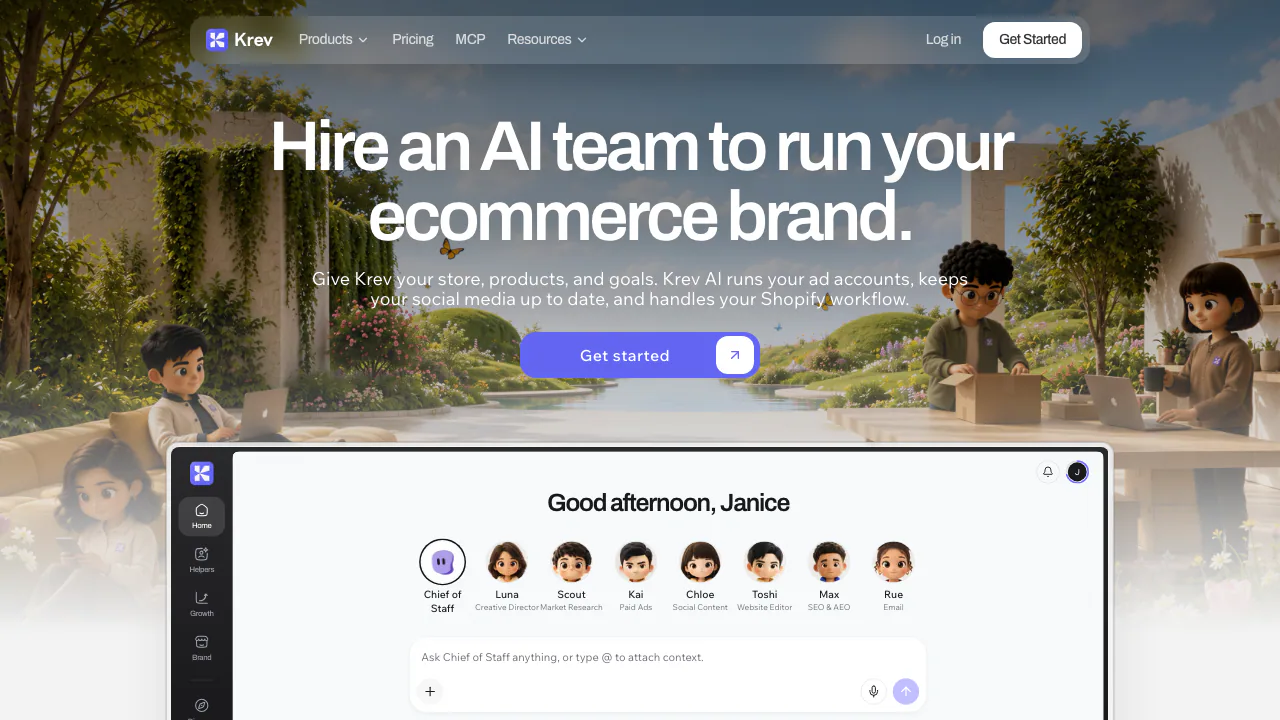
Krev is an AI ecommerce marketing workspace for brands that already have products to sell. Give it a store URL, some product photos and a launch goal. Its specialists can research competing offers, make visuals and draft the campaign around them. A small Shopify team can start with one item and use the same product brief for a listing refresh, a short ad and a social post.
Build the first batch of launch creative
Add your website or upload a product by hand. Brand DNA reads the site's visual cues, including colors and fonts. For a new weekender bag, give Luna a clear photo, the actual dimensions and a single selling point. Ask Scout to look at how competitors demonstrate capacity or show the bag in use. Use those references to pick a shot list and write an original brief.
Generate a clean product image for the listing and a lifestyle variant for the ad. Check that the zips, handles and lining still match the reference. Give the short video the same review, especially if a presenter describes features or demonstrates the product.
Review work before it reaches customers
With the appropriate accounts connected, Kai can stage Meta and TikTok campaigns and suggest changes. Chloe prepares the social calendar. Toshi can preview Shopify storefront edits, Rue handles workflows such as cart recovery, and Max works on search visibility. Before approval, check the destination account, budget, offer and landing page.
A connection can grant Krev access to catalog, customer or campaign data, depending on its scope. Removing access stops future syncing. Stored records have a separate deletion process. Krev privacy policy · Data deletion instructions
Choose a plan by task and volume
The international USD pricing page checked November 6, 2026, lists Starter with Scout, Luna and 100 monthly credits. Team includes the full roster, 250 credits and MCP access. Grow raises the media allowance to 500 credits and supports a larger catalog. Check the billing cycle and total in checkout. Official Krev plan comparison
Frequently asked questions
Can I make product photos without connecting Shopify?
Yes. Add a product and upload reference images directly. Krev lists PNG, JPG and WebP as supported image formats.
Can Krev generate a short video ad?
Yes. Luna can make creator-style clips and export MP4. Base video generation uses one credit per second. Count each planned variant when estimating the credits for a test.
Is there a free plan for generating images?
The public comparison lists paid workspace plans. A standard image uses one credit and a high-quality image uses two. Paid users can use the outputs commercially subject to third-party rights. Commercial-use terms
Official resources
- Krev product FAQ covers formats, credits and how to reach support.
- Krev MCP setup explains how to connect a compatible client on Team or higher.
Related tools
AI Marketing & Sales Tools →
Image to Image GeneratorFreemium
Multi-model AI studio for image-to-image creation and prompt editing
PhotoroomFreemium
Create commerce-ready product photos with background removal, AI staging, fashion models, batch editing, and video.
AXLFreemium
Bring leads, sales and delivery into one workspace.
SendoffPaid
Draft and send newsletters from Claude or Codex on your own cloud accounts.
DealPilotPaid
Research companies, review cold emails and track overseas outreach