

Tripo AIFreemium
Create, texture, rig, and export 3D models from text or images.
Meshy AI: Text and Image to 3D Model Generator
Generate editable 3D assets from text or images in minutes.
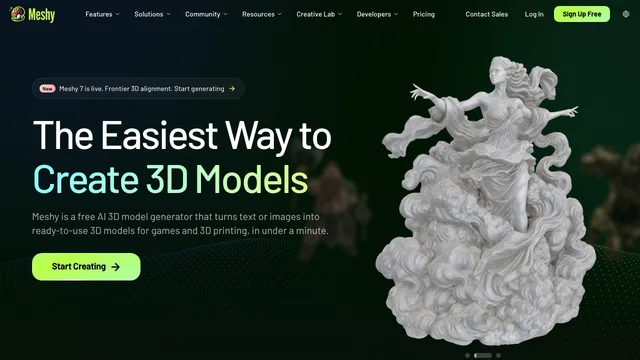
Meshy AI is a browser-based AI 3D model generator that turns text prompts or reference images into textured assets. It serves game developers, 3D artists, product visualizers, and printing hobbyists who need a fast starting point. This guide covers its workflow, credits, exports, commercial rights, and the cleanup still required for serious production.
Meshy AI overview and best use cases
Meshy combines text-to-3D, image-to-3D, AI texturing, remeshing, rigging, animation, and export tools. It is useful for concept props, background objects, tabletop miniatures, product mockups, and rapid iteration before a specialist rebuilds a final model. Beginners get a guided workflow; experienced artists can use results as blockouts in Blender, Unity, or another DCC application.
AI 3D model generator workflow
Begin with a narrow brief: subject, material, style, silhouette, polygon target, and destination software. Review low-cost previews before spending credits on refined geometry or textures. Inspect candidates from every angle, because the default preview can hide holes, fused parts, or distorted backs. Meshy’s official Text to 3D page and API documentation explain interactive and programmatic paths.
Text to 3D prompting
Concrete prompts work better than broad artistic prose. “Weathered bronze lantern, low-poly game prop, separate handle, no background” constrains form and use. Generate several candidates, choose the strongest silhouette, then refine. Save prompt versions and change one variable at a time so a successful visual direction can be repeated across an asset family.
Image to 3D preparation
Use a clear front or three-quarter image, neutral lighting, an uncluttered background, and a fully visible outline. A single picture cannot reveal hidden surfaces, so the system must infer them. For important work, compare additional references and correct proportions manually. Never treat reconstructed dimensions as measurement-grade CAD.
Meshy exports and editing
Meshy lists FBX, OBJ, USDZ, GLB, STL, and BLEND downloads for generated models. Choose GLB for web previews, FBX for many game and animation pipelines, STL for printing preparation, and BLEND for continued Blender work. After import, verify scale, axes, normals, UVs, texture paths, polygon count, and material compatibility.
Meshy AI texturing, rigging, and animation
AI texturing can finish a generated asset or restyle an uploaded model. Auto-rigging and animation speed up prototypes, but deformation quality depends on topology and character design. Test shoulders, elbows, hands, cloth, and extreme poses. Unusual anatomy, mechanical joints, or layered clothing frequently need manual weights and a custom rig.
Meshy AI pricing and rights
Meshy uses credits. Its official pricing page lists a free monthly allowance plus paid individual, studio, and enterprise plans. The page says free outputs use CC BY 4.0 with attribution, while premium plans provide different ownership and privacy terms. Confirm live pricing and licensing before commercial release because plans can change.
AI 3D model generator quality and production limits
Generated meshes may contain uneven topology, thin surfaces, internal geometry, texture seams, or missing details. Games need triangle, collision, draw-call, texture-memory, and LOD checks. Printing needs watertightness, wall thickness, scale, overhang, and support checks. Engineering and product teams should use the output for visualization, then rebuild exact geometry in CAD.
Meshy AI privacy and responsible inputs
Upload only reference images and models you are authorized to use. A result can still resemble a protected character, branded product, or another artist’s style. Meshy says web-app data is stored on AWS in the United States and is not used for training without consent. Organizations should review current retention, privacy, and enterprise controls before submitting confidential assets.
Who should choose Meshy AI
Meshy fits creators who value speed, broad 3D features, accessible exports, and rapid visual exploration. It is weaker when the first output must have perfect topology, exact dimensions, or guaranteed originality. Test one real asset on the free plan and record credits, cleanup time, export success, and whether the result saves total production effort.
Meshy AI frequently asked questions
Is Meshy AI free?
Yes. A free plan includes monthly credits, but queue priority, features, privacy, and licensing differ from paid plans.
Can Meshy models be used commercially?
Free outputs use CC BY 4.0 with attribution according to the pricing FAQ; paid-plan rights differ. Verify the current terms and your input rights.
Does Meshy replace Blender?
No. Production work can still require retopology, UV correction, rig cleanup, art direction, and technical validation.
Which files can Meshy export?
The official site lists FBX, OBJ, USDZ, GLB, STL, and BLEND, with availability depending on the workflow.
Is Meshy suitable for 3D printing?
It can create printable starting points, but users must repair meshes and validate thickness, scale, supports, and watertightness.
Does Meshy provide an API?
Yes. Meshy publishes APIs for text-to-3D, image-to-3D, texturing, and related workflows; access and credits depend on the plan.
Related tools
AI 3D & Spatial Design Tools →
KreaFreemium
Generate, edit and enhance images, video and 3D assets across many AI models
BrickForgerAIPaid
Turn a text idea into a brick model, parts list and PDF building guide.
zCADFreemium
Turn an engineering brief into editable solid CAD, then refine it in your browser.
FloorGenFree
Generate and refine measured floor plans, furnish rooms and explore the same design in 3D.
ArchOne AIFreemium
All-in-one AI spatial design visualization platform for architecture, interiors, and landscapes