

KreaFreemium
Generate, edit and enhance images, video and 3D assets across many AI models
Tripo AI: Fast Text and Image to 3D Generator
Create, texture, rig, and export 3D models from text or images.
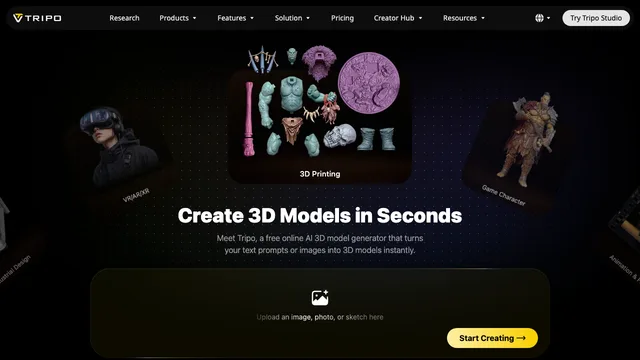
Tripo AI is an AI 3D model generator that turns text prompts, single images, or multiple views into downloadable models. Its browser workspace emphasizes fast creation and post-processing, while a separate API serves developers. This review explains the real workflow, credit use, commercial rights, output limits, and checks needed before an asset reaches a game, film, commerce, or 3D-printing pipeline.
Tripo AI overview and suitable projects
Tripo combines generation, texturing, mesh segmentation, completion, low-poly processing, rigging, animation retargeting, and format conversion. It is useful to indie game teams, illustrators exploring 3D, e-commerce designers, educators, and developers prototyping a 3D feature. It saves the most time when a convincing concept or secondary asset matters more than perfect edge flow on the first attempt.
AI 3D model generator workflow
Define style, polygon budget, texture resolution, moving parts, and export format before generating. Build a small candidate set, compare silhouettes from several angles, and spend extra credits only after choosing a direction. The official 3D model generator page outlines the main creation modes.
Text to 3D prompt strategy
Describe subject, material, shape language, visual style, and destination. Avoid combining conflicting requirements. A low-poly mobile-game prop needs different geometry from a cinematic close-up. Keep a prompt log and alter one condition at a time so quality improvements and wasted attempts are easy to identify.
Image to 3D and multiview input
Use clean, consistent front, side, back, or three-quarter references with complete outlines. Reflections, transparent parts, cropping, and dramatic shadows create ambiguity. Multiple views can reduce uncertainty, but hidden surfaces are still inferred. Inspect proportions and back-facing details instead of judging only similarity to the input image.
Tripo AI texturing and mesh tools
Texture generation quickly establishes color and material direction. Segmentation, mesh completion, smart low-poly, and quad options support different downstream jobs. They do not guarantee production-ready geometry. Check UV seams, bleeding, normals, disconnected pieces, internal faces, and whether simplification preserves the silhouette.
AI 3D model generator rigging and animation
Automatic rigging is convenient for previews and conventional characters. Test joint placement, skin weights, hands, shoulders, clothing, and extreme poses before export. Retargeted motion may need cleanup. Unusual anatomy, mechanical joints, and layered accessories commonly require a custom skeleton or manual weighting.
Tripo AI exports and downstream checks
Common formats improve compatibility, but interchange can change scale, axes, materials, texture links, and bone names. Open the exported file in its final application before approval. For games measure triangles, draw calls, collisions, texture memory, and LOD behavior; for printing check watertightness, wall thickness, scale, and supports.
Tripo AI pricing and API credits
Tripo uses credits for generation and post-processing. The official OpenAPI pricing page lists task costs, a base conversion rate, and starter API credits. Studio subscriptions and API billing are separate products. Check the live checkout and expected task mix before committing to a plan.
Image to 3D commercial rights and input ownership
Official Tripo materials indicate that free-tier outputs may not include commercial rights, while professional plans provide different permissions. Record the plan, generation date, source images, and accepted terms. Never upload art, people, branded products, or characters without permission; an output license cannot cure an infringing input.
Tripo AI comparison and buying decision
Compare Tripo with alternatives such as Meshy using one identical brief. Measure generation time, credits, cleanup hours, texture quality, rig usability, licensing, and export reliability. Marketing examples use favorable inputs; a controlled test shows which tool reduces total production time for the asset types you actually make.
Tripo AI frequently asked questions
Is Tripo AI free?
Tripo offers free or trial credits, but allowances and usage rights can change. Check the current Studio and API billing pages.
Can free Tripo models be used commercially?
Official materials indicate that free outputs may exclude commercial rights. Review the current plan terms before commercial publication.
Does Tripo AI provide an API?
Yes. Tripo publishes an OpenAPI for generation, texturing, rigging, animation, segmentation, and conversion with credit billing.
Is Tripo AI good for game assets?
It can accelerate concepts and secondary assets, but teams still need topology, texture, collision, LOD, performance, and license checks.
Can Tripo AI rig characters?
It offers rigging and animation post-processing. Standard humanoids are easier, and every result needs deformation testing.
Is Tripo AI better than Meshy?
That depends on the asset. Test both with the same prompt or image and include cleanup, credits, exports, and rights in the comparison.
Related tools
AI 3D & Spatial Design Tools →
BrickForgerAIPaid
Turn a text idea into a brick model, parts list and PDF building guide.
zCADFreemium
Turn an engineering brief into editable solid CAD, then refine it in your browser.
MeshyFreemium
Generate editable 3D assets from text or images in minutes.
FloorGenFree
Generate and refine measured floor plans, furnish rooms and explore the same design in 3D.
ArchOne AIFreemium
All-in-one AI spatial design visualization platform for architecture, interiors, and landscapes