

SurgePixFreemium
Generate images, posters and decks, then refine individual layers.
MyLens AI: Interactive AI Presentations from Your Sources
Turn documents, links and ideas into narrated visuals and individual presentations that viewers can question.
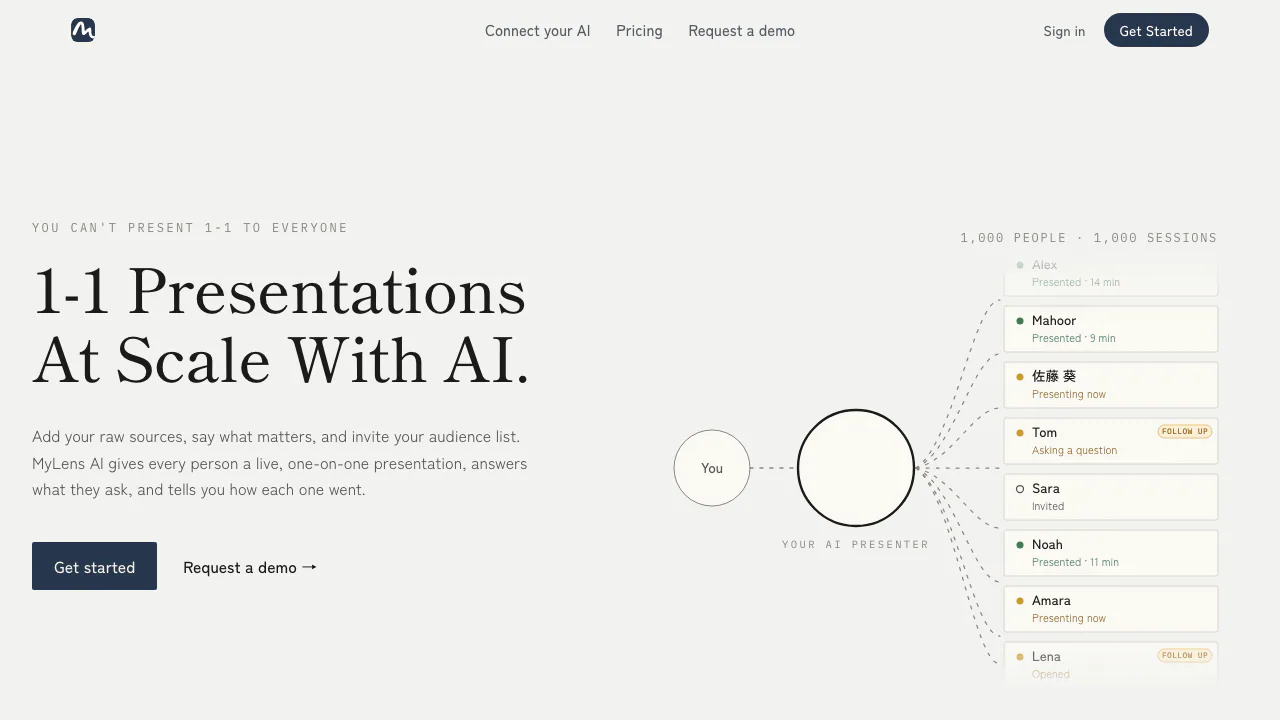
MyLens AI turns source material into interactive presentations and visual summaries. Bring a document, link, video or set of notes, identify what matters, and use diagrams, narration and source-based questions to explain it. The current product also focuses on delivering a separate live presentation to each invited viewer.
What does MyLens actually do?
Think of MyLens as an assistant that both organizes your material and walks people through it. A trainer could supply an onboarding guide and common questions, prepare a presentation, and invite new hires to explore it individually. Each viewer can ask questions at their own pace.
Mind maps and timelines remain part of the product, alongside this broader presentation workflow. For teams that repeatedly explain the same information, the useful output is a visual explanation that people can investigate, with session feedback for the author.
Build a presentation that answers questions
The homepage describes six preparation steps: add sources, teach the AI your goals and audience, create the presentation, choose what the AI may do, invite viewers, and go live. Set the intended tone and boundaries before choosing permissions for additional slides, deeper explanations and source citations.
During an individual session, MyLens can respond to a question with another visual layer or slide when permitted. Its stated approach is to answer from your supplied files and flag missing answers. Authors can review session duration and questions to decide who needs a follow-up. These capabilities suit sales explanations, customer updates, employee onboarding and lessons; the illustrated audience size is not a promise about a free account's capacity.
Match the visual to the material
The input catalogue lists PDFs, Word and PowerPoint files, images, CSV/Excel data, webpages and YouTube. Google Drive imports use selected files rather than continuous access to your entire Drive.
Choose a mind map for connected ideas, a flowchart for steps and decisions, a timeline for events, or a table for comparable information. Clickable nodes offer explanations, expansion and citations, allowing a concise overview to lead into detail. Narration adds a guided walkthrough.
A practical PDF or video workflow
- Start with material you are allowed to upload and a specific question, such as which findings affect a project decision.
- Upload the PDF and describe the summary, comparisons or key numbers you want. For a video, paste a YouTube link and specify the highlights.
- Generate the visual and assess whether its structure represents the original material.
- Open important nodes and compare citations, dates and numbers with the source. Ask the AI to refine incomplete sections.
- Present inside MyLens, share, or export within your plan's permissions.
The mind-map page documents PNG, PDF and PowerPoint (PPT) exports. It does not establish that every export retains live interaction or individually editable shapes. Source checking remains necessary: the terms explicitly warn that AI can make mistakes and hallucinate.
Free credits and paid editing
Checked October 20, 2026, the public USD pricing cards list Free at $0 with 15 AI credits per month, a “10K Source Limit,” multiple sources per storyboard and AI narration. The cards do not define that source-limit unit or explain the credit cost of each action. Fifteen credits should not be read as fifteen complete presentations.
The displayed annual plans are Pro at $12 per member/month, billed $144 yearly, with 150 monthly credits and manual editing; Premium at $24, billed $288 yearly, with 450 credits and Brand Kit; and Business at $120, billed $1,440 yearly, with 2,000 credits and higher source limits. These are annual-billing equivalents, not verified month-to-month prices or tax-inclusive local quotes.
Check the current pricing and allowances before subscribing. The subscription terms describe automatic renewal, cancellation at the end of the paid period and non-refundable charged fees without prorated refunds. In particular, manual editing appears under Pro even though feature pages describe editable outputs more broadly.
Privacy depends on how you share
The privacy policy says workspace content is private by default and neither MyLens nor its business-API AI providers train models on it. Those providers still process relevant content to generate results; this is a cloud service.
Public sharing expands access, and the terms say published public stories on the free plan can be indexed by Google. Check sharing settings before uploading or distributing internal material. Imported sources are saved in the workspace: disconnecting an integration or revoking Google access does not delete existing copies. Use content or account deletion controls separately.
Browser and AI-client access
The official Chrome extension creates visual summaries from webpages and YouTube while browsing. Use the full web app when preparing a complete presentation and managing sharing.
For supported AI clients, the official MCP setup guide publishes the MyLens endpoint and platform instructions. The connection requires signing in and enabling tools; client or workspace policies may require an administrator.
Frequently asked questions
Is MyLens AI free?
There is a Free plan with 15 monthly AI credits on the checked pricing page. Higher allowances and manual editing require the relevant paid plan. Check current account permissions rather than assuming unlimited free generation.
Can MyLens make mind maps and timelines?
Yes. Notes and documents can become branching mind maps, and the visual catalogue includes timelines, flowcharts and tables. Select a form that fits your information and verify its content.
Do I need to download an app?
You can use the web app. An official Chrome extension is also linked from the site for browser-based summaries; use that verified entry point when looking for a download.
Official resources
- MyLens guides: workflows and practical tutorials.
- Trust Center: security information and business documentation requests.
- Request a demo: assess a team presentation workflow.
- Product support: account and usage questions.
Related tools
AI Presentation Tools →
HeyPiFreemium
An AI meeting workspace for turning live discussion into work.
MagicSlidesFreemium
MagicSlides is an AI presentation maker that turns a topic, written content or source material into a slide deck you can refine
Z.aiFreemium
A GLM-powered web assistant for chat, files, slides, apps and agent tasks.
NuvioPaid
Nuvio AI accounting software for small businesses
CoachareFreemium
Turn coaching conversations into goals, practice and weekly action.