

MuleRunFreemium
AI agents, cloud workspaces, and repeatable workflows
Z.ai Chat: GLM assistant and Agent mode guide
A GLM-powered web assistant for chat, files, slides, apps and agent tasks.
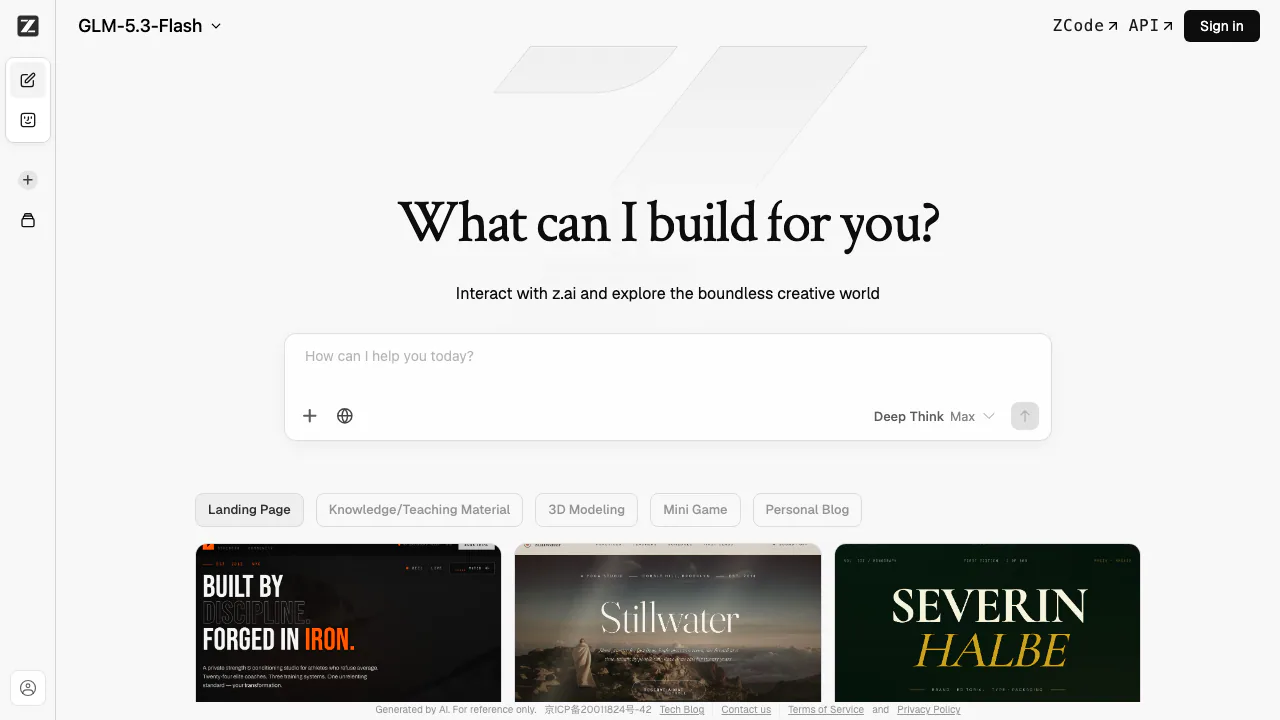
Z.ai Chat is a browser-based, GLM-powered assistant for direct conversations and more involved creation tasks. The same web app separates Chat mode from Agent mode, so it suits people who want either a quick answer or a guided workflow for slides, writing, data analysis, websites and apps. This listing covers the consumer chat page—not Z.ai’s separate model API.
Choose the mode around the outcome
Use Chat mode when you want to ask a question, improve text, reason through an idea or work with an attached file in a conversational loop. The current interface provides a model selector and a Deep Think control. Its home screen also offers starters for a landing page, teaching material, 3D modeling, a mini game and a personal blog.
Agent mode is designed around a task rather than a single reply. Visible starters include chat applications, full-stack development, smart writing and data insights. It also shows connection entry points for Discord, Lark and WeChat; Telegram is labelled as coming soon. Treat those connections as optional integrations whose availability and permissions may vary by account.
A practical first run
- Open the official Z.ai Chat page and choose Chat or Agent mode.
- Select an available GLM model if the default is not suitable for your task.
- Write a precise goal, include the desired output and add any constraints.
- Attach files only when they are necessary. The interface currently states a maximum of 10 files, each up to 50 MB; a complete format list was not verified.
- Send the prompt, inspect the answer or artifact, and ask for corrections. Verify important facts and test generated code before relying on it.
This makes Z.ai useful for drafting, structured analysis and prototypes, but it is not a substitute for professional medical, legal, financial or other qualified review.
Access, plans and current limits
As checked on September 2, 2026, Z.ai’s terms say the service can be accessed without registration, although core features may require an account. Some services or features may be paid. Z.ai does not publish a stable, universal consumer-chat price on the page we verified, so check the relevant service screen and official subscription terms before buying. API token prices belong to a separate developer product and should not be used as Chat pricing.
Privacy and content terms to review
Z.ai’s privacy policy covers prompts, images and other input used to provide the service, and describes use of data for service improvement and research. It says personal data is generally processed in Singapore, with retention depending on purpose and legal obligations. The signed-in settings include a model-improvement sharing switch and controls to archive or delete chat history.
The individual Terms say users retain rights to their prompts and requested outputs as between the parties, but outputs may not be unique and the Terms grant Z.ai broad rights over User Content. Review the current terms before uploading confidential material or using output commercially.
Frequently asked questions
Is Z.ai free?
The site can be opened without registration, but some core features may require login and some services may require payment. Check the current account or checkout screen for the plan, quota and renewal terms that apply to you.
What is the difference between Chat and Agent mode?
Chat mode is best for an interactive prompt-and-response loop. Agent mode exposes task starters for multi-step creation such as full-stack development, writing and data analysis, plus optional app connections.
Can Z.ai upload files?
Yes. The current chat input shows a limit of 10 files and 50 MB per file. Because the interface did not expose a complete supported-format list during verification, confirm compatibility in the upload picker before preparing a large job.
How does Z.ai use prompt and chat data?
Inputs are processed to provide the service, while the policy and Terms also describe improvement and research uses. Check Data & Privacy settings, the current privacy policy and the sensitivity of your material before uploading it.
Official resources and community
- Z.ai product support and contact page — support, sales and verified social links.
- Official GitHub organization and Hugging Face models — open-source projects and model files.
- Official X account and Discord community — announcements and community discussion.
Related tools
AI Assistants & Chatbots →
RevolteFreemium
Agentic software delivery from engineering intent to reviewed code and production workflows.
Kilo CodeFreemium
An open-source coding agent for IDE, terminal and cloud workflows
Visual Studio CodeFreemium
An extensible code editor with Copilot suggestions, chat and agents
DevinFreemium
Autonomous coding agent for repository questions, code changes, tests, debugging, migrations and pull requests.
DeepSeekFreemium
Free AI chat, reasoning, web search, file analysis and coding with token-priced developer API access.