

Strawberry BrowserFreemium
A desktop browser with AI companions for research, recurring work, meeting notes and reviewed actions across your tabs.
Sider Code AI Webpage Customizer
Customize webpages with natural-language instructions
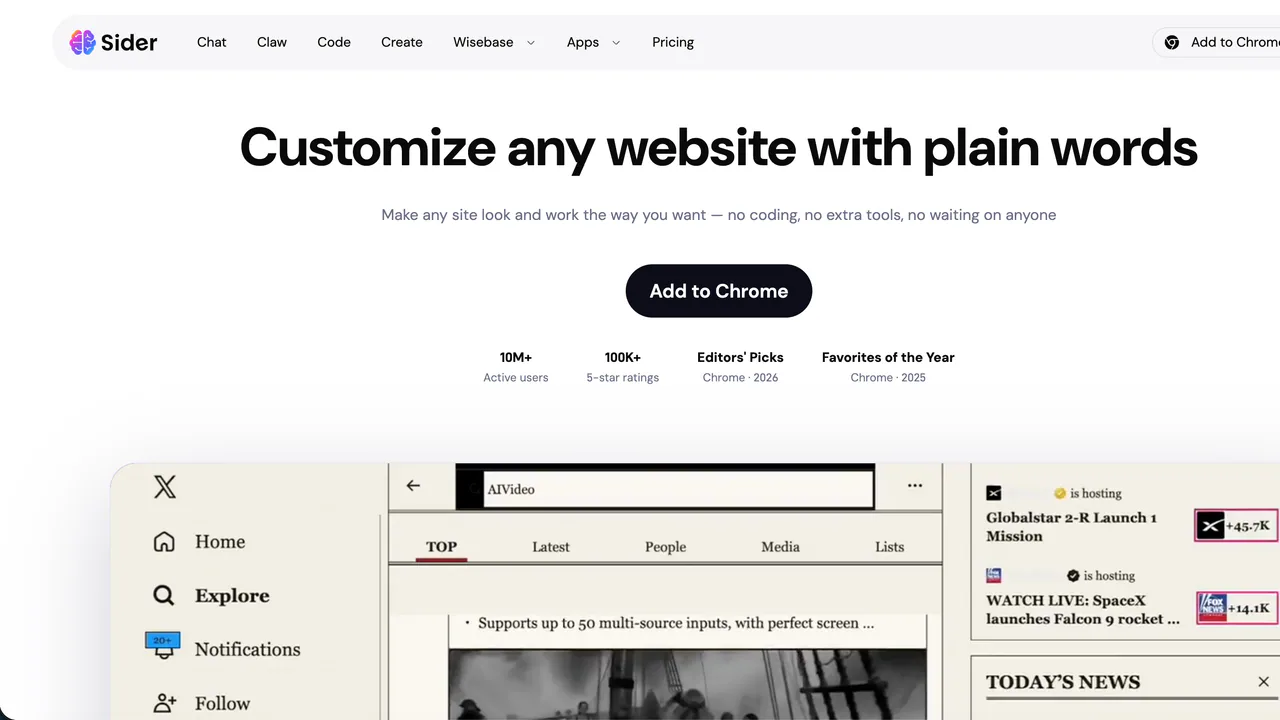
Sider Code is an AI webpage customizer inside the Sider browser extension. Instead of writing CSS or userscripts, you describe how the current page should look or behave, review the result, and refine it with follow-up instructions.
What Sider Code can change
Sider Code can hide advertisements, pop-ups, sponsored posts or sidebars; switch a page to a darker or cleaner reading layout; extract images; add navigation such as a floating table of contents; and add AI-powered actions such as a button that summarizes comments. It combines page understanding with page modification, so the result can go beyond a temporary visual edit.
The official Sider Code examples include Reddit comment summaries, cleaner X threads, Google Docs dark mode, reorganized Hacker News discussions, Wattpad reading layouts and removal of YouTube Shorts.
Setup and first customization
Open Code from the Sider sidebar and choose Get started. The official setup guide requires two preparations: enable Allow User Scripts in Chrome’s extension settings and install the separate Sider Operator extension, which helps test and debug generated changes.
Then open the page to customize, select Code and state a specific outcome, such as “hide the right sidebar and make the article full width.” Review the changed page. If a section is wrong, send a narrower follow-up instruction or attach a screenshot that identifies the area. Refresh after a script is generated to check its full effect.
Saved scripts, credits and paid access
Each customization is stored under My Scripts and can be switched on or off. When enabled, it is applied automatically when you revisit the same website. The previously generated script is not charged again merely because you return.
Sider says credits are calculated dynamically according to task complexity. A customization that adds an AI action may consume credits whenever that action runs. As verified on 3 September 2026, Sider Code is available only with the newer Lite, Plus and Max paid plans; free users and users of older paid plans must upgrade. Exact local prices can change, so consult the current Sider pricing page.
Limits, permissions and privacy
Sider Code currently works only in the Sider sidebar because it operates on the active browser tab; full-screen mode is not supported. Sider says it is designed for many websites, not literally every site. Complex layouts or site restrictions may require several prompts and some requested changes may not work reliably.
The feature needs permission to run user scripts on webpages. Before using it on private dashboards, inboxes or authenticated services, review the extension permissions and Sider’s privacy policy, which describes collection of account, device and usage information and sharing with service providers.
Who is Sider Code for?
It best suits readers, researchers and browser power users who repeatedly adapt third-party pages but do not want to maintain their own userscripts. It is less suitable when a change must be published for every visitor, when an organization requires tightly controlled code review, or when a site’s restrictions prevent page modification.
Frequently asked questions
Do I need to know how to code?
No. The intended workflow uses natural-language instructions. You still need to enable user-script permission and install Sider Operator during setup.
Do changes survive a refresh?
Saved and enabled scripts are reapplied when you revisit the same website. You can disable them from My Scripts.
Does Sider Code work on every website?
It is designed for many websites, but special restrictions and complex layouts can require extra refinement or block some changes.
Is Sider Code free?
No. The official guide currently lists Lite, Plus and Max as eligible paid plans. Credit use varies with task complexity.
Can I use it in full-screen mode?
No. It currently operates only from the Sider sidebar on the active tab.
Official resources
- Sider Code product page — examples and product overview.
- Sider Code help guide — setup, prompts, scripts, credits and limitations.
- Pricing and plans — current subscription information.
- Privacy policy — data collection, retention and sharing details.
- Sider support — product and account assistance.
Related tools
AI Browser Tools →
Lexmount BrowserFreemium
Search, extract and automate webpages with managed cloud browsers
Retriever AI (rtrvr.ai)Freemium
Turn browser instructions into checked tables and completed web tasks.
RillFree
Turn the page you are reading into work for your own coding agent.
bmuxFree
Visible browser automation with split workspaces and explicit agent control
NuvioPaid
Nuvio AI accounting software for small businesses