

ReplitFreemium
Build, test and deploy apps with an AI coding agent.
Bolt.new AI app builder guide
Build websites and apps in the browser by chatting with AI.
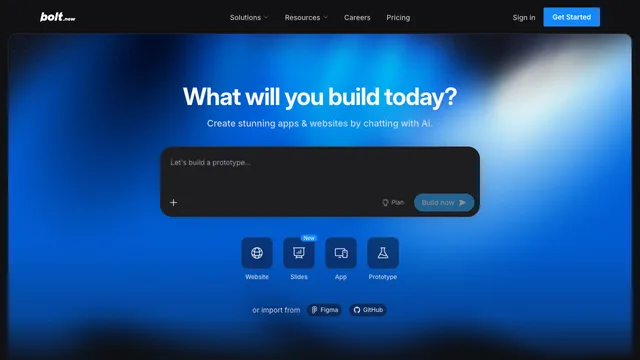
Bolt.new AI is a browser-based AI builder for websites, full-stack JavaScript web applications and mobile apps created with Expo. It combines conversational generation, editable code, a live preview, StackBlitz WebContainers, Bolt Cloud databases and hosting, and integrations such as GitHub, Figma, Stripe and Supabase. It is designed for people who want to move from an idea to a working product without installing a local development environment.
Bolt can shorten the first build, but users still need to define the product, test generated behavior and understand token, database, hosting and app-store costs. The platform is accessible to beginners while retaining code view and source-control options for developers.
What Bolt.new AI can build and who it suits
Bolt can create landing pages, company sites, stores, dashboards, CRMs, booking products, job boards, SaaS applications and other JavaScript-based full-stack projects. If the first prompt clearly requests a mobile app, Bolt can generate an Expo-compatible project for iOS, Android and web.
It suits founders testing a business, product managers making a functional prototype, marketers publishing campaign pages, agencies delivering client work, students learning by building and developers accelerating repetitive setup. It is less suitable when the backend must use an unsupported runtime such as PHP or Python, when browser-based development is prohibited, or when a safety-critical system needs a tightly controlled engineering process.
Bolt.new AI tutorial: plan, build, test and publish
Begin with a short specification: target users, their core task, required pages, data, integrations and preferred visual direction. State whether the project is a website, web app or mobile app in the first prompt. A web project does not convert cleanly into a mobile Expo foundation later, so this early choice matters.
Build the smallest useful flow first. Review the preview, then make focused changes and test after each step. Use discussion or planning features before a broad refactor, and make direct code edits when that is faster than another AI request. Once the main flow works, add authentication, realistic data, failure states and permissions. Publish to the included test domain before connecting a production domain or preparing an app-store build.
Bolt.new AI app builder technology and limits
Bolt runs its development environment in the browser with StackBlitz WebContainers. It focuses on JavaScript technologies: Node.js for server-side code and browser-compatible JavaScript frameworks for the frontend. PHP and Python backends are not supported inside the native Bolt environment. Chrome and other Chromium browsers on desktop provide the best experience; mobile browsers are not fully supported for building.
Users can choose among available AI agents, edit files in Code View and import designs from Figma or Google Stitch. Large projects can hit browser-memory or model-context limits. If a preview fails, inspect the error and code instead of repeatedly sending the same prompt, because repeated attempts consume tokens without guaranteeing a fix.
Bolt Cloud database, authentication and hosting
Bolt Cloud can automatically create a database when the requested application needs one. Project settings expose tables, authentication, file storage, logs, secrets, server functions, user management and a security audit. A user can also choose Supabase when starting a project or connect external tools for more control.
Every user can publish a web project to a free .bolt.host subdomain. Paid plans add custom domains and larger Cloud allowances. Database versioning has an important limitation: restoring an earlier project version does not restore the database. Unpublished databases with little activity for six days or more may be paused and restored when the project is used again. Production teams therefore need separate data backups and migration discipline.
Bolt.new GitHub import, export and code ownership
Bolt can import an existing GitHub repository as a new Bolt project, or create a new GitHub repository from a project that began in Bolt. Branches can be used to separate work, and code stored in GitHub can be developed locally or deployed through another provider. A project can also be downloaded as a ZIP.
Connecting an already existing repository to an already existing Bolt project is not the same as importing it as a new project and is not supported in every transfer scenario. Project owners control the GitHub integration, and collaborator changes may wait to sync until the owner returns. Bolt states that users own code they create and may use it for lawful commercial projects. An external repository remains valuable for backup, review and portability.
Bolt.new AI pricing, free tokens and real cost
As checked on August 31, 2026, Free includes public and private projects, a 300,000-token daily limit, one million tokens per month, a 10 MB file-upload limit, Bolt-branded website hosting, up to 333,000 web requests and unlimited databases. Free tokens do not accumulate from one day to the next.
The individual Pro plan starts at $25 per month when billed monthly. It starts at 10 million monthly tokens, removes the daily cap and Bolt branding, increases uploads to 100 MB, supports custom domains, raises included web requests to one million and expands database capacity. Unused paid subscription tokens can roll over for one additional month while the subscription remains active.
Most token consumption comes from the agent reading, understanding and synchronizing project files, so larger codebases can cost more per message even for a small change. Direct edits in Code View do not consume AI tokens. Compare the subscription with database, hosting, external API, Expo and app-store developer fees before committing.
Bolt.new mobile app workflow with Expo
For a mobile project, say “mobile app” in the first prompt so Bolt creates an Expo-compatible foundation. Expo can target iOS, Android and web from one codebase. During development, Expo Go and the device-preview QR code provide a quick way to test on a phone.
Publishing requires additional steps outside the browser builder. The developer downloads the code, uses Node.js and the Expo Application Services CLI, checks the project, creates production builds and submits them through App Store Connect or Google Play Console. Apple and Google developer accounts may require fees, and store review remains separate from Bolt. This is a genuine mobile path, but not a one-click guarantee of approval or production quality.
Bolt.new AI security and production checklist
Bolt provides a database Security Audit that can identify missing row-level security policies and insecure permissions. Secrets can be stored for server functions so private API keys do not appear in browser code. Bolt is SOC 2 Type II compliant, but platform compliance does not automatically make every generated app secure.
Before launch, verify sign-up and password reset, authorization across roles, table RLS, file access, server-function inputs, payment webhooks, rate limits, logs, backups and dependency vulnerabilities. Database restore behavior should be tested separately from project version history. Sensitive or regulated applications need human code review, threat modelling, privacy documentation and, where appropriate, penetration testing.
Is the Bolt.new AI app builder the right choice?
Bolt is a strong choice when a team wants browser-based development, editable code, import from GitHub, built-in Cloud services and a real Expo route for mobile. It is especially useful for prototypes, marketing sites, early SaaS products and small teams that value speed.
Consider another setup when the backend must be PHP or Python, the codebase is too large for a browser environment, mobile work cannot begin with Expo, or infrastructure and security controls require a fully local toolchain. Evaluate the whole lifecycle rather than the first successful prompt.
Bolt.new AI FAQ
Is Bolt.new AI free?
Yes. Free has daily and monthly token limits, Bolt branding and smaller upload and Cloud allowances. The exact plan terms should be checked before starting a large project.
Can Bolt.new AI build mobile apps?
Yes. Bolt uses Expo for projects requested as mobile apps from the first prompt. Store distribution still requires Expo tooling and Apple or Google developer workflows.
Can Bolt.new import an existing GitHub repository?
Yes, an existing repository can be imported as a new Bolt project. Bolt can also create a new repository for a project started inside Bolt.
Does Bolt.new export code?
Yes. Users can keep code in GitHub or download a project as a ZIP, then work in a local editor or deploy elsewhere.
Why does Bolt use so many tokens?
The agent reads and synchronizes project files as context. Larger projects therefore use more tokens per message. Focused prompts, smaller changes and direct Code View edits can reduce consumption.
Does Bolt restore the database with project history?
No. Restoring an earlier project version does not roll the database back. Maintain separate backups and migration plans for important data.
Related tools
AI Coding & Developer Tools →
v0Freemium
Build editable full-stack web apps from prompts, screenshots and repositories with GitHub, databases and Vercel deployment.
Z.aiFreemium
A GLM-powered web assistant for chat, files, slides, apps and agent tasks.
LovableFreemium
Build and deploy full-stack web apps with natural language.
PaddockFree
Linux computers and controlled sandboxes for coding agents on your own VPS.
Revix AIFreemium
Repository-aware AI code review for your team’s standards