

ContextGemFree
Extract typed document data with source references using Python, LLMs and decision models.
tabsh: a browser terminal for coding agents and projects
Keep local shells, coding agents and project status together in your browser
What does tabsh actually do?
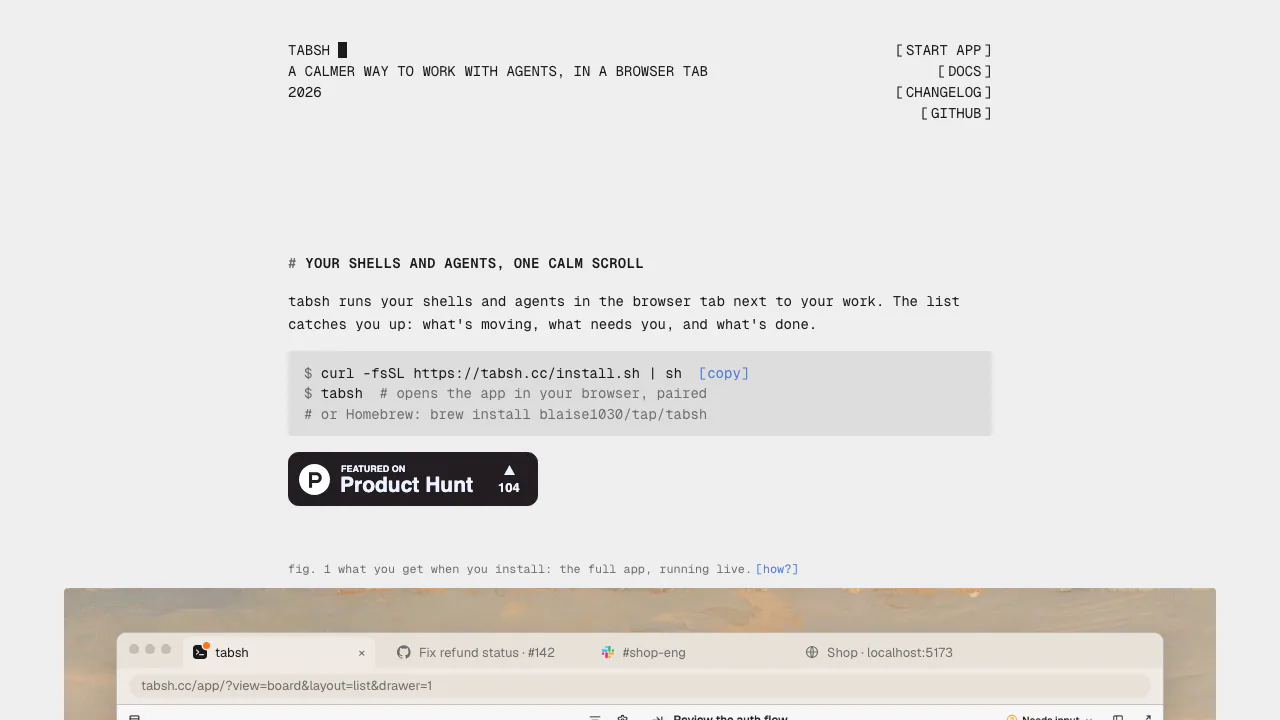
Tabsh is a browser interface for terminals and existing coding agents running on your own computer. Think of it as a place to keep a development server, an agent fixing a bug and another project's shell visible alongside your issue tracker and documentation. A local Rust daemon executes the shells; the browser displays and controls them.
This coding agent terminal is useful when launching agents is easy but remembering which project needs a response has become difficult. The homepage includes a simulated demo for exploring the interface. Real work requires installing the local daemon; the demo does not execute commands on your machine.
Keep projects and agent sessions in view
Each shell or agent becomes a card with its own working folder. Use board columns to move cards between Backlog, In progress, Needs input, Completed and Archived. Switch to the list when you want every project's cards in one scroll, grouped by status, rather than opening terminals individually to find a waiting task.
A card opens its terminal or chat surface. The file explorer follows the shell's folder; filename search, clickable paths and URLs, and an editing pane help inspect work beside the command that produced it. Dropping a file into a terminal inserts its path. Shells can reattach after a tab closes or reloads, while workspace restoration retains tabs, folders and scrollback.
Connect your existing coding agents
The homepage names Claude Code, Codex, Cursor CLI and OpenCode, with configurable providers for other prompt-taking CLIs. Provider settings describe startup, resume and ACP commands. Cards offer terminal TUI and chat UI surfaces, but capabilities and connection requirements vary: do not assume every custom CLI supports the same chat features.
Tabsh organizes tools you choose and configure. It does not replace the agent's authentication, runtime requirements or model service.
Start a first task and verify its status
- Prepare a supported Mac or Linux computer, a project folder and a configured coding CLI. For Homebrew, install with
brew install blaise1030/tap/tabsh; the docs also describe installer and source-build options. - Run
tabsh. It opens a browser paired to the daemon. Open a card in the intended project folder and verify the working directory. - Inside that Tabsh terminal, ask the agent to run
tabsh setupand follow its guide. Setup backs up configuration, preserves existing hooks and reports the changed file and how to undo the integration. - Confirm the test moves the card to Needs input with
setup test, then back to In progress. If it does not, give the report back to the same agent. Available events differ between agents. - Assign a small task and review its output, changed files and tests. Configured hooks can trigger a notification and chime when an offscreen terminal needs input or completes.
The foreground daemon ends when its launching terminal closes. Homebrew users who want it running from login can stop that foreground process, run brew services start tabsh, then pair once at http://127.0.0.1:7681.
Local execution, code conflicts and remote access
The daemon binds to loopback and uses a pairing token carried in a URL fragment. Official materials describe no Tabsh account, relay or telemetry. These statements concern Tabsh's connection: an attached coding agent can still call an external model under that provider's policies. Check those policies separately before sharing private code.
There is no automatic Git worktree isolation. Agents use the selected checkout and branch, so concurrent edits can collide. Divide responsibilities, prepare separate checkouts or worktrees when needed, and review the resulting diff and tests.
Another device requires an optional private access setup. The docs cover Tailscale or SSH tunnelling and warn against exposing the shell's plain HTTP port publicly. Keep pairing in place.
Free software and supported systems
Checked on October 28, 2026, Tabsh is free, MIT-licensed software with no paid tier. That does not grant access to paid agents, models or networking services.
Official builds cover Apple silicon and Intel Macs, plus x86-64 and arm64 Linux; there is no Windows build. Safari uses the daemon-served app at http://tabsh.localhost:7681. Chrome may ask permission to reach local applications. Tabsh suits local development across several projects; evaluate these requirements before expecting hosted execution or isolated agent environments.
Frequently asked questions
Does free Tabsh include Claude Code or Codex usage?
No included model allowance is established by Tabsh's free software statement. Access, authentication and usage costs belong to the agent or model service you select.
Can I work just by opening the homepage?
The homepage demo is simulated. A real local terminal requires the installed daemon and a paired browser.
Does local execution mean all AI requests stay offline?
No. Local shell transport and an agent's model requests are separate. Your chosen agent configuration determines whether prompts or code go to a model provider.
Official resources
- Setup, status hooks and private remote access: follow current instructions and undo steps.
- Official GitHub repository: inspect source, the MIT license and project issues.
- Release changelog: check changes before upgrading.
Related tools
AI Coding & Developer Tools →
OvermindFreemium
Prepare agent data, fine-tune models and measure the result.
Off Grid AIFreemium
Local AI chat, documents and optional work memory on your own devices
TelegramFreemium
Cloud messaging for personal conversations, communities and connected bots.
OpenStatusFreemium
Open-source monitoring, status pages and reviewed AI incident workflows
PapermarkFreemium
Share confidential files, track readership and review documents with AI.