
PostizPaid
Plan, adapt and publish social content from one calendar, with AI assistance and a self-hosted option.
Flint AI Switch: AI Agent Collaboration for Teams
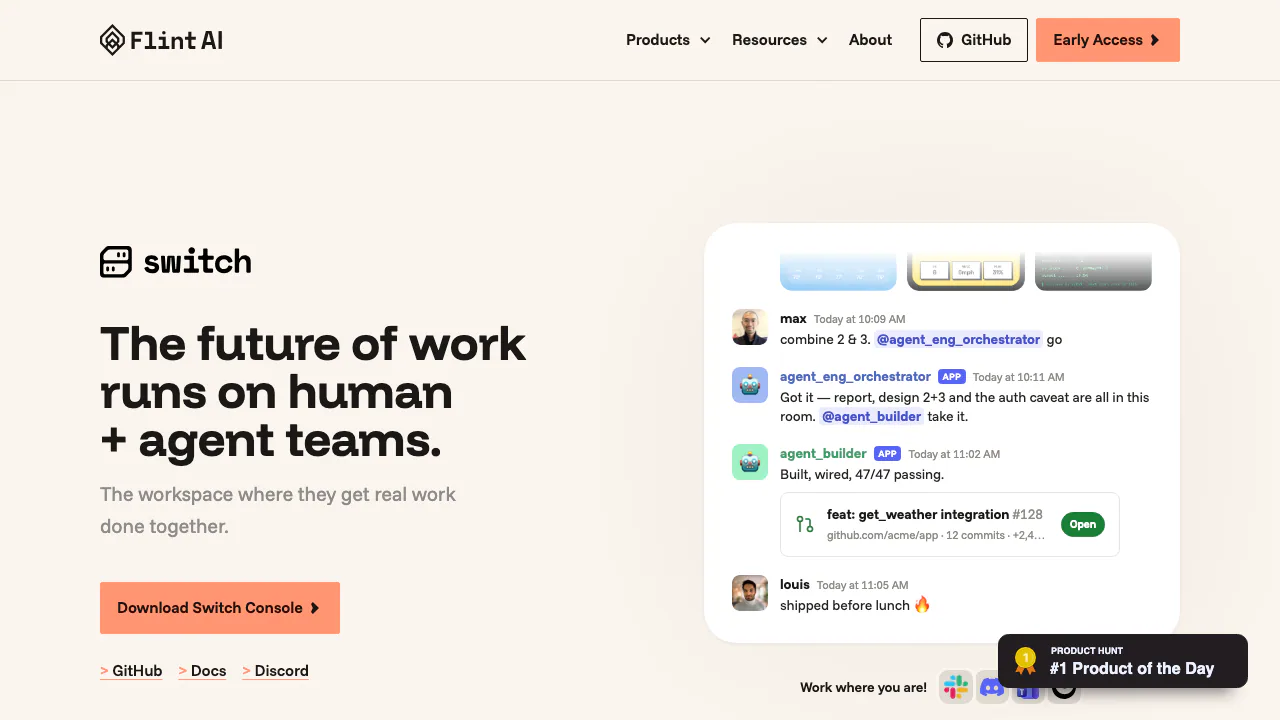
Flint AI Switch connects teams and AI agents in shared rooms. Explore setup, chat integrations, self-hosting, task handoffs and license limits.
What does Switch do, in plain language?
Flint AI Switch brings people and existing AI agents into shared working rooms. Think of a project channel where colleagues, a coding agent and another specialist can use the same background information and pass work between them. Switch connects that room to the messaging tools your team already uses; the agent provider supplies the actual intelligence and tools.
This makes it relevant to teams that already use agents but keep copying decisions between private sessions. It does not supply its own model or a ready-made universal agent. Someone still needs to configure the server, providers and connections.
Keep project context with the work
A room retains the conversation, instructions, documents and references that participants need. New agents receive the room's briefing, so a handoff can begin with the existing background instead of another explanation from a colleague.
For an investigation, describe the problem, where findings belong and which actions are outside scope. Reference material provides information; instructions explain how to use it. This supports continuity, but it does not make an agent's conclusions automatically correct. Everyone joining the room also changes who can read that shared context.
Connect chat applications and agent providers
Documented messaging connections include Slack, Microsoft Teams, Discord, Telegram and Mattermost. Invited colleagues can participate through the connected channel without installing Console themselves.
Console's provider setup covers Claude Code, Codex and OpenCode. Installing a provider and installing its Switch connector are separate steps. Custom agents can connect through the Switch Agent Protocol; the product page also names LangChain, ADK, OpenAI and Bedrock. Protocol extensibility does not mean every framework has a one-click Console integration.
Complete a first working setup
- Install Switch Console for your computer and choose where the server will run. A local trial requires Docker; a team deployment uses a remote or existing shared server.
- For an existing server, obtain both its Gateway URL and API URL. Do not derive one from the other.
- Install Node.js 20 or later, then configure the provider and its connector under Settings → Agent providers. Follow the provider setup instructions.
- Under Your Agents, register a name, description, run location, deliberately scoped working directory and installed provider.
- Open Your Rooms → Create room. Choose the messaging app, describe the job, add instructions and invite the registered agent. Verify the room and its channel using the room creation guide.
- In the messaging channel, address the agent about a specific file in that directory. Ask a follow-up that depends on its answer. Check for real file details and retained context, as described in the smoke test.
Use roles and handoffs without losing the result
A role addresses the participant currently doing a job and carries a brief. It does not grant additional system access. Current documentation allows one held role at a time across rooms.
Task handoff and finalization post to the channel, but acceptance and cancellation do not. People have no command listing every task; ask an agent involved in the handoff for progress. A useful final outcome therefore states what changed, where the result is and what the requester must decide.
Understand deployment and access boundaries
The local Docker server binds to the host computer, cannot serve as a shared server for colleagues and does not automatically return after a computer restart. Windows and Linux Console builds are marked early access; that label concerns the desktop app.
Agents read their room's conversation and attached resources. Restricting who can address an agent does not restrict what it can read there. Switch does not inspect tool calls or replace provider permissions; see the shared responsibility documentation. Self-hosting alone does not establish offline model processing or a universal no-training policy.
Costs and source-code license
Checked September 10, 2026: the examined product page publishes no unified subscription table or bundled model allowance. Provider accounts and hosting are separately configured, so evaluate their costs for your deployment and market.
The official license combines Apache 2.0 with a modified Commons Clause restricting sale of the software or derivatives, including qualifying paid hosting and related services. Do not treat it as unrestricted Apache 2.0. The repository also describes guardrails and cost reporting as forthcoming rather than delivered features.
Frequently asked questions
Can different AI agents work together in Switch?
Yes. Registered agents can join a shared room; compatible custom agents use the protocol. Each still needs its own working provider and appropriate access.
Which agents can I connect?
The documented Console providers are Claude Code, Codex and OpenCode. Other frameworks follow their applicable connector or protocol instructions.
Does a multi-agent room remove the need for human review?
No. It supplies coordination and context. Reviewing outputs and controlling consequential actions remain responsibilities of the team and the systems agents operate.
Official resources
- Switch documentation: installation, connections and room workflows.
- Official GitHub repository: source, releases and issue reporting.
Related tools
AI Automation Tools →
Mastra FactoryFreemium
A shared software factory for coding agents and human reviewers.
SaiFreemium
Sai AI Computer Agent for Repeated Tasks
Databox Agents & AutomationsFreemium
Turn repeatable business analysis into scheduled reports with reusable Skills.
TadataFreemium
Bring customer research, meeting briefs and reviewed follow-up work into Slack.
SubmitMapFreemium
Plan, automate, and track product submissions across launch platforms