

LM StudioFreemium
Download, test and serve open models locally with chat, documents and APIs
FlipHTML5: AI Flipbook Maker & Digital Publishing
Interactive Flipbook Maker and AI Digital Publishing Platform
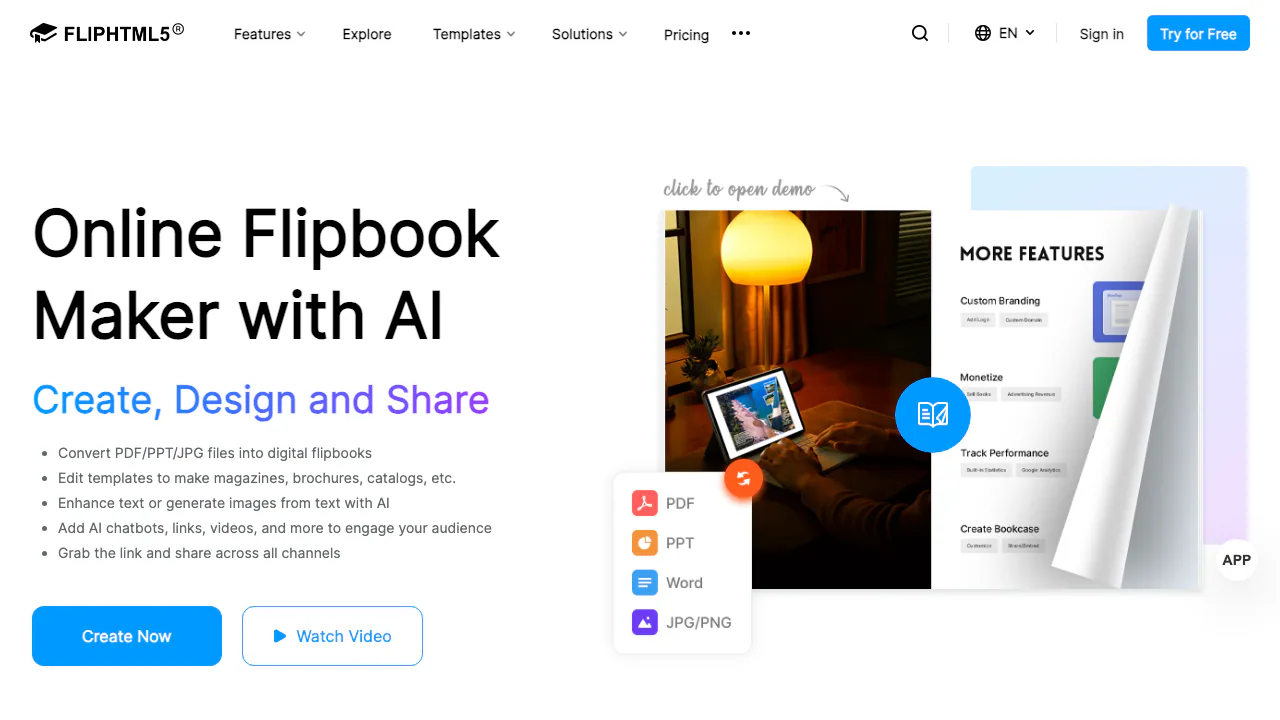
FlipHTML5 is an online digital publishing platform and interactive flipbook maker developed by Wonder Idea Technology. It enables creators, educators, marketers, and businesses to transform static documents—including PDF, Word (DOC/DOCX), PowerPoint (PPT/PPTX), and image files—into responsive HTML5 flipbooks featuring realistic 3D page-turning animations, ambient sound effects, and multimedia interactions.
Core Capabilities and AI Features
Beyond basic document conversion, FlipHTML5 integrates an AI creation suite powered by monthly AI points:
- Document to Interactive Flipbook Conversion: Instantly convert multi-page PDFs or presentations into mobile-friendly flipbooks with custom book themes, navigation bars, and background audio.
- AI Ebook and Document Generator: Generate structured publications, brochures, and catalogs directly from textual prompts or topic outlines.
- Integrated AI Page Assistant: Rewrite, expand, summarize, or translate copy inside the visual page editor, and generate context-relevant images with text-to-image AI.
- Interactive AI PDF Chatbot: Embed a conversational AI assistant within digital publications so readers can query document content, extract summaries, and find answers in real time.
- Rich Multimedia Page Editor: Embed YouTube, Vimeo, and local MP4 videos, audio tracks, clickable hyperlinks, trigger buttons, image sliders, and animated hotspots.
- Digital Monetization and Bookcases: Sell digital publications commission-free via integrated payment gateways (Stripe/PayPal), protect content with passwords, and organize issues in virtual bookcases.
Step-by-Step Publishing Workflow
- Upload Source Documents: Upload your PDF, Word, PowerPoint, or image files via the web dashboard or desktop client. The platform automatically renders pages into high-resolution HTML5.
- Customize Appearance and Branding: Select reading layouts (single or double-page), configure custom logos, adjust background textures, and set up brand colors.
- Enhance with AI and Multimedia: Open the visual editor to insert interactive media elements, generate complementary copy or illustrations using AI, and enable the reader AI chatbot.
- Publish and Distribute: Share publications instantly via direct links, QR codes, social networks, or iframe embed snippets for websites and learning management systems.
Pricing Structure and Free Plan Boundaries
FlipHTML5 operates on a freemium model with tiered capabilities:
- Free Plan ($0/month): Includes 500 AI points per month, up to 5 book uploads per day (max 500 pages per book, 50MB file size limit), 1 virtual bookcase, and 100MB cloud storage. Publications include FlipHTML5 branding and sponsor advertisements.
- Professional Plan ($15/month or $149/year, ~$12.42/month): Provides 5,000 AI points per month, ad-free reading experience, 10 bookcases, 50GB storage, and up to 50 book uploads per day.
- Platinum Plan ($35/month or $299/year, ~$24.92/month): Offers 10,000 AI points per month, 100 daily uploads, 50 bookcases, unlimited cloud storage, custom domain mapping, animation editor access, and offline export (EXE, macOS APP, HTML, and ZIP).
- Enterprise Plan ($99/month or $999/year, ~$83.25/month): Up to 10 sub-accounts for team collaboration, 15,000 AI points per month, custom enterprise branding, and priority customer support.
Data Privacy, Copyright, and Technical Limitations
Users retain full intellectual property and commercial copyright over their uploaded source documents and generated flipbooks. Free plan users should note that documents are publicly accessible and feature platform watermarks. Offline desktop conversions and custom domain hosting require a Platinum or Enterprise tier subscription.
Frequently Asked Questions
Can I create and share flipbooks for free on FlipHTML5?
Yes, the free plan allows you to upload up to 5 documents per day (up to 500 pages and 50MB each) and share them online via public web links and embed codes, subject to platform watermarks.
What file formats can I convert into a flipbook?
FlipHTML5 natively supports PDF (.pdf), Microsoft PowerPoint (.ppt, .pptx), Microsoft Word (.doc, .docx), and standard image formats (.png, .jpg, .jpeg, .webp).
How do AI points work in FlipHTML5?
AI points fund generative AI actions inside the platform, including AI text writing, translation, text-to-image creation, and conversational queries handled by the interactive PDF chatbot.
Can I export my flipbook for offline reading without internet access?
Offline export formats—including standalone Windows executables (.exe), macOS applications (.app), and local HTML/ZIP archives—are available on the Platinum and Enterprise plans.
Official Resources and Verification Links
- Official Website & App: FlipHTML5 Platform
- Pricing & Plans: FlipHTML5 Pricing Details
- Help Center & Documentation: FlipHTML5 Support Center
- Privacy Policy: FlipHTML5 Privacy Terms
- Customer Support: support@fliphtml5.com
Related tools
AI Productivity & Document Tools →
AnythingLLMFreemium
Build local or team AI workspaces with document knowledge, agents and workflows
LightPDFFreemium
AI PDF editor, converter, and document chat on web, desktop, and mobile
ContextGemFree
Extract typed document data with source references using Python, LLMs and decision models.
PapermarkFreemium
Share confidential files, track readership and review documents with AI.
NovastartFreemium
Arrange real app windows, follow AI agents and share a working canvas.