

TomoFreemium
Turn a topic into short lessons, quizzes and a daily learning habit.
Kippy AI: Language Tutor for Speaking Practice
Practice real conversations with AI and useful speaking feedback.
What is Kippy AI, in plain English?
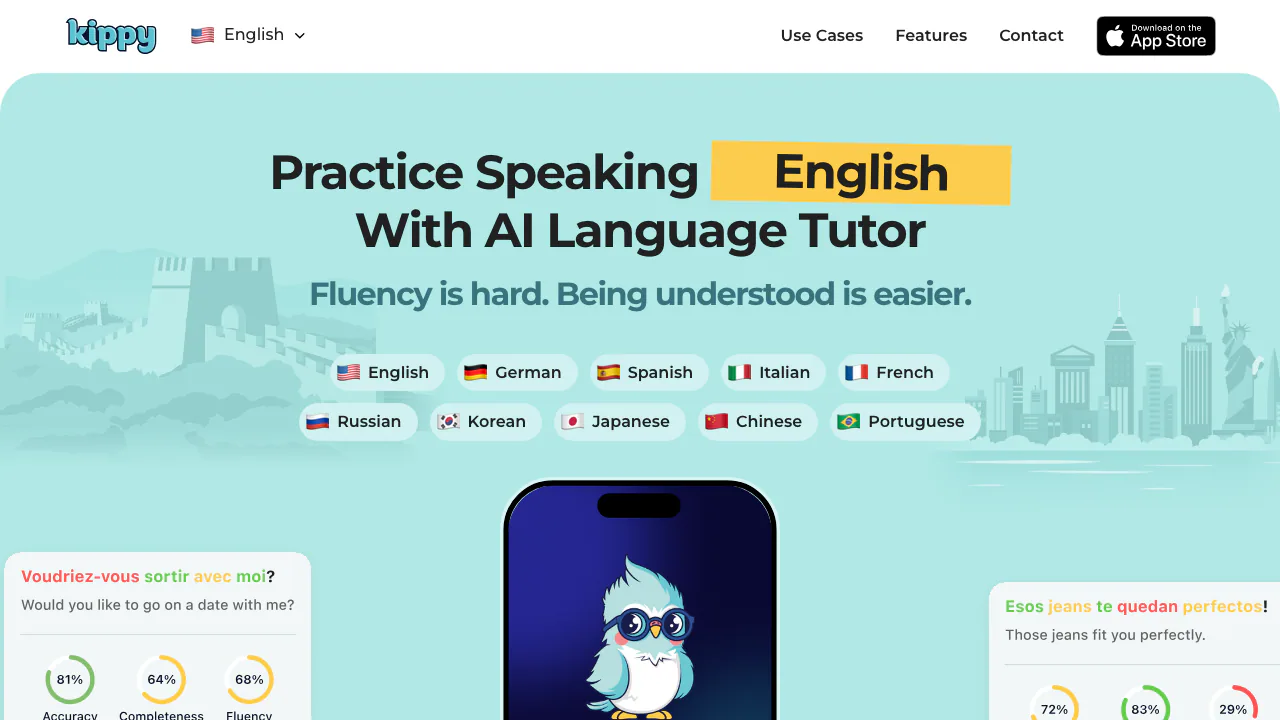
Kippy AI is an AI language tutor for practicing what you can say out loud. You speak with an AI partner, get help when a word is missing, and review pronunciation and grammar feedback. It suits learners who can follow lessons or videos but hesitate when a real conversation needs an immediate answer.
Operated by DeepSine Limited, Kippy can accompany classes, a human tutor or independent study. Its practical role is to give you additional speaking turns between lessons. The mobile app provides conversations and learning records; the website also has a separate free pronunciation exercise you can try in a browser.
Rehearse a conversation you actually expect to have
Live Call supports hands-free speaking and listening, while text chat gives you more time to form a response. Choose Kippy for a helpful guide, Tippy for supportive conversation, or Yappy for a partner who challenges your opinions. This changes the style of practice rather than the language-learning goal.
For a focused exercise, use an existing scenario or create your own roleplay. Kippy advertises more than 30 everyday scenarios. A useful custom practice could be explaining a hotel-room problem:
- Give the roleplay a title and emoji.
- Describe the hotel setting, who you are speaking to and the problem.
- Set a concrete goal, such as asking for a different room.
- Rehearse aloud. If you get stuck, ask for a word or explanation in your own language, then return to the target language.
- Repeat the situation with a different explanation or follow-up question.
Bilingual questions and suggested responses make it easier to continue. Start with a short answer, then add a reason or question instead of trying to deliver a perfect speech immediately.
Turn pronunciation feedback into something to practice
Grammar Check considers sentence structure and conversational context, and lets you hear an improved sentence. Speech Report covers pronunciation, fluency, vocabulary and grammar. These are practice aids; a score should not be treated as an accredited language qualification.
After a conversation, open Vocabulary Report to revisit the words and phrases you actually used. Sort or filter by pronunciation score, listen again and repeat the difficult parts. Save useful expressions in Personal Phrasebook for later listening and pronunciation practice. Progress Tracking shows daily and monthly spoken-word activity, including new words, so you can distinguish having studied a word from having used it.
For a smaller first step, open the free browser pronunciation checker. Select a language, allow microphone access, read the displayed sentence and inspect accuracy, completeness and fluency. Read it again to compare attempts. This web checker supports English, Spanish, French and Italian; the app has a broader language selection.
Devices, languages and what Premium costs
The official app guide lists iPhone and iPad with iOS 17 or later. The app offers English, German, Spanish, Italian, French, Russian, Korean, Japanese, Chinese and Portuguese practice. Check the download page for your device and region before subscribing.
Checked on November 13, 2026: app download is free, and the official US listing quotes Premium at US$99.99 per year. That is a US annual price; your local App Store checkout determines currency, taxes and available offers. Free download does not establish unlimited free conversations. The subscription terms describe recurring billing and renewal unless cancelled; any trial duration and included access should be checked in the offer shown to you. The published service terms also specify an adult, 18+ audience.
Voice practice involves data processing. The privacy policy allows some audio to be reviewed by people and audio/transcripts to be used to improve the service and underlying technology. Use fictional details when rehearsing a work or personal situation, and read the full policy before sharing sensitive material.
Frequently asked questions
Is Kippy free?
The app is free to download, and the website has a free pronunciation checker. Premium is a paid subscription. A permanent free allowance for full app conversations was not established by the inspected public pages.
Can I practice on a computer?
The browser checker can be used on the website. The full speaking app is presented through the iPhone/iPad download route; the web exercise should not be assumed to include all app features.
What if I cannot answer in the language I am learning?
Use bilingual questions, a suggested reply or an explanation in your own language. Then try a short spoken answer in the target language and build from there.
Official starting points
- Get the Kippy app: check device compatibility and current purchase conditions.
- Contact Kippy: ask product or account questions through the official form.
Related tools
AI Learning Tools →
UnoRouterFreemium
One key for multiple AI models, with provider routing and browser chat
Bicep Heart AIPaid
Make a short, silent arm-heart video from one consenting adult’s photo.
ScroogeFrog AIPaid
Investigate paid traffic, review AI recommendations and prepare Google Ads evidence.
MitraPaid
Delegate incoming and outgoing calls with Mitra
CALL-EFreemium
Calls for bookings, quotes and everyday errands