

CALL-EFreemium
Calls for bookings, quotes and everyday errands
Mitra: AI Phone Assistant for Calls and Follow-Ups
Delegate incoming and outgoing calls with Mitra
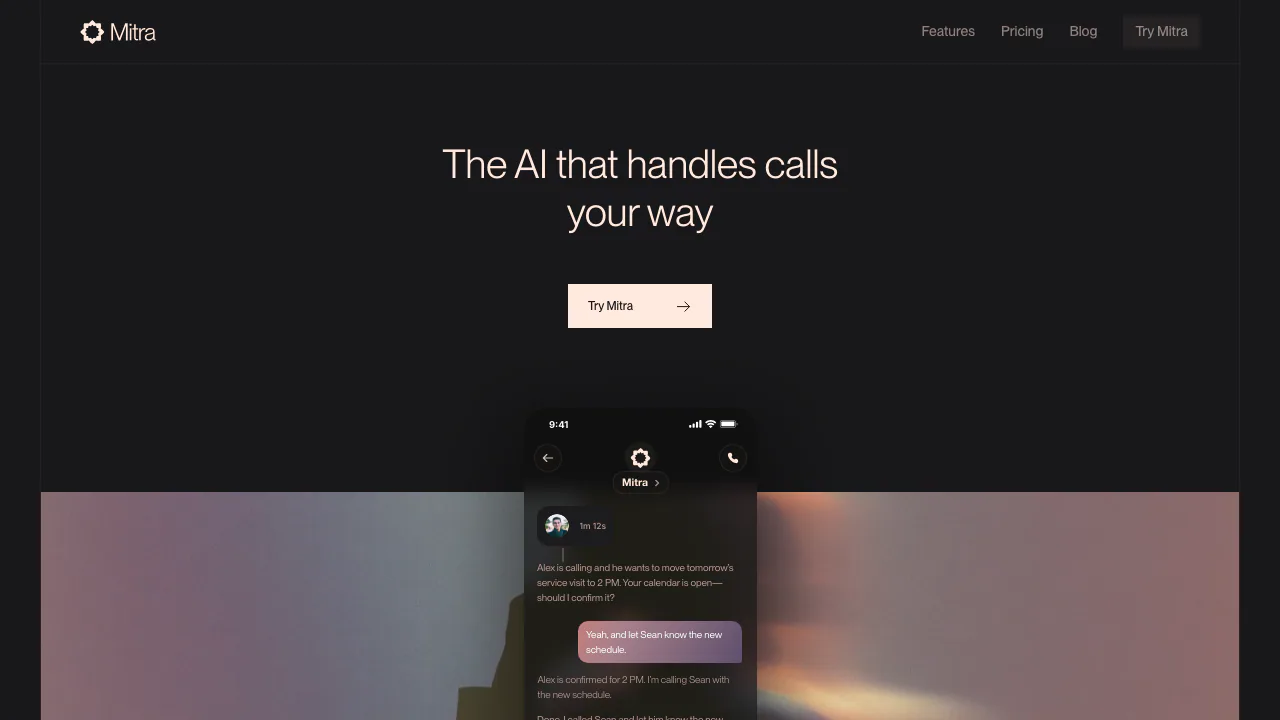
Mitra is an AI phone assistant for people who want help answering calls, making routine calls and carrying out the follow-up. You give it the goal in a conversation, set the permissions it may use and review what happened afterward. The service is operated by DeusMachina, Inc.
What is Mitra, in plain English?
Think of Mitra as an assistant you can ask to handle a real telephone conversation. For example, you can ask it to find an available appointment, answer a caller while you are busy or pass an important call to you. It speaks with the other person and returns information you can inspect. You can also call Mitra directly to explain a task aloud.
The useful distinction is between getting an answer and getting something done. An appointment request can involve a call, checking options, asking you for a decision and then following up through a connected calendar or message service. Whether an action is available depends on the connected account, device and permission settings.
Handle calls without losing the next step
Mitra handles incoming and outgoing calls, with controls for involving you during a conversation. You can read the live transcript, listen in and join when you need to speak for yourself. Transfer rules can connect an urgent caller directly or have Mitra call you privately for permission first. Set a clear rule for which situations should interrupt you.
After a call, its history can include a recording, transcript, summary and next steps. These let you check names, proposed times and what the other person actually agreed to. The documentation qualifies these artifacts as available when generated; a missing transcript should be investigated rather than treated as proof that no call took place.
Connected services extend the workflow to follow-up texts, email, calendar changes, browser actions and files. You can keep one assistant or create separate assistants for different purposes and conversations. That can help keep a personal appointment separate from another ongoing task.
Try a controlled appointment call
For a first test, choose someone who expects the call and use a narrowly defined request:
- Open Mitra on the web or install the appropriate app, sign in and open your main assistant conversation.
- Complete phone setup. Under Settings → Connectors → Phone, choose the Making calls preference. Ask each time is useful while checking how your instructions are interpreted.
- Give the contact or number, goal, dates and constraints. For example: “Call this clinic and ask about Tuesday appointments after 2 pm. Bring me the options before booking.”
- Answer follow-up questions and check the approval request. Connect a calendar only if this task needs it.
- Inspect the call history or ask how the call went. Distinguish an offered time from a confirmed booking before taking the next step.
The official calling guide explains the actual approval settings. If a call started through MCP appears slow, check its existing request or call status before repeating it. Closing the external chat does not stop an active call.
Apps, devices and MCP access
The download page lists web, Mac, Windows, Linux, iPhone/iPad and Android versions. Published minimums include macOS 15, iOS 18 and Android 9; Windows supports Windows 11 or Windows 10 version 2004 and later. Check the listed build for your device.
In Settings → Connectors, add only the services needed for your workflow. The homepage illustrates Gmail, WhatsApp, iMessage and browser actions, but availability and controls can vary by device and service.
The Mitra MCP guide documents a connection for Claude, ChatGPT and other compatible AI apps. The server uses browser OAuth at https://mcp.getmitra.com/mcp. It can expose assistant conversations, call history and transcripts through tools while retaining Mitra’s existing permissions. It requires an active Mitra plan or trial and has no separate MCP connection fee. The external app receives Mitra’s replies rather than unrestricted independent access to every connected account.
Trial, plans and usage limits
Checked on November 13, 2026: the website offers a 7-day trial with 2 call hours and limited chat. It ends when either the time limit or call allowance is reached. Continued use requires a paid plan.
The website displays dollar prices: Pro is $30 monthly or $300 yearly with 5 call hours per month; Premier is $90 monthly or $900 yearly with 20 hours; Prime is $300 monthly or $3,000 yearly with 80 hours. Yearly prices are annual charges, not monthly prices. Local taxes, app-store prices and regional availability should be checked at purchase.
All three list unlimited parallel calls, which does not mean unlimited call hours. Chat allowances also differ by plan and refill weekly; subscribers can buy additional call hours and credits. Enterprise uses custom pricing. See current official pricing before choosing a plan, especially if several long calls may consume the allowance quickly.
Privacy and calling boundaries
The current privacy policy says private call audio, transcripts, summaries, messages, files, contacts and memories are not used to train or fine-tune AI models. Content is still processed to provide the service, including by relevant AI or infrastructure providers and connected services. Retention depends on the purpose; the policy does not give one universal deletion period. Account deletion can be requested through settings or support.
The terms of use contain restrictions on marketing, promotional and other commercial communications, as well as recording and consent requirements. Do not assume that a business example on the homepage authorizes an outbound sales campaign. The reviewed pages did not establish a complete supported-country, carrier or conversation-language list, so confirm those details before relying on it for a particular location.
Frequently asked questions
Is Mitra free?
It offers a limited trial, not a verified permanent free tier. The trial lasts up to 7 days or 2 call hours, whichever comes first, with limited chat.
Can it both make and receive calls?
Yes. Both are described by the official product pages. Complete phone setup and check the number, carrier and country requirements for your situation.
Can I require approval before it calls?
Yes. Making calls includes Always, Ask each time and Never. Ask each time requires confirmation before an outgoing call.
Are private calls used to train AI?
The current privacy policy says they are not used for model training or fine-tuning. That commitment is separate from processing content to handle calls and provide requested features.
Official help and community
- Help Center: setup, account access, permissions and troubleshooting; it lists support@deusmachina.inc for support.
- Mitra Community: questions, workflow tips and feature discussions.
- Officially linked Discord: community questions and feedback.
Related tools
AI Voice Agents →
EditsFreemium
Edit on your phone or Mac, add captions and share a clean 4K export.
TellPipPaid
Live answers from your own documents, with client commitments ready for the next call.
VaaniPaid
Build multilingual calling agents with business knowledge, tools and memory.
EclatiraFreemium
Build voice and video AI agents for web and phone.
UnoRouterFreemium
One key for multiple AI models, with provider routing and browser chat