
Kippy AIPaid
Practice real conversations with AI and useful speaking feedback.
Tomo AI Learning App: Turn Curiosity into a Daily Course
Turn a topic into short lessons, quizzes and a daily learning habit.
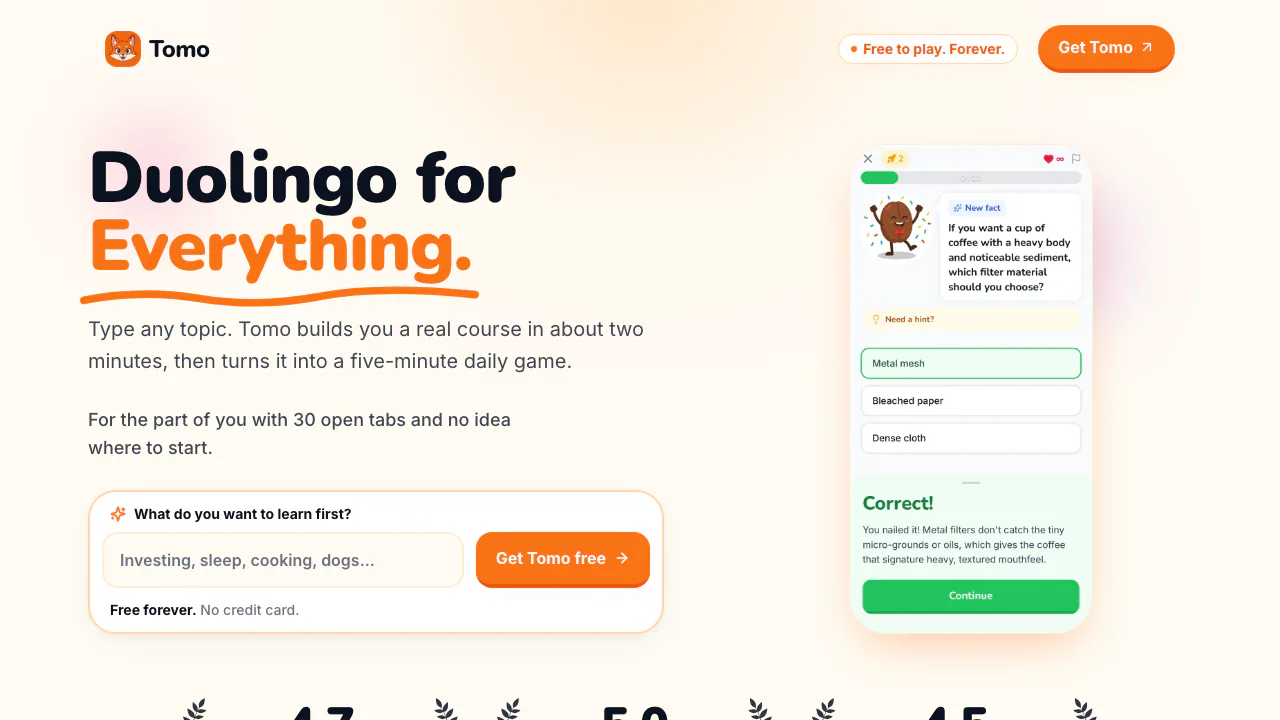
Tomo is an AI learning app for people who want a clear way into a subject and a small lesson they can finish each day. It generates a course from your chosen topic, then lets you work through questions and feedback.
What is Tomo, in plain English?
Think of Tomo as a course builder and a pocket learning game combined. You name something you want to understand; it organizes the subject into sections, units, levels and quizzes. Instead of deciding which of dozens of articles to read next, you get a starting point and a path to follow. The intended rhythm is about five minutes a day, rather than a long class you must set aside an evening for.
Build your first course from a topic
The official walkthrough describes this sequence:
- Describe a topic you want to learn. For a first try, a focused interest such as coffee brewing is easier to evaluate than an enormous subject.
- Choose a teaching voice and how deeply you want to explore it. Examples include Professor, Bestie, Storyteller, Pirate and a plain-language “Explain Like I’m 5” style.
- Wait for the course map. Tomo describes mobile generation as taking about two minutes; this is an estimate.
- Open a level, answer its questions and read the feedback. Check whether the course order and explanations match what you wanted to learn.
The output is a course you study within Tomo. The inspected pages do not establish document import, downloadable course files or a public developer API.
Use short sessions to practice, not just browse
Lessons ask you to recall information and show feedback after answers. XP, completed levels and a daily streak make progress visible. These features give you a reason to return to the same subject, although points and streaks do not by themselves prove mastery.
Public examples range from Roman history and espresso to chess, personal finance and AI agents. Tomo suits exploratory learning and niche interests. Its AI-generated lessons can contain mistakes, so check consequential facts against authoritative sources. Treat a course as an introduction, not professional advice or a verified qualification.
Learn on your phone or inside ChatGPT
The website offers public course-map previews and links to iPhone and Android downloads. Check availability in your own app store; interface languages and offline use were not verified.
The official Tomo page for ChatGPT explains how to add it, start as a guest or connect a Tomo account, and request a course from a topic or the current conversation. Connecting a free account unlocks every course level and carries courses, XP and streaks into the mobile app.
Free access, Sparks and optional purchases
Checked on October 20, 2026: the website describes a free plan that does not expire and needs no credit card. In ChatGPT, playing courses is free and a new learner receives enough Sparks to create a course. Creating more uses Sparks from the Tomo account.
Optional purchases include a Tomo PRO subscription and consumable Sparks packs, processed by Apple or Google. The inspected pages do not publish a universal current price or a precise recurring free generation allowance. Review the store offer and purchase terms before paying; free play should not be read as unlimited free creation.
Understand what is stored
Tomo records topics, prompts, answers and learning progress. Its privacy policy says the ChatGPT integration receives a topic and short summary rather than the full chat history. Analytics and mobile session replay can be disabled in Settings; the terms say contributed content is not used to train AI models. Read the privacy policy for retention and account deletion requests. The service is not intended for under-13s, and higher local consent ages may apply.
Frequently asked questions
Is Tomo free?
There is a continuing free plan, alongside optional purchases. Additional course creation can require Sparks; exact regional prices and allowances should be checked in the app.
How do I generate a course?
Enter a topic, select a teaching style and depth, then wait for the course map. The mobile workflow is described as taking about two minutes.
Can I use it without installing the mobile app?
You can preview courses on the website and use the official ChatGPT integration. Guest access lets you start; linking a Tomo account adds full-level access and progress continuity.
Official help
- Tomo support: account questions, bugs and product feedback.
Related tools
AI Learning Tools →
UnoRouterFreemium
One key for multiple AI models, with provider routing and browser chat
Bicep Heart AIPaid
Make a short, silent arm-heart video from one consenting adult’s photo.
ScroogeFrog AIPaid
Investigate paid traffic, review AI recommendations and prepare Google Ads evidence.
MitraPaid
Delegate incoming and outgoing calls with Mitra
CALL-EFreemium
Calls for bookings, quotes and everyday errands