

AI BridgeFreemium
Organize real coding CLIs, approvals and resumable workspaces in one Mac app.
VibeiDE: Manage AI Coding Agents in One Workspace
Queue Claude Code, Codex and OpenCode tasks, then review every result.
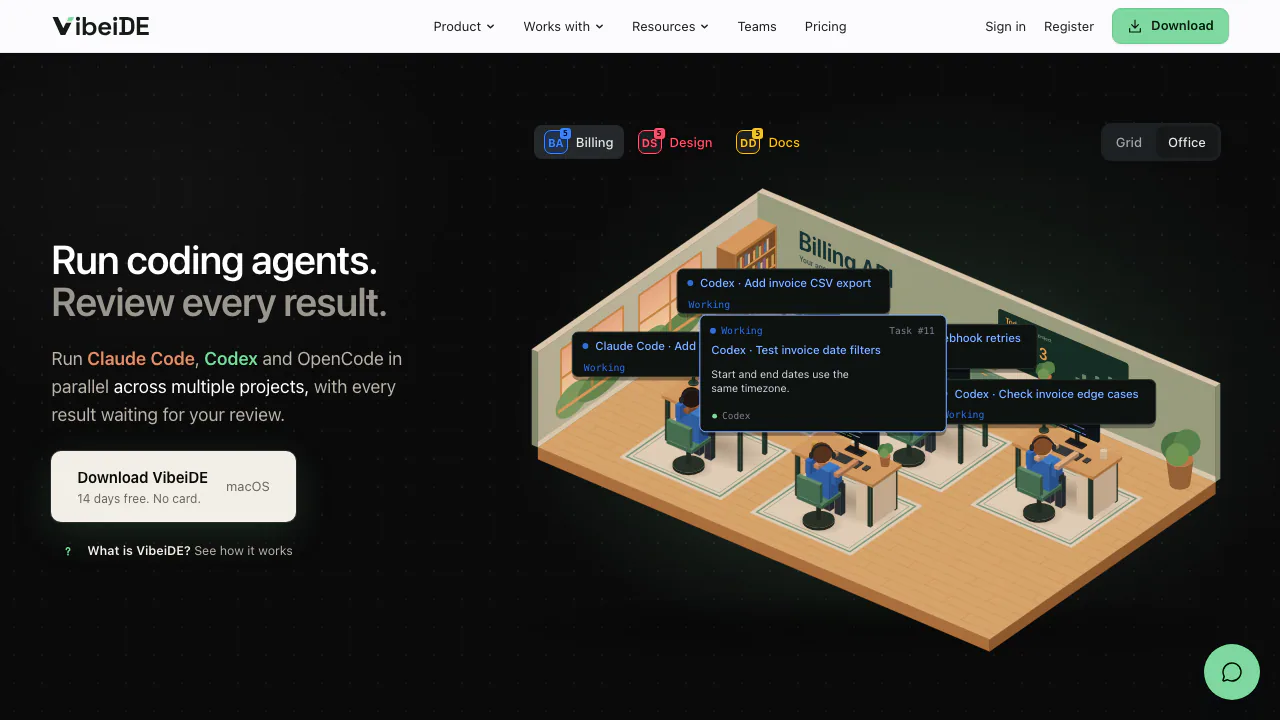
What does VibeiDE actually do?
VibeiDE is a desktop workspace for managing AI coding agents across local projects. Imagine a task board connected to the coding tools already on your computer: you describe a job, choose a provider, watch the run and inspect the result before accepting the change. Crowie s.r.o. develops the app.
It coordinates your installed Claude Code, Codex and OpenCode command-line tools using your own accounts. Your editor remains part of the workflow. The useful change is having requests, running sessions and unfinished reviews in one place when several repositories compete for your attention.
Keep parallel work reviewable
Each project has a queue and a separate concurrency limit for each provider. Extra requests wait until a slot opens; you can edit or reorder waiting tasks while work continues. Office gives agents a visual desk, while Grid shows the same activity with less animation. Provider usage indicators help you plan around reported limits and reset times.
Finished tasks collect in Ready for review with their request, activity and result. Inspect available patches and run relevant checks; clearing a review does not commit, merge or approve code. A related follow-up can continue a supported saved conversation, provided the provider history is still available.
Separate queues do not isolate files. Explicitly choose a worktree per task where available, prepare independent checkouts, or run overlapping edits in sequence.
Choose a workflow for the size of the job
Execute suits a bounded implementation or investigation. Plan council lets one provider draft a read-only plan, another challenge it and the author revise before a separate implementation handoff. Two agents can share an incorrect assumption, so the revised plan still needs your judgment.
Turbo separates fresh planning from a fresh executor responsible for the implementation graph. Standup turns successful project work into a dated summary. Optional Mobile control lets a paired phone queue and review tasks while an awake, connected computer runs them. Company mode, currently early access beta, shares selected activity metadata with managers rather than full code or agent output.
Try one task you can check
- Install the current desktop release and connect one working provider CLI with your own account.
- Sign in to VibeiDE to activate access, choose a familiar local repository and start with one provider slot.
- Choose Execute and request the main entry point, test command and one small improvement, explicitly asking for no file edits.
- Inspect Task Activity, open the result and compare the named files and commands with the repository.
- For writable work, define acceptance checks and separate write targets before raising concurrency.
The setup walkthrough warns that Codex and Claude Code may start with broad unattended permissions. Choose Read-only for Codex or Ask permission for Claude Code when exploring an unfamiliar repository. macOS and Windows are supported; full validation is on macOS, while Linux remains experimental.
Trial, app licence and model usage are separate costs
Checked 28 October 2026: the device-bound trial lasts 14 days without a card. Launch prices in USD before tax are $7.99/month, $79/year or $249 once for Solo; Team is $14.99 per human seat/month, including managers. Provider subscriptions and inference charges are additional.
For purchases before 1 January 2027 at 00:00 UTC, active subscriptions keep their launch rate. New subscriptions then become $9.99/month, $99/year or $19.99 per Team seat/month; Lifetime stops being sold. A lifetime licence still requires online validation, and updates depend on continued maintenance. Check current prices and billing conditions before paying.
VibeiDE is proprietary software licensed per user.
Understand where project data goes
Normal task records, code, diffs and conversations are stored on your computer; provider credentials stay in the CLI authentication store. Prompts and relevant context still reach your selected model provider under its terms. Review that provider's policy before sending private source code.
Current Mobile control and Company sharing use end-to-end encryption, subject to version and reconnection requirements. Sharing task names can expose the beginning of an unnamed prompt. The privacy policy explains relay metadata, screenshots and optional reports; local storage should not be read as a promise of fully offline processing.
Common questions
Can I keep using it free after the trial?
Saved history and results remain readable. New queueing, retries and resumed execution require valid access; reinstalling or changing accounts does not reset the same device's trial.
Does the licence include a Claude Code or Codex account?
No. Connect your own provider account or configured OpenCode installation. One working CLI is enough to begin, and its usage limits continue to apply.
How many agents can I run at once?
You set per-provider limits for each project. Available slots, provider allowances and your computer constrain actual execution; parallel writers also need separate worktrees or checkouts.
Official resources
- Product tour: inspect the workspace and workflow screens.
- Documentation: provider prerequisites and task handling.
- Business contact: official seller and support details.
Related tools
AI Coding & Developer Tools →
PulseDevFreemium
Point at a website element, describe the fix and review the source diff.
Revix AIFreemium
Repository-aware AI code review for your team’s standards
ManyAgentsPaid
Run Claude Code and optional Codex agents with isolated worktrees, review and live previews.
walkai-talkaiPaid
Voice commands for coding agents, with replies over radio
buddylistFree
Bring coding agents into project chats, reviews and tests.