

Visual Studio CodeFreemium
An extensible code editor with Copilot suggestions, chat and agents
Devin AI Review: Coding, Tests and Pull Requests
Autonomous coding agent for repository questions, code changes, tests, debugging, migrations and pull requests.
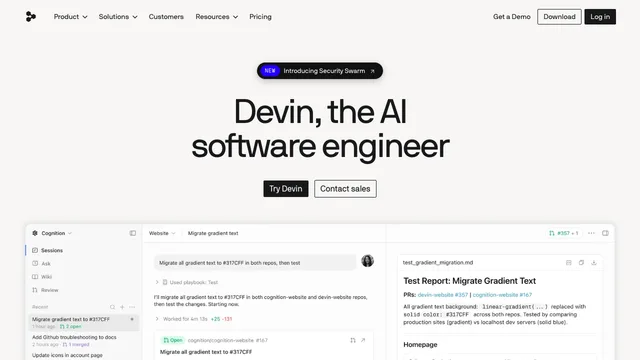
Devin AI is an autonomous software-engineering agent that can inspect repositories, plan work, edit files, run commands, test changes, and create pull requests. It is designed for engineering backlogs rather than one-off code completion. This review explains Ask and Agent modes, suitable tasks, repository context, integrations, pricing and usage, security controls, failure risks, and the review process teams need before merging Devin's work.
What Devin AI does
The official documentation describes Devin as an AI software engineer that can write, run, and test code. Common tasks include bug fixes, small features, targeted refactors, test coverage, CI repair, dependency updates, migrations, internal tools, and pull-request review. Devin works through a conversational interface with a browser, shell, and embedded IDE.
Autonomy does not remove engineering ownership. The best tasks have a clear repository, reproducible problem, acceptance criteria, relevant commands, and a definition of done. Ambiguous product decisions or sensitive architecture changes require closer collaboration and approval.
Devin AI Ask and Agent modes
Ask mode explores a codebase and prepares a plan without changing files. It can answer repository questions with code references and turn investigation into a scoped prompt. Agent mode can edit code, run commands, browse the web, execute tests, and complete a multi-step task end to end.
Start in Ask mode when the problem is uncertain or crosses several systems. Confirm the proposed plan, affected files, test strategy, and risks before switching to Agent. A narrow first task makes it easier to judge whether Devin understood the codebase.
Devin AI task selection and prompting
Good assignments include a bug with reproduction steps, a migration with an inventory and target pattern, or a feature with API and UI acceptance criteria. Provide repository conventions, environment setup, test commands, forbidden changes, security constraints, and examples of desired behavior.
Avoid prompts such as fix everything or improve performance without a measurable target. Split large projects into reviewable milestones. Require Devin to state assumptions and stop for decisions that change scope, data models, public APIs, or production infrastructure.
Devin AI coding, tests and pull requests
Devin can work in a branch, edit multiple files, install dependencies, run tests, inspect browser behavior, and prepare a pull request. Teams can watch terminal output and take over in the IDE. Parallel sessions help with independent tasks but can conflict when they modify overlapping code.
Every result needs normal review: inspect the diff, reproduce the issue, run the complete relevant test suite, scan dependencies, and verify logs. Check authentication, authorization, migrations, concurrency, error handling, accessibility, and rollback. Never merge solely because an agent reports success.
Devin AI integrations and automation
Devin can connect with GitHub, GitLab, Bitbucket, Jira, Linear, Slack, Microsoft Teams, monitoring tools, APIs, MCP servers, schedules, and webhooks. These integrations support ticket planning, CI repair, incident triage, scheduled maintenance, and status summaries.
Grant least privilege and separate read-only discovery from write access. Require approval for destructive commands, production changes, external messages, and secret access. Use audit logs, budgets, timeouts, idempotency, and alerts. Automation should fail safely when a provider, test, or model is unavailable.
Devin AI pricing and usage
Current official pricing lists Free with a light agent quota and unlimited inline edits and Tab completions. Pro costs twenty dollars per month with increased quotas and more models. Max costs two hundred dollars monthly for much higher usage. Team pricing combines a monthly team fee with paid full developer seats, while Enterprise uses custom terms.
Usage cost varies with the model, task size, context, complexity, and reasoning. Paid allowances refresh on daily and weekly schedules, and extra usage can be purchased at API pricing. Teams should measure representative bugs and features instead of estimating cost from message count alone.
Devin AI security and repository access
An engineering agent may read source code, execute commands, access package registries, call integrations, and use secrets explicitly granted to it. Repository and workspace configuration should limit branches, credentials, networks, and production systems. Use separate environments and short-lived scoped tokens.
Review the current security documentation and organizational controls before connecting proprietary code. Secrets must stay in approved secret stores, not prompts or committed files. Monitor tool calls and revoke access when a project or team member no longer needs it.
Devin AI limitations and risks
Devin can misunderstand requirements, choose an unsuitable library, introduce a subtle regression, stop after partial success, or spend too much usage on an unclear task. Tests can also be incomplete or written to match an incorrect implementation. Long autonomous execution increases the cost of a wrong assumption.
Use checkpoints and small pull requests, preserve human review gates, and verify outcomes independently. Do not delegate final medical, financial, legal, safety, or compliance judgment to generated code or analysis. Production incidents need accountable engineers and established response procedures.
Who should use Devin AI
Devin AI fits engineering teams with maintained repositories, reliable tests, documented setup, review capacity, and a backlog of scoped work. It can be useful for repetitive fixes, migrations, test expansion, dependency maintenance, and parallel investigation.
It is less suitable for undocumented systems, repositories that cannot be sandboxed, highly sensitive code without an approved deployment model, or teams lacking reviewers. Pilot it on several small tasks and measure correctness, review time, merged value, usage cost, and regressions.
Devin AI frequently asked questions
Is Devin AI free?
A Free plan provides a light quota. Paid Pro, Max, Team, and Enterprise options increase usage and controls.
Can Devin AI write and run code?
Yes. It can edit files, run commands and tests, browse, and create pull requests in Agent mode.
What is Ask Devin?
Ask mode answers codebase questions and plans work without modifying the repository.
Does Devin AI replace code review?
No. Engineers still need to inspect diffs, run tests, verify security, and approve merges.
Can Devin AI work on multiple tasks?
Yes. Parallel sessions are supported, but overlapping files or dependencies can create conflicts.
How is Devin AI usage calculated?
Usage varies by model, task complexity, context, and reasoning. Allowances and extra usage depend on the selected plan.
Related tools
AI Coding & Developer Tools →
Z.aiFreemium
A GLM-powered web assistant for chat, files, slides, apps and agent tasks.
MuleRunFreemium
AI agents, cloud workspaces, and repeatable workflows
DeepSeekFreemium
Free AI chat, reasoning, web search, file analysis and coding with token-priced developer API access.
v0Freemium
Build editable full-stack web apps from prompts, screenshots and repositories with GitHub, databases and Vercel deployment.
ReplitFreemium
Build, test and deploy apps with an AI coding agent.