

MiniMax H3 MaxFreemium
Turn a written shot into a short video with synchronized audio.
Fotor Video Agent: AI Video Generator and Editor
Chat your way from a rough idea or source file to an editable video project.
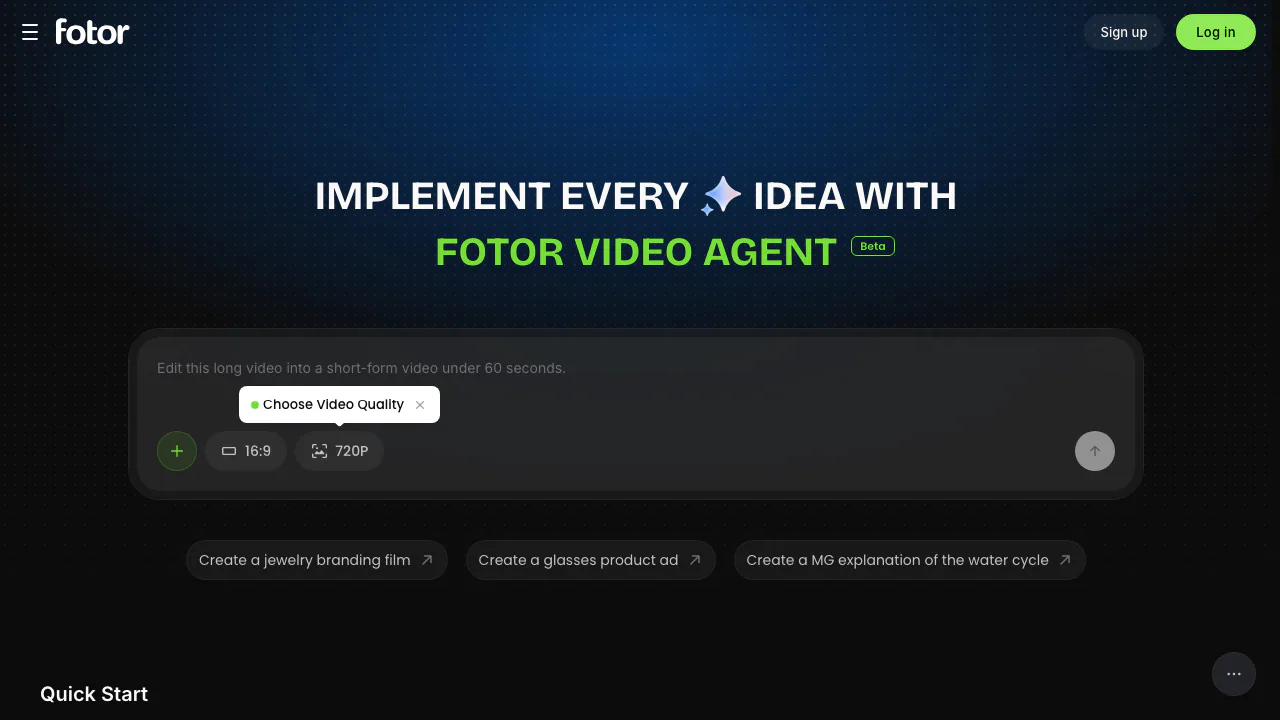
Fotor Video Agent is a browser-based AI video generator and editor for people who want to move from a brief to an editable video project without building every scene on a blank timeline. The beta interface combines a conversational prompt box, optional file attachments, format controls and task-specific starting points for explainers, advertising, presenters, montage and short-form repurposing.
What Fotor Video Agent is designed to do
The product page describes a chat-led workflow for complete, production-ready videos and motion graphics that remain editable. That makes it a better fit for a multi-step production brief than a one-shot clip request. Current Quick Start options include MG Explainer, Product Launch Video, Motion Overlay, AI Talking Presenter, TVC Film, Product Ads, UGC Creator Ads, Smart Video Montage, Long Video to Shorts and Talk-Head Enhancement.
Because the product is marked Beta, treat those cards as a current menu rather than a permanent feature contract. It is most useful for creators, educators and marketing teams that can review the draft, correct details and make final editorial decisions.
How to brief the AI video agent
Start with the result, audience and delivery format. A useful prompt should state the purpose of the video, the viewer, desired duration, tone, key messages, visual references and the action the viewer should take. If you attach a logo, product image, recording, script or presentation, use only material you have permission to upload and explain how each file should be used.
- Choose the closest Quick Start scenario or describe the project in your own words.
- Attach only the source files that genuinely help the task.
- Specify the aspect ratio and target quality; the visible home controls currently show 16:9 and 720P or 1080P.
- Ask for a clear scene order, narration or on-screen text, and any brand constraints.
- Generate the project, then review every scene before export.
The upload control lists common image, video, audio, document, spreadsheet, presentation, text and web-file extensions. That does not guarantee every format will be processed in every workflow, so confirm that the agent understood each attachment.
Which workflow should you choose?
Use MG Explainer for an educational concept or a structured analysis. Product Launch Video, Product Ads, TVC Film and UGC Creator Ads are aimed at campaign and commerce work. AI Talking Presenter suits a presenter-led explanation. Smart Video Montage helps assemble selected assets, while Long Video to Shorts is the relevant starting point when an existing recording needs to become short social content.
For a first test, use a small, low-risk project. A 20–30 second product overview with a supplied image, three approved claims and one call to action is easier to judge than a broad request such as “make a viral ad.”
Review the editable result before publishing
AI can speed up assembly, but it cannot approve facts, rights or brand accuracy for you. Check product claims, names, numbers, captions, pronunciation, logos and the relationship between voiceover and visuals. Watch for cropped subjects, unreadable text, abrupt cuts, inconsistent characters and footage that implies a claim you cannot substantiate.
If the output uses customer footage, faces, trademarks, music or third-party creative assets, confirm the necessary permissions. Fotor’s terms make users responsible for uploaded content, and commercial permissions for Fotor design resources can vary by subscription and resource. Read the current Fotor terms of service before commercial delivery.
Free access, credits and beta limits
The official Fotor pricing page lists a free Basic plan with limited free credits, 50 AI Agent chats and one AI Agent task. Pro and Pro+ raise the published chat and task allowances. Fotor does not currently show a separate fixed Video Agent beta price on the page we checked, so verify the account’s in-product quota before committing to a deadline or batch campaign.
The interface, scenarios and consumption rules may change during beta. Keep a copy of your source files and exported deliverables rather than treating the service as the only archive.
Privacy checks before uploading source media
Fotor’s privacy policy says AIGC inputs and outputs are generally stored on AWS servers in the United States until the user deletes them, usually for the life of the account. It also says prompts and images may be sent to a selected third-party generation provider after the user uploads content and chooses that engine.
A further policy detail matters for free testing: AIGC made by unsubscribed users with gift credits may be public in the community by default, with an opt-out and deletion controls. Review the current policy and privacy settings before uploading confidential footage, unreleased campaign assets, personal data or identifiable faces.
Fotor Video Agent FAQ
Can Fotor Video Agent create a complete video?
Its current beta page is positioned around complete, editable video and motion-graphics projects, with scenarios spanning explainers, ads, presenters, montage and long-video repurposing. The result still needs human review.
Is Fotor Video Agent free?
Fotor has a free Basic plan with limited credits and AI Agent usage. A separate fixed price for Video Agent beta tasks was not published on the checked pricing page, so the live account quota is the reliable source.
What files can I upload?
The web interface lists common image, video, audio, document, spreadsheet, presentation, text and web formats. Actual processing depends on the selected task, so verify that the agent recognized each attachment.
How does Fotor handle uploaded and generated content?
The privacy policy describes account-linked storage, user deletion controls, transfers to selected third-party model providers and a special public-community default for some gift-credit output. Check the policy before using sensitive material.
Official resources
Related tools
AI Image & Video Generators →
Turn a story idea into a narrated faceless short video.
Rap Duo AIPaid
Turn two photos into an English rap duet with generated music and vocals.
KreaFreemium
Generate, edit and enhance images, video and 3D assets across many AI models
GrokFreemium
Real-time AI chat, research, code, images, video and voice from xAI.
Zzo.aiFreemium
Create and edit images, then turn text or stills into video with multiple AI models.