

LlamaFree
Run open models on your computer, chat with files, and connect your apps to a local API.
AgentValley — a Claude Code monitor in your Mac notch
See active sessions, waiting agents and project usage without switching terminals.
What is AgentValley used for?
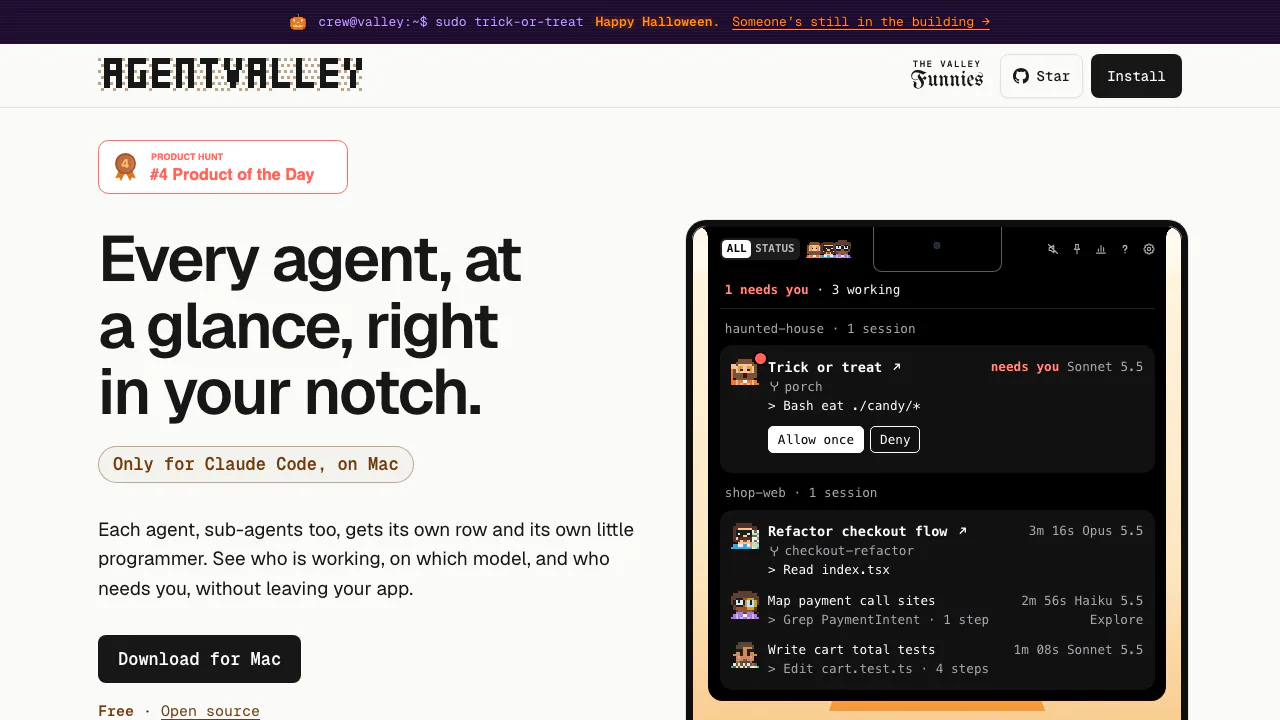
AgentValley is a free, open-source Mac companion that puts local Claude Code sessions in a panel under the screen notch. In plain terms, it is a small control room: see which coding agent is working, what it last did and which one needs an answer while you stay in another app. Each agent has a small pixel-art programmer, including the sub-agents started by a session. It is built for developers already using Claude Code and requires macOS 15 or later.
See which agent needs your attention
Sessions are grouped by project, with worktrees counted under their project. Each session has a card, and its sub-agents appear as rows showing their task, model and latest step; sub-agent rows also count steps. This helps distinguish a main task from delegated exploration or planning.
When a session asks a question or requests permission, a red count appears beside the notch. Open the panel to read the request, then jump to its app. The optional “Go to the session’s tab” setting targets the exact tab in Terminal and iTerm2. Ghostty has a known ambiguity when two sessions use the same folder. Sounds can be disabled or changed to a plain chime.
Install it and follow a real session
- Download the official DMG, drag AgentValley into Applications and launch it. Alternatively, use Homebrew:
brew install --cask morsechimwai/tap/agent-valley. - Run a Claude Code session, point at the notch and check that its project, task and latest action appear.
- Press Control–Option–Command–A from another app, select a row with the arrow keys and press Return to return to that session.
- For permission replies inside the panel, enable “Answer from the notch” in the app’s Claude Code settings, run the plugin command shown there and restart Claude Code. Read the command before choosing Allow once or Deny.
The permission plugin is a separate, manual setup step; monitoring and replying are different capabilities.
Read project costs and plan limits
History opens from the chart button. Choose a day, week or month, then inspect a day’s hours or a project’s sessions. Costs are calculated at API prices, so use them as comparable usage estimates rather than treating them as your subscription bill. Export PDF produces a statement for all projects or one selected project. History stays on your Mac after Claude Code removes old files.
The panel also shows tokens for the last five hours and today, with a twelve-hour chart. “Plan limits” is off by default; enabling it adds five-hour and weekly limits with reset timing. As verified on October 25, 2026, the app itself is free; optional sponsorship supports development. Access to Claude Code has its own terms.
Local data and optional changes
The public implementation disclosure says the app reads ~/.claude/projects and ~/.claude/sessions, examines running processes and project Git information, and keeps its own data in ~/Library/Application Support/AgentValley. If you enable Plan limits, it reads your Claude Code login from Keychain and sends it to api.anthropic.com. It also checks GitHub for updates daily unless disabled.
The optional terminal status line is installed with a command from Settings. It changes ~/.claude/settings.json, installs a font and, for Ghostty, adds a configuration line. Its removal command reverses those additions. Review these optional changes before enabling them; the app’s local-first design does not mean every configuration makes no network requests.
Who benefits and what to check
It is especially useful when you run several local Claude Code sessions and lose time finding a waiting terminal. Settings can move the panel to a connected display and return it to the notch when disconnected. A quiet status means no written activity for two minutes; it does not prove completion or a particular amount of progress. The documented scope is Claude Code on Mac. The app’s source uses the MIT license, and the project is independent of Anthropic.
Frequently asked questions
Is AgentValley free?
Yes. The official app is free and open source. Sponsorship is optional; it does not replace any Claude Code access requirements.
Does the cost estimate equal my bill?
No. History uses API prices to estimate usage cost. Your actual charges depend on your Claude access and billing arrangement.
What data does it read?
It reads local Claude Code session files and project/process information. Plan-limit credentials access and terminal configuration changes are optional and described above.
Official downloads and support
Related tools
AI Coding & Developer Tools →
PapermarkFreemium
Share confidential files, track readership and review documents with AI.
OpenStatusFreemium
Open-source monitoring, status pages and reviewed AI incident workflows
ACE-StepFree
Generate and refine music from descriptions or your own lyrics with an open-source model.
FramefieldsFree
Create, inspect and render video compositions with TypeScript and a coding agent.
PaddockFree
Linux computers and controlled sandboxes for coding agents on your own VPS.