

JevModelFreemium
Turn text or JSON into labels, scores and probabilities with Jev.
OpenStatus: Uptime Monitoring & Status Pages
Open-source monitoring, status pages and reviewed AI incident workflows
What does OpenStatus do, in plain English?
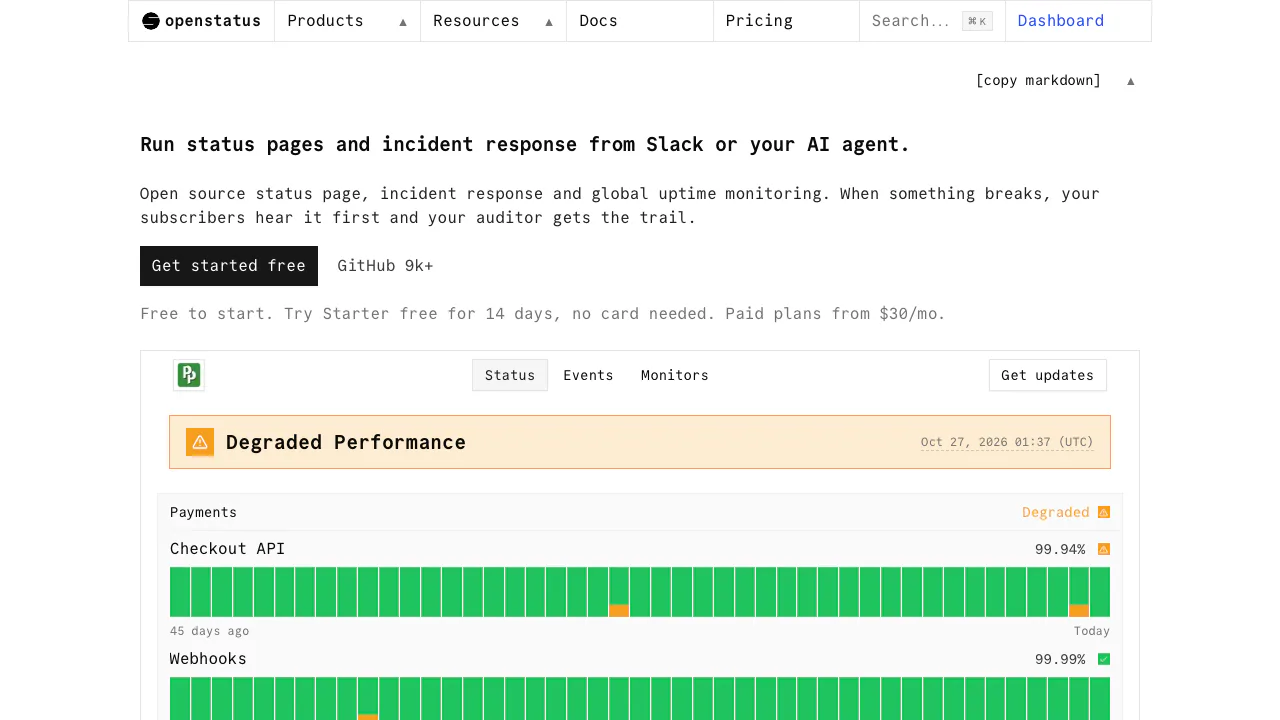
OpenStatus combines uptime monitoring, a customer-facing status page and incident response in one service. Think of it as a watchman that checks your website or API, a noticeboard that tells customers what is happening, and a shared incident record for your team. Its AI features help turn a conversation into a reviewed update or a postmortem draft.
It suits developers, SaaS teams and operations teams that want checks and outage communication together. You can use the hosted web dashboard or explore the open-source deployment.
Check availability and response quality across regions
An HTTP response alone does not prove that an API is working correctly. OpenStatus supports a chosen request method, headers and body, plus assertions on the status code, response headers and content. Latency thresholds let a slow response count as degraded before it becomes a timeout.
The hosted probe network spans 28 regions across Fly.io, Koyeb and Railway; your plan determines how many regions each monitor can use. Per-region results and DNS, connection, TLS, time-to-first-byte and transfer timings help narrow down where a request slowed down. Alerts can go to services such as Slack, Discord, email, PagerDuty or a webhook.
Set up a monitor and a customer status page
- Prepare a public endpoint and decide what a correct response should contain.
- In Monitors, choose Create Monitor, enter a name and full URL, and configure the request, assertions and interval.
- Save and inspect the response-time and status-code charts. Check the actual response rather than assuming a green HTTP code validates your whole business workflow.
- Create a status page with a title and slug, then add components under Components. Link components to monitors for automatic health tracking; use static components for services you manage manually.
- Open the public page and verify the component names and health information. Configure a domain or access controls if your plan supports them.
The first-monitor tutorial provides the current setup path. A status report adds public explanations and updates; scheduled maintenance gives users advance notice.
Handle incidents from Slack and AI clients
On a paid plan, install Slack from Settings → Integrations, authorize the correct workspace and invite the bot to a channel. Mention @openstatus to check monitor health or request a status-update draft. Review the proposed text, affected services and notification choice before approving it.
Internal incidents track severity, a commander, notes and a timeline. They are distinct from public status reports: resolving an internal incident does not by itself resolve its public report. Incident management is being enabled workspace by workspace. After resolution, the agent can prepare a postmortem from the available record for human editing and approval.
For external AI clients, the MCP reference documents OAuth, workspace selection and read-only or write access. Publishing tools require an explicit notification decision; client-side confirmation still matters. CLI, API, SDK and Terraform interfaces also support developer workflows.
Free limits, paid plans and self-hosting
Verified on October 27, 2026, the hosted Hobby plan includes 1 monitor, 1 status page with 3 components, and a minimum 10-minute interval. Starter has a 14-day trial without a card.
Public USD monthly list prices are $30 for Starter, $100 for Pro and $500 for Scale. Starter includes 20 monitors, 1-minute checks and up to 6 regions per monitor. Pro includes 50 monitors, 30-second checks and 28 regions per monitor. Custom domains, subscribers and the Slack agent require a paid plan. Add-ons, annual billing and checkout currency affect the final bill; see the current plan comparison.
Data handling and practical limits
The self-hosting guide covers Docker Compose and AGPL-3.0 deployment. Full self-hosting requires your own probes and analytics configuration; a separate lightweight option serves only the status page. Hosting and maintenance still require resources.
Monitor URLs, request headers and bodies, integration credentials and incident notes are processed by the service. Response-body collection is opt-in under its privacy policy, and monitoring retention follows the plan. Review sensitive request data and channel access before connecting production systems. Monitoring and AI drafts support investigation; they do not establish a verified root cause or repair your application.
Frequently asked questions
What can I use for free?
Hobby supports a small monitoring and status-page setup. Its 10-minute minimum interval and one-monitor allowance make it important to assess whether it fits the service you need to watch.
Can I host OpenStatus myself?
Yes, under AGPL-3.0. Follow the official deployment guide and plan for probes, analytics, updates and infrastructure costs.
Does an AI assistant publish without review?
Slack presents approval steps. MCP uses the connected client's confirmation controls and requires an explicit notify value for publishing; grant read-only access when observation is sufficient.
Official resources and developer community
- Documentation: configuration and integrations.
- GitHub repository: source, issues and license.
- Official Discord: setup discussions.
- Official X channel: product announcements.
- Service status: OpenStatus availability.
- Contact and support: account, billing and business questions.
Related tools
AI Operations & Incident Response →
Strawberry BrowserFreemium
A desktop browser with AI companions for research, recurring work, meeting notes and reviewed actions across your tabs.
KiwiFree
Timely reminders and everyday actions through messaging, with approval before spending
Lexmount BrowserFreemium
Search, extract and automate webpages with managed cloud browsers
sideOSPaid
Voice commands, local dictation and tasks in your Mac apps
BasedashPaid
Ask business questions, check the SQL and build live dashboards from connected data.