

KernoFreemium
Validate backend changes and critical user flows inside your coding agent’s workflow.
Codemind: an AI coding assistant for delegated builds
Delegate JavaScript and TypeScript tasks and receive code tested against your acceptance criteria.
What does Codemind actually do?
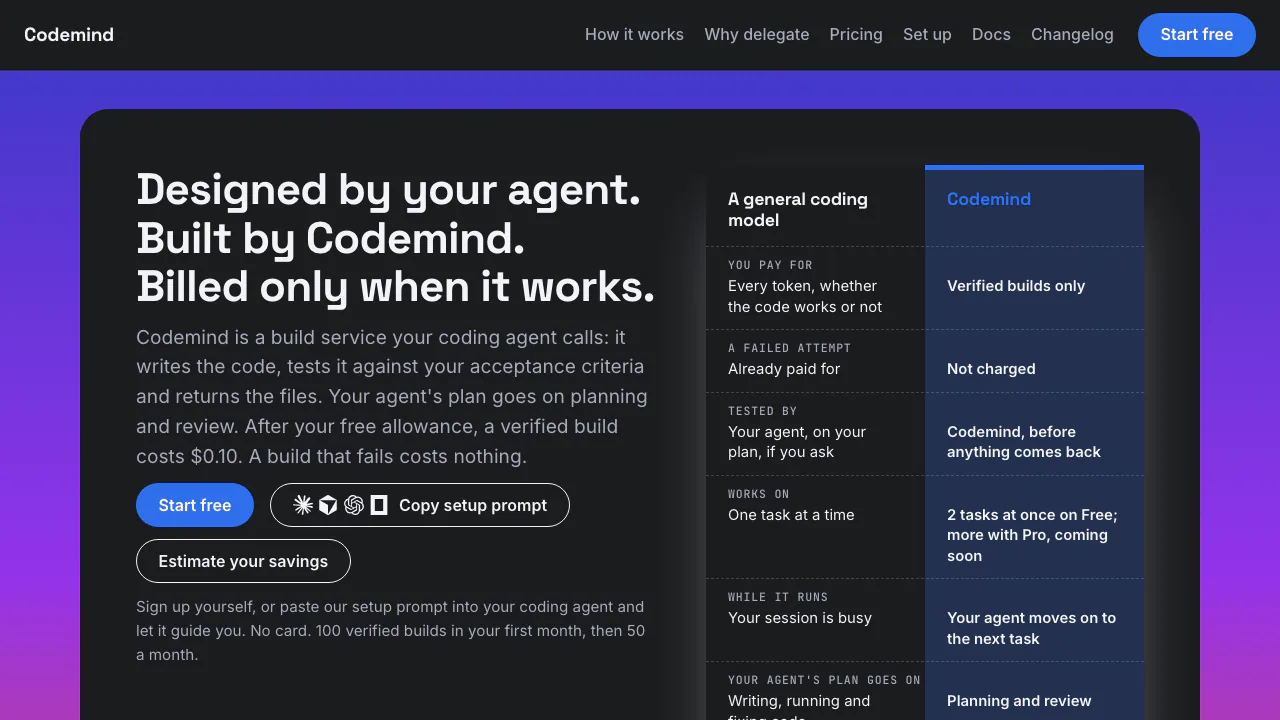
Codemind is a build service that your AI coding assistant can call. You and your agent define a task; Codemind writes the code, tests it against the acceptance criteria and returns the resulting files. The agent continues to plan the work, edit your project and review the result.
Think of it as delegating a small implementation job with an explicit definition of done. The useful output is tested code files and a build result, rather than another conversational suggestion. A passing result means the submitted criteria were tested; it does not establish that every requirement of your application has been met.
Where it fits in a JavaScript or TypeScript project
Current support covers JavaScript and TypeScript, including Cloudflare Workers, Node and React. You can request new code, provide an existing file to receive the complete modified file, or ask for a separate code review or test run. This makes bounded features and changes with clear inputs and expected outputs a sensible starting point.
The service works over MCP or REST. Supported clients include Claude Code, Cursor, Codex and OpenCode. Cursor support was tested through its agent CLI, and Codex requires a recent CLI with remote MCP support. Cline is listed as coming soon. Other programming languages are not currently supported.
From a task description to files you can review
- Start from the official dashboard or use the current setup prompt on the website. The CLI setup path requires Node 18 or newer; follow the current instructions for your agent.
- Define the task title, stack and testable acceptance criteria. Include relevant existing files when changing code.
- Delegate the build. For example, a webhook-validation task could specify the expected response for a valid signature, an invalid signature and a missing signature. These are suggested criteria, not a prebuilt product template.
- Inspect the build result. A successful build returns files for your agent to integrate; a failed build returns a status and error code.
- Review the changes and run the checks for your actual project before deploying. Vague criteria can be rejected before a build starts, so define observable outcomes rather than simply asking for code that works.
What verification and code privacy mean here
Codemind writes tests from your acceptance criteria. Its terms for generated code state that verification is not a warranty of correctness, security or suitability. You retain rights to your submitted code, specifications and generated code, while production review remains your responsibility.
The code and data privacy policy says submitted tasks, criteria, source files, generated code and verification reports are stored. Code and components are isolated to your account and are not used to train AI models. Build data is retained for the life of the account and can be deleted on request. Check these conditions before sending a private codebase; this is a remote service with storage.
Free builds, limits and the advertised paid rate
Checked on 15 October 2026: no card is required. The free allowance is 100 verified builds in the first month and 50 each month thereafter, with up to two concurrent builds and 20 builds per hour. Failed builds are not charged.
The current pricing page advertises US$0.10 per verified build beyond the allowance, but paid top-ups are not yet available or billable. Until they open, using up the allowance stops new builds until the next month. Pro, Swarm and Ship are upcoming features; Pro pricing has not been announced. The vendor has not measured total cost against having your agent write the code itself, so there is no verified savings percentage to rely on.
A Custom option offers negotiated volume pricing, reserved capacity and support by contact.
Questions before trying Codemind
Is my code used to train AI models?
The privacy policy says it is not used for model training. Tasks, source files, generated code and reports are still stored for the life of the account, with export or deletion available on request.
Can I keep building free after the monthly allowance?
The allowance renews monthly. Paid top-ups are not open as of the verification date, so new builds wait once the allowance is exhausted.
Can verified code go straight into production?
Review it and run your own project checks first. Verification covers tests derived from your submitted criteria and does not guarantee security or completeness.
Official documentation and support
- Integration and API documentation: check the current connection and build instructions.
- Product changelog: verify released capabilities.
- Official support: build, account, security and data export or deletion requests.
Related tools
AI Coding & Developer Tools →
CrewTowerPaid
Monitor coding agents and answer supported requests from your Mac’s notch.
StepFunPaid
Explore StepFun models in AI Studio or integrate coding, multimodal and voice capabilities through an API.
DropstoneFreemium
Read repositories, review code changes and carry working preferences across Chat, CLI and SDK.
OpenPilotFree
A desktop coding agent that works in your project folder with the model you choose.
RillFree
Turn the page you are reading into work for your own coding agent.